
Google Review Policy: 2026 Changes and How to Stay Compliant
Google tightened its review rules in 2026, and some habits you've used for years now cross the line. Counter tablets, contests that reward staff for name mentions, and requests that push for a 5-star rating all break policy.
Here's the part that catches owners off guard. The Google review policy covers how you ask for reviews, as well as what customers post. That means your staff scripts and in-store habits may break these rules without you noticing.
Google is enforcing these rules now, so every business that asks for reviews should review its process. Here's what changed in 2026, what counts as a violation, and how to build a compliant workflow.
Main Takeaways
- Google's 2026 updates bar on-site review pressure, requests for specific content like a staff member's name, and staff review quotas.
- Violations fall into four groups: fake engagement, rating manipulation, conflict of interest, and inappropriate content.
- Enforcement ranges from removing single reviews to showing a public warning, restricting posting, or suspending a profile.
- Staff recognition should run on internal CX metrics, like survey scores, instead of review mentions or quotas.
- A compliant workflow asks after the visit ends, uses the same process at every location, and never offers perks or tells customers what to write.
What Do Google Review Rules Actually Require?
Google's review policy says every review on a Google Business Profile must reflect a genuine customer experience. Google removes reviews that are fake, paid for, written by someone with a conflict of interest, or inappropriate. The rules apply to reviewers and to the businesses that ask them for reviews.
The policy covers every business with a profile, even one that never asks for a review. It comes down to four principles:
- Authenticity means the review reflects a real visit.
- Independence means the reviewer has no tie to the business.
- Honesty means you never push a customer toward a rating or certain words.
- Appropriateness rules out offensive, off-topic, or illegal content.
Those principles shape your everyday work: how you ask for reviews, what your software does with each request, and what staff say at the counter.
They matter, too. In 2025, Google blocked or removed more than 292 million reviews that broke its policy, according to its April 2026 Maps update. It also put posting limits on more than 782,000 accounts. Enforcement runs every day, at scale.
What Changed in Google's Review Policy in 2026?
In 2026, Google added rules that bar businesses from pressuring customers to review while they're on the premises, asking for specific content like a staff member's name, and setting staff review quotas. Google also gained the ability to pause new reviews on a profile during a spam spike.
The changes came in two updates. In February, Google added a line saying businesses shouldn't require or pressure customers to leave reviews while they're on the premises, or ask for specific content, as Search Engine Roundtable reported.
In April, it added two more rules to its policy:
- No asking staff to collect a set number of reviews.
- No asking staff to request reviews with specific content, such as employee names.
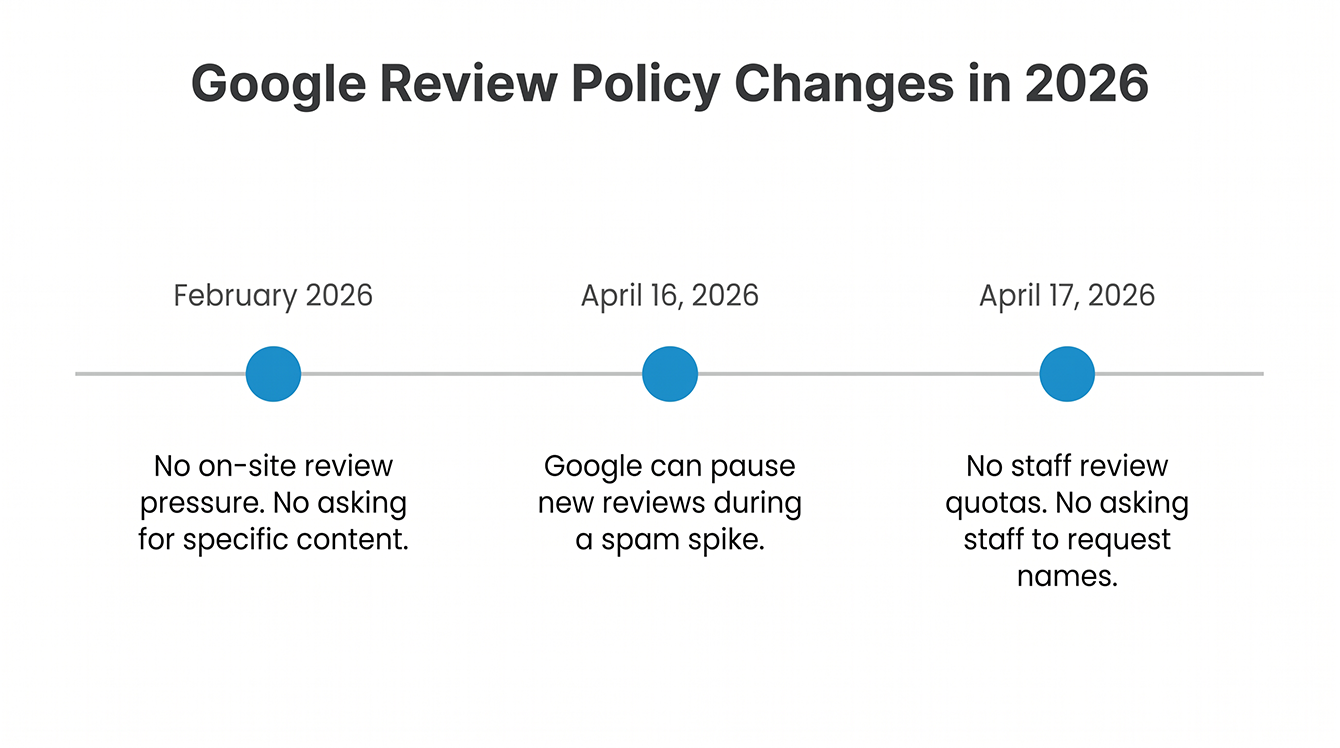
Here's how those rules look in practice.
Staff Name Mentions, On-Site Pressure, and Quotas
The wording in Google Maps Prohibited & Restricted Content is blunt. Merchants shouldn't require or pressure people to leave reviews while they're on the premises. They shouldn't ask for set content, such as a staff member's name. They shouldn't require staff to collect a set number of reviews, either.
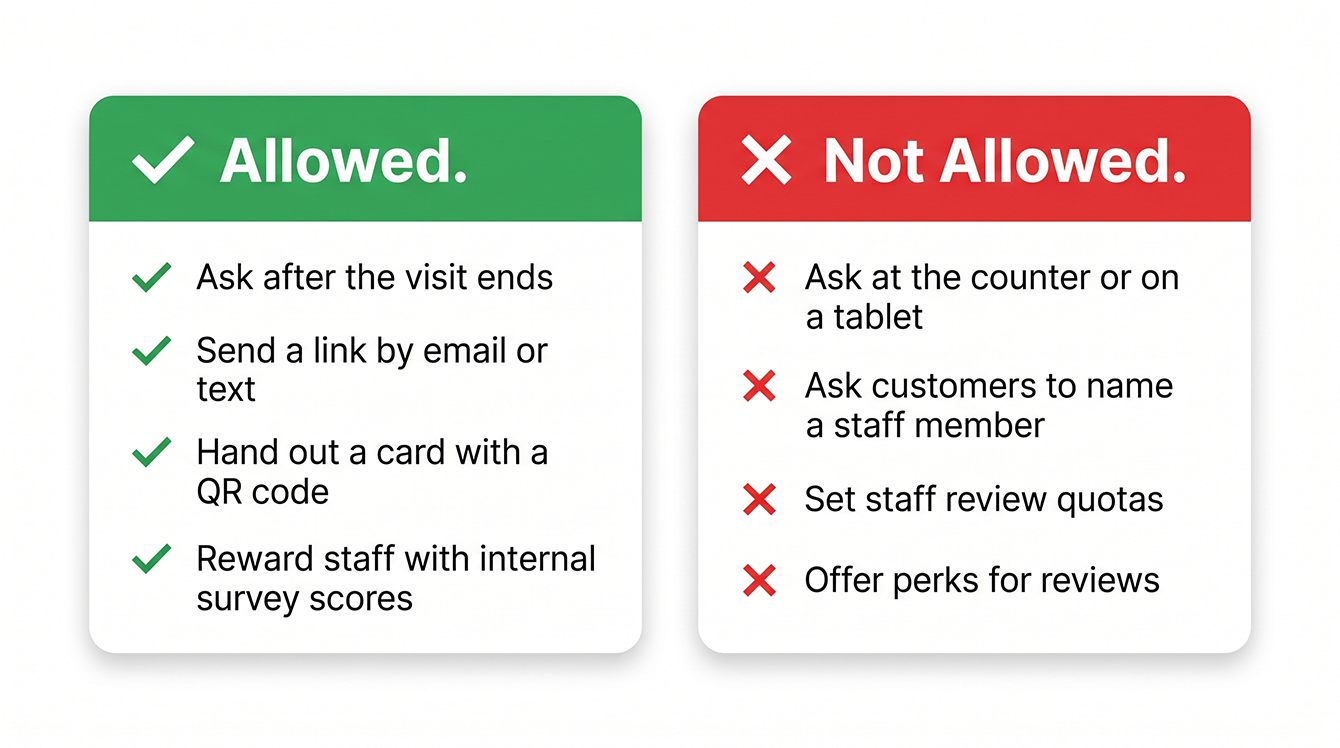
Google's policy doesn't name kiosks or tablets. But a device at your counter puts the ask on your premises, while the customer is still there, which is exactly what the rule targets. Several reviews from one shared device can also look suspicious. The safe move is to retire counter devices and let customers review on their own phone, on their own time.
Enforcement grew alongside the rules. Google uses AI to track reviews over time, so a review that posted fine can still come down later. It also shows warnings on profiles where it removed suspicious 5-star reviews, according to Google's 2025 Maps update.
What to Do Instead of Staff-Name Incentives
Some programs have to end now. Name-mention contests are out. So are bonuses tied to public review mentions. Scripts that tell customers to "mention [employee name]" in their review must go, too.
You can still reward great service. Recognize staff through internal customer experience (CX) metrics, like Net Promoter Score℠ (NPS®) feedback tied to the visits they handled. Survey results and internal shout-outs also work well. Keep staff praise apart from what customers write in reviews. You'll still see who drives great visits, and no customer has to name anyone in public.
Four industries feel these changes most:
- Automotive: Dealerships should retire post-sale tablets and "mention your sales rep" cards.
- Home services: Technicians shouldn't hand phones to homeowners or ask to be named in reviews. Send the request automatically once the job closes in your field management software.
- Healthcare and medspa: Front-desk tablet stations and "leave a review before you leave" scripts put the ask on the premises.
- Franchise and multi-location: Google bans review quotas for staff. Swap them for internal CX benchmarks.
The 2026 updates closed loopholes that let businesses stay technically compliant while still pressuring customers and staff. The safer approach is to keep review requests voluntary and staff recognition behind the scenes.
What Counts as a Google Review Policy Violation?
A Google review violation is any review, rating, or request that breaks Google's prohibited content rules. Most violations fall into four groups: fake engagement, rating manipulation, conflict of interest, and inappropriate content. Reviewers can break the rules, and so can the businesses that ask for reviews.
Fake Engagement
Fake engagement is any review that doesn't come from a real customer visit. Common violations include:
- Reviews someone paid for
- Reviews from people who never used the business
- Reviews a bot wrote
- Reviews from family, friends or employees
Rating Manipulation
Rating manipulation is any attempt to push your average up through biased requests. Google's policy lists these practices:
- Giving discounts, gifts, or perks for a review
- Pushing customers toward a star rating or certain words
A 1-star review with no text still counts as a real rating. It breaks policy only if it's fake or comes from someone with a conflict of interest, like a competitor. The reporting section below shows how to flag a review that violates these rules.
Conflict of Interest
A conflict of interest covers reviews from anyone with a personal or financial tie to the business:
- Current or past staff
- Owners who review their own business
- Competitors, whether the review is good or bad
- Family or close friends
Inappropriate Content
Improper content crosses lines of safety, privacy, or relevance. Examples include:
- Hate speech or harassment
- Private details about others
- Sexual material
- Dangerous or illegal content
- Off-topic rants with no link to the visit
Most businesses break these rules by accident. The slips hide in staff scripts, counter habits, and bonus plans built before the rules got stricter.
Write Review Requests That Pass Google's Rules
Knowing what Google bans is step one. Knowing how to ask in a way that holds up is step two. This guide covers both.
Read the Written Google Reviews GuideHow Google Detects Review Policy Violations
Google's AI systems watch behavior as closely as they read review text. Still, Google doesn't publish its full list of signals. Its announcements point to sudden spikes and patterns it tracks over time, and local search experts commonly flag others like these:
- Same-device posts: Several reviews sent from one device or internet protocol (IP) address.
- IP clustering: A batch of reviews from one network, such as your store's Wi-Fi.
- Review velocity spikes: A sudden surge of reviews in a short window.
- Name-mention patterns: Many reviews naming the same staff member in similar words.
- Templated language: Reviews with shared phrasing, which hints at a script.
A review that passes today can still fail later, because Google keeps checking reviews after they post.
How Compliant Businesses Avoid False Positives
A clean program can still trip these signals by accident. Push hard for reviews after a big event, and the surge can look like a velocity spike. Let reviews flow through your shared office network, and Google may read that as IP clustering.
The fix is spacing and variety. Spread requests across your customer base instead of sending batches. Avoid sending them from one site's network. Vary the timing and channel, so the pattern never looks automated or planned.
What Happens When Google Catches a Violation?
Google can remove single reviews, show a public warning, restrict posting, or suspend an entire Google Business Profile. Where you land depends on the type and scale of the violation. An isolated slip usually costs a few reviews, while a repeated pattern moves you toward bigger penalties fast.
Google doesn't publish a fixed penalty scale. The table below matches common violations to the outcomes businesses most often see. Use it to gauge where your own habits put you.
| Violation Type | Typical Trigger | Possible Consequence |
|---|---|---|
| Single fake or paid-for review | One-off purchased review, small gift for a review | Individual review removal |
| On-premises pressure / kiosk use | Shared tablet, counter scripts, “review us before you leave” | Review removal; repeated patterns may bring posting restrictions |
| Staff name-mention campaigns | Coordinated “mention [name]” requests across customers | Review removal; possible posting restrictions |
| Systematic fake engagement | Purchased review campaigns, bot-generated reviews | Profile suspension and posting restrictions |
A burst of rule-breaking requests can also cost you publicly. When Google removes suspicious 5-star reviews, it can show shoppers a notice saying so, according to the 2025 Maps update. Google can also pause new reviews during a spam spike, according to its April 2026 Maps update, though that protection mainly targets attacks on your profile.
Google isn't the only rule-maker, either. The Federal Trade Commission's (FTC) 2024 rule on reviews and testimonials took effect in October 2024. It bans fake reviews, buying reviews, and certain kinds of review suppression, and lets the FTC seek civil penalties.
How to Build a Compliant Review Request Workflow
A compliant workflow sends review requests after the visit ends. It reaches customers through channels they already use, such as email, text, or a printed card. And it never offers a perk or tells customers what to write.
When and How to Ask
Timing comes first. Wait until the service or sale is done, and skip the ask during the visit. Send the request within 24 to 48 hours of service completion by email or text message (SMS). You can also hand out a printed card with a direct Google review link or QR code for customers to use later, on their own phone.
There isn’t just one compliant way to automate review requests. Some programs collect feedback first, then invite customers to share a review. Others send the review request right after service. Our Feedback First and Reviews First workflows cover both.
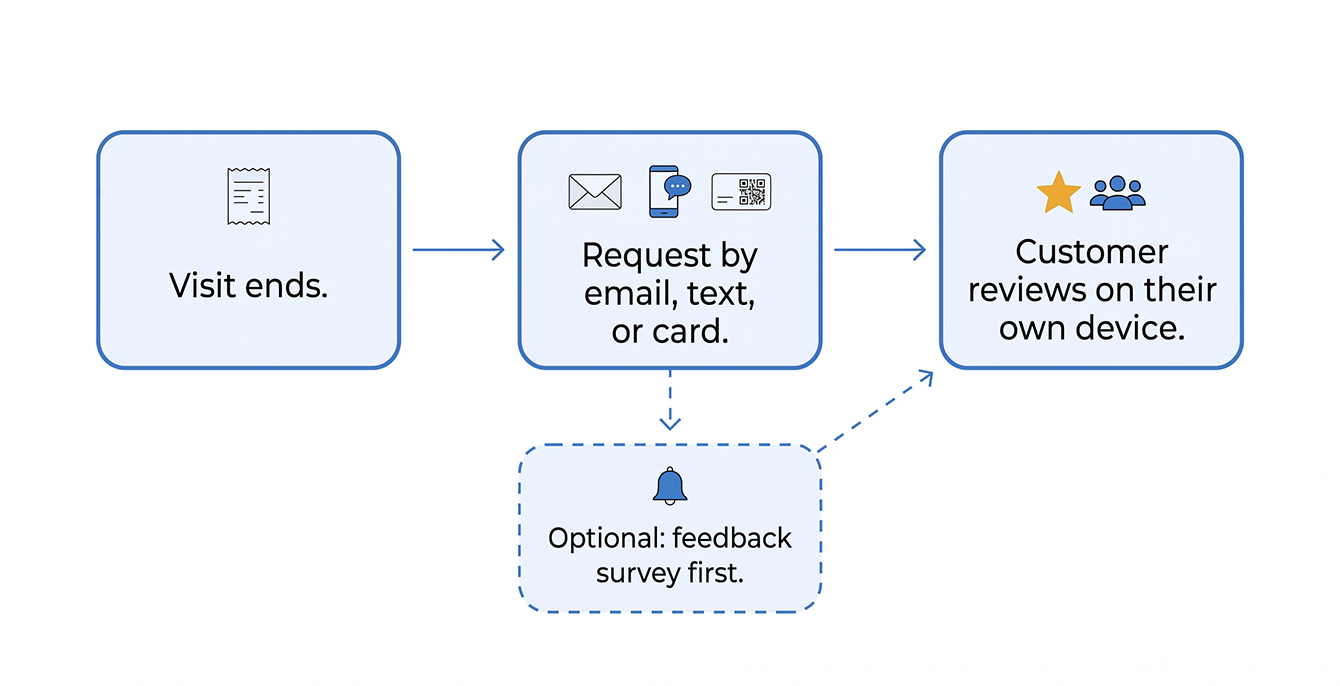
At LoyaltyLoop®, our team sets up whichever workflow you choose. Requests go out by email or text after the transaction closes, once the customer has left your counter. Our Touch Frequency Filter℠ keeps the same customer from being asked too often, with a 90-day default. Poor Feedback Alerts flag a bad experience, so your team can follow up privately, too.
Multi-Location and Franchise Compliance
Every location needs the same request workflow, because Google's rules apply across your whole brand. One rogue site running a kiosk or a name-mention contest can trigger action that hurts every site. At LoyaltyLoop, we set and maintain each location's workflow, timing, and channels, so no single site runs its own version.
See How Managed Google Review Programs Work
Our team sets up compliant review requests and keeps every location on the same process, so you don't have to police each site.
Explore Google Review ManagementReporting a Violating Review: What to Know
If a review about your business breaks Google's policy, you can flag it from your Google Business Profile. Google's review removal help page walks through the steps. If Google decides the review doesn't break policy, you get a one-time appeal. Google doesn't promise a timeline, and the review stays up while it decides.
Google only removes reviews that break its rules. A review that's simply negative stays up. For honest complaints, a calm reply works better, and our guide to negative, fake, and accidental reviews covers each case. Reporting works as a backstop. A compliant workflow does far more to protect your review count.
Audit Your Review Workflow with LoyaltyLoop
Google's 2026 rules come down to three changes: no review pressure on your premises, no requests for specific content like staff names, and no staff review quotas. Add the long-standing bans on fake and paid reviews, and a compliant program is simple. Ask after the visit, on the customer’s own device, with no perks or scripts. Of course, fixing today's issues doesn't mean you're done for good.
A compliant program stays compliant only when someone builds it around Google's rules and updates it as they shift. At LoyaltyLoop, our fully managed service takes on the setup and ongoing changes for you, so your program doesn't depend on any one site or person. Learn how we run Google review programs for single sites and multi-location brands.
Stop Guessing Whether Your Workflow Is Compliant
See how our team sets up and runs review requests so every location follows the same process.
Schedule a DemoFAQs About Google Review Policy
Q: What Are the New Rules for Google Reviews in 2026?
A: In 2026, Google added rules against pressuring customers to review while they're on your premises and against asking for specific content, like a staff member's name. It also bans staff review quotas. Older rules still apply, including the bans on fake and paid reviews. Google can now pause new reviews on a profile during a spam spike.
Q: Is It Illegal to Leave a Bad Review on Google?
A: No. Honest reviews based on real experiences count as opinion. A business can still report a review that makes false claims of fact, harasses someone, shares private details, or includes hate speech. Reviews with false and harmful claims can also bring legal risk for the person who wrote them.
Q: How Do I Know If One Old Campaign Is Still Putting My Reviews at Risk?
A: Sort your Google reviews by date and look for the patterns Google flags. Watch for a sudden spike after a push or contest. Look for clusters naming the same staff member, and for repeated phrasing. Also check for reviews that vanished or new reviews that stopped. Removed reviews and public warnings are the visible signs of enforcement.
Q: Do I Have to Remove Review Links From Every Email Signature, Receipt, and QR Code?
A: No. A standing link or QR code is fine as long as nobody feels pressured on site. A counter script or "review us before you leave" prompt crosses the line. Keep the link neutral, with no perks, star-rating requests, or "mention our team" wording.
Q: If I Stop My Staff Review Contest, How Do I Keep Recognizing Top Performers?
A: Track performance through internal measures, like survey scores and feedback tied to each visit. Then reward from that private data instead of public review content. Bonuses and shout-outs can follow internal CX results. Don't tie pay or praise to review counts or the names in them.
Q: What If a Customer Posts a Review That Mentions Our Staff by Name Without Being Asked?
A: You haven't broken anything. The rule targets businesses that ask for name mentions. A customer who names someone on their own is fine. Thank them in your reply without inviting more name-dropping, and don't spotlight the mention in a staff contest. Keep your request scripts free of name prompts, so you can show the mention was unprompted.
Q: Can I Still Ask a Customer for a Review After I've Resolved Their Complaint?
A: Yes. Don’t make it a condition of the fix, a refund, or any perk. Resolve the issue first, then send the request with the same timing and channel you use for your other review requests.