Your fully-managed customer experience platform
LoyaltyLoop is a complete customer feedback tool loaded with great features to help you retain customers, drive more sales, engage customers to promote you to others, and even automatically restart dormant accounts.
Stardard Features
Fully Managed Service
Let us do the heavy lifting for you. We'll manage the program so you can focus on using feedback to grow your business.
NPS & CX Question Tracking
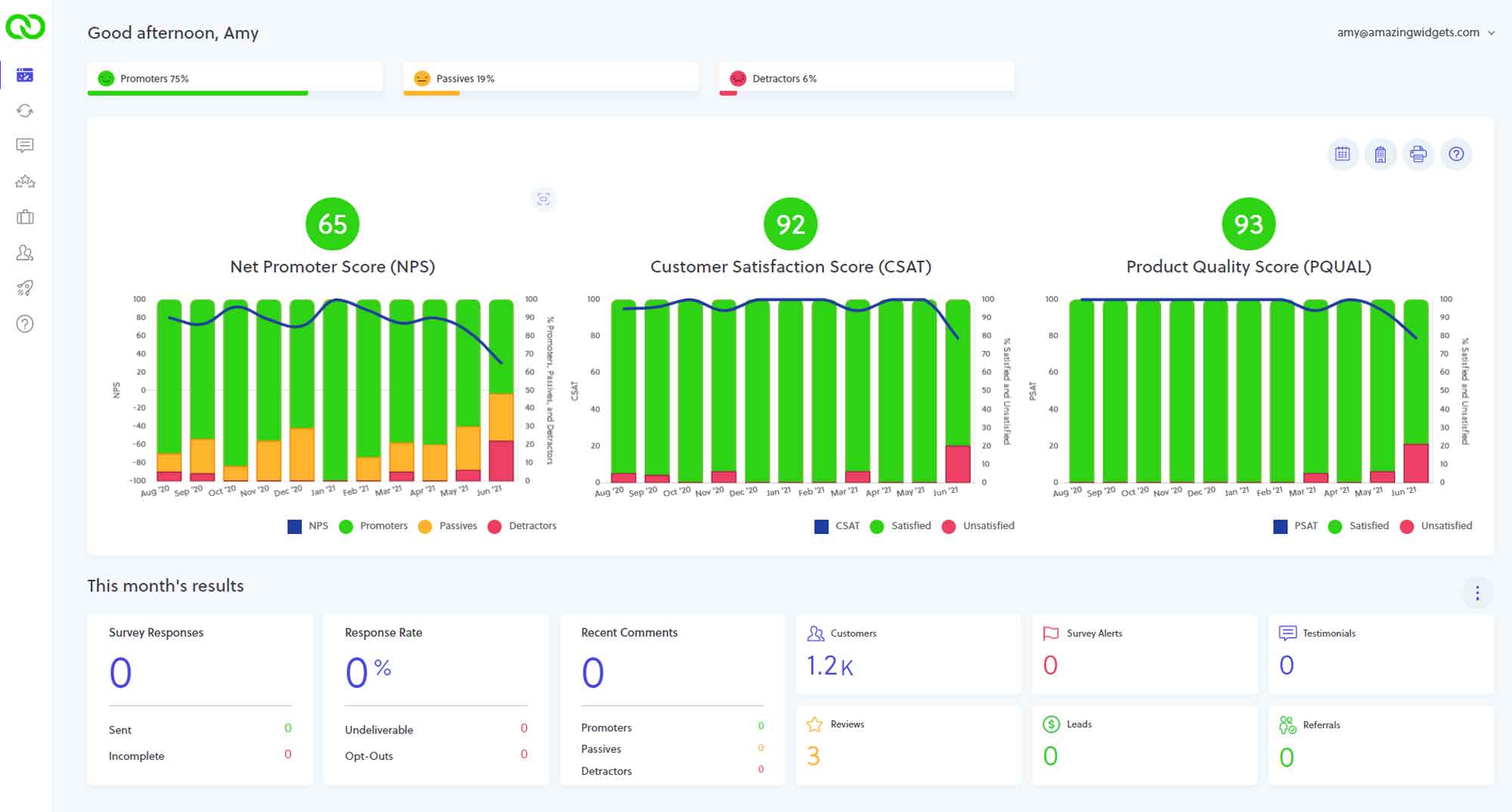
Automatically measure customer loyalty and track NPS and other CX metrics on your easy & intuitive dashboard.
Automate with Integrations
All plans come with access to our integrations to automate the triggering of customer surveys, and access to our REST APIs
Google Reviews
Easily and smartly encourage online reviews that consistently generate high-quality actual customer Google reviews and reviews on a variety of other third-party platforms.
Smart Surveys
Get the perfect branded customer surveys, using a variety of questions and scales, fully supported by a team that handles setup and ongoing management from day one.
Live Human Support
When you have questions, need training, or want to update your program, you will have access to our live human support in addition to email and knowledge base tools.
Highlighted Features
Meaningful Reviews
Reviews with stars are good, but reviews with stars and words are better! See how LoyaltyLoop helps generate meaningful reviews, the kind Google loves.
Meet your Reviewers
Never be left wondering who that reviewer was. LoyaltyLoop's ReviewMatch helps you sort out that mystery without ever lifting a finger.
Multiple Google Profile Support
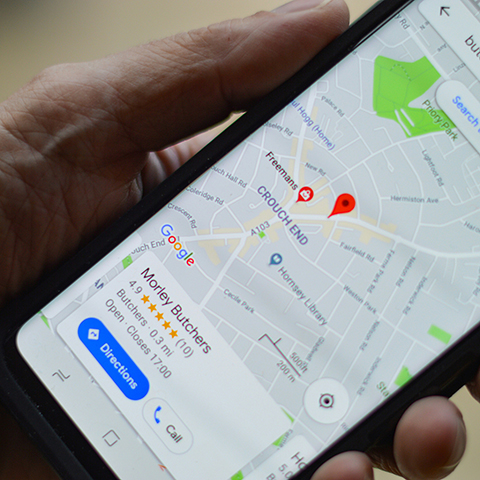
Do you struggle to get reviews on all your Google Profiles because you cannot identify which customer purchased from which territory. Our Review Site Alternator solves that problem.
Manage Google Reviews
Check out how easy it is to reply to reviews and use AI-suggested replies if you struggle to find the words, and run on demand follow-up review campaigns
Publish Testimonials
Market you business by sharing glowing customer testimonials including multimedia testimonials right on your website, social channels, and in other marketing.
Unlock Sales Opportunities
Through the subtlety of your feedback process, drive more sales from cross-selling, referral generation and dormant account restarts.
Engage customers via Email or SMS
While email is still most common form of B2B communications, many B2C businesses use SMS with customers. LoyaltyLoop uses email by default, and you can add SMS any time.
Words matter in Google reviews

LoyaltyLoop makes it easy to get Google Reviews
While a 5-star rating is a great start, reviews with written comments are significantly more powerful. Google prioritizes reviews that include text because they provide essential context to potential customers and help search engines understand your business better. Simply put: the more reviews you have with comments, the stronger your social proof and Google ranking.
The LoyaltyLoop Balance
Gathering feedback is a balancing act. You want a low-friction experience for your customers, but you also need actionable insights for your business. LoyaltyLoop has spent years refining this balance to deliver superior results for your customer experience and online presence.

Choose Your Strategy: Feedback First vs. Reviews First
Every business is unique, which is why LoyaltyLoop offers two primary configurations to meet your specific goals:
1. Feedback First (Recommended)
This is our default setting, designed to give you the "inside scoop" before a public post.
- Private Insights: Customer feedback is gathered privately first, allowing you to understand their experience and make improvements.
- Proactive Management: Negative feedback is directed to you immediately.
- Seamless Reviews: After the private interaction, the system prompts the customer for a public review. LoyaltyLoop even copies their private comments to their clipboard, making it effortless for them to paste their thoughts directly into Google.
2. Reviews First
If you prefer to skip the private feedback stage, this configuration focuses on speed.
- Direct Solicitation: All customers are asked for a review immediately, regardless of their disposition.
- Optional Insights: While the review is the primary goal, you can still include a secondary "ask" to collect internal feedback or answer specific questions.
Words Matter!
If words matter in reviews because Google puts higher weight on them, how do you get your customers to post reviews with words instead of just clicking the stars? It's easy with LoyaltyLoop.
With our Feedback First configuration, customer comments are captured during the feedback process. When customers are redirected to your Google Business Profile to post their review, LoyaltyLoop presents and copies their feedback comment to their clipboard, making it simple for them to pick their stars and paste their comment as their review. More reviews with comments, the better the social proof and Google ranking.
Pro-Tip: The "One Review" Rule
Generally, a customer can only leave one Google review per account. However, they can return to update an existing review at any time. While an update won't increase your total review count, it can improve your overall star rating.
Ready to see it in action?
Start generating more Google Reviews with comments to boost your SEO and tell the story to prospects with words and not just stars.
Schedule a Demo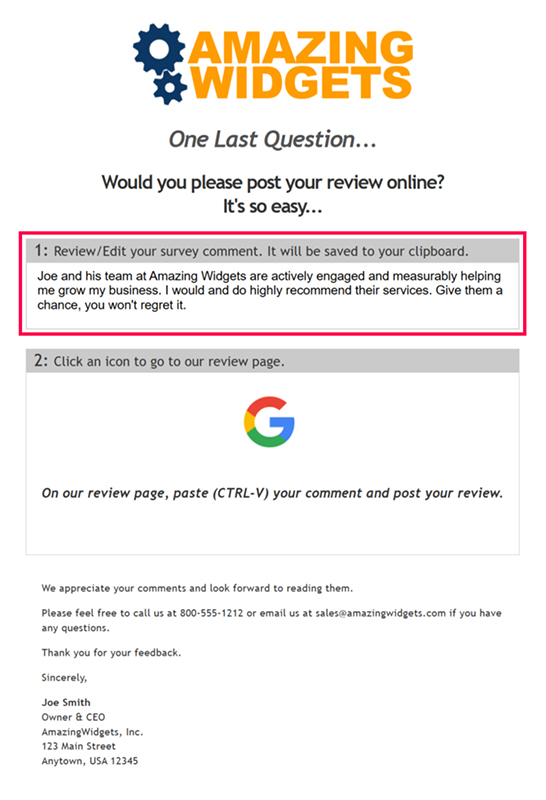
ReviewMatchSM by LoyaltyLoop
Unmask the Mystery Behind Your Google Reviews
Have you ever received a glowing Google Review from "John5809" or "Big Apple Toni" and realized you have no idea who this customer is, and hence no way to engage them to say 'thank you'? When Google usernames don't match your customer records, it creates a frustrating barrier to meaningful engagement. Don’t worry, LoyaltyLoop has the solution.
ReviewMatch intelligently bridges the gap between your Google reviews and your customer database. As LoyaltyLoop engages your audience for feedback, our system works behind the scenes to automatically match your customer contacts with their corresponding Google reviewers.
How the Intelligence Works
Google usernames rarely align perfectly with your contact info. ReviewMatch solves this by:
- Analyzing Data Points: Comparing various elements of customer survey responses against the details of your Google reviews.
- Intelligent Weighting: Using pattern matching and weighted logic to identify exactly which customer posted which review.
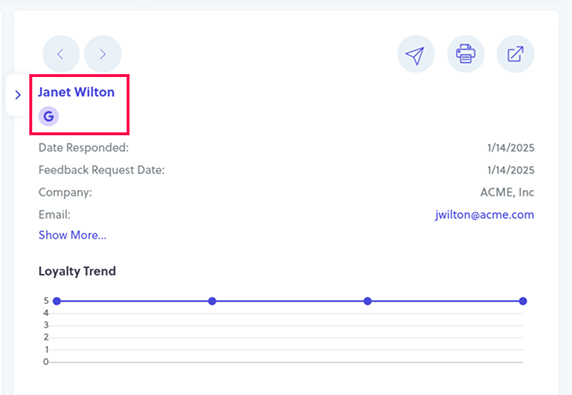
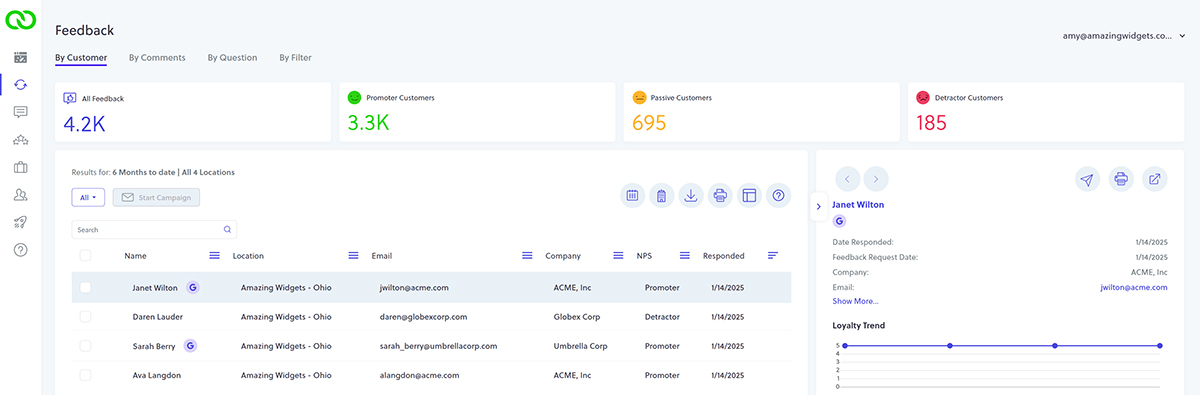
- Visual Indicators: Displaying a Google “G” icon next to matched contacts throughout the LoyaltyLoop application.
- Seamless Integration: On your Reviews tab, matched names appear as links that take you directly to that specific customer's feedback history.
Take Action with Precision
Knowing who has, and who hasn't, posted a review allows you to market smarter.
- Targeted Campaigns: Isolate contacts who haven’t posted a review yet.
- Follow-Up Efficiency: Use the Campaign feature (available on Promoter and Premier plans) to send targeted follow-ups to specific segments.
Ready to see it in action?
Respond to your reviewers more personally and show you care.
Schedule a DemoBalance your online reputation with Review Site Alternator
Managing multiple online profiles shouldn't be a headache. If your internal systems automatically track customer transactions by territory or location, the preferred setup is to add Locations to your LoyaltyLoop account. This allows us to parse your data by location so every customer is requested for feedback from the correct entity and encouraged to post their review on the corresponding Google Business Profile. But what if you cannot track transaction by location? Don't worry, we have a solution.
Why Choose a Multi-Location Configuration?
When you use a location-based setup, you gain powerful insights and control:
- Segmented Results: View your feedback and performance data by individual location.
- Customization: Each location operates with its own unique survey, invitation sequence, and dedicated review sites.
Introducing the Review Site Alternator
But what if your systems don't associate transactions with specific territories? Or perhaps you prefer to view your business as a single entity regardless of how many Google Profiles you maintain?
This is where the LoyaltyLoop Review Site Alternator comes into play.
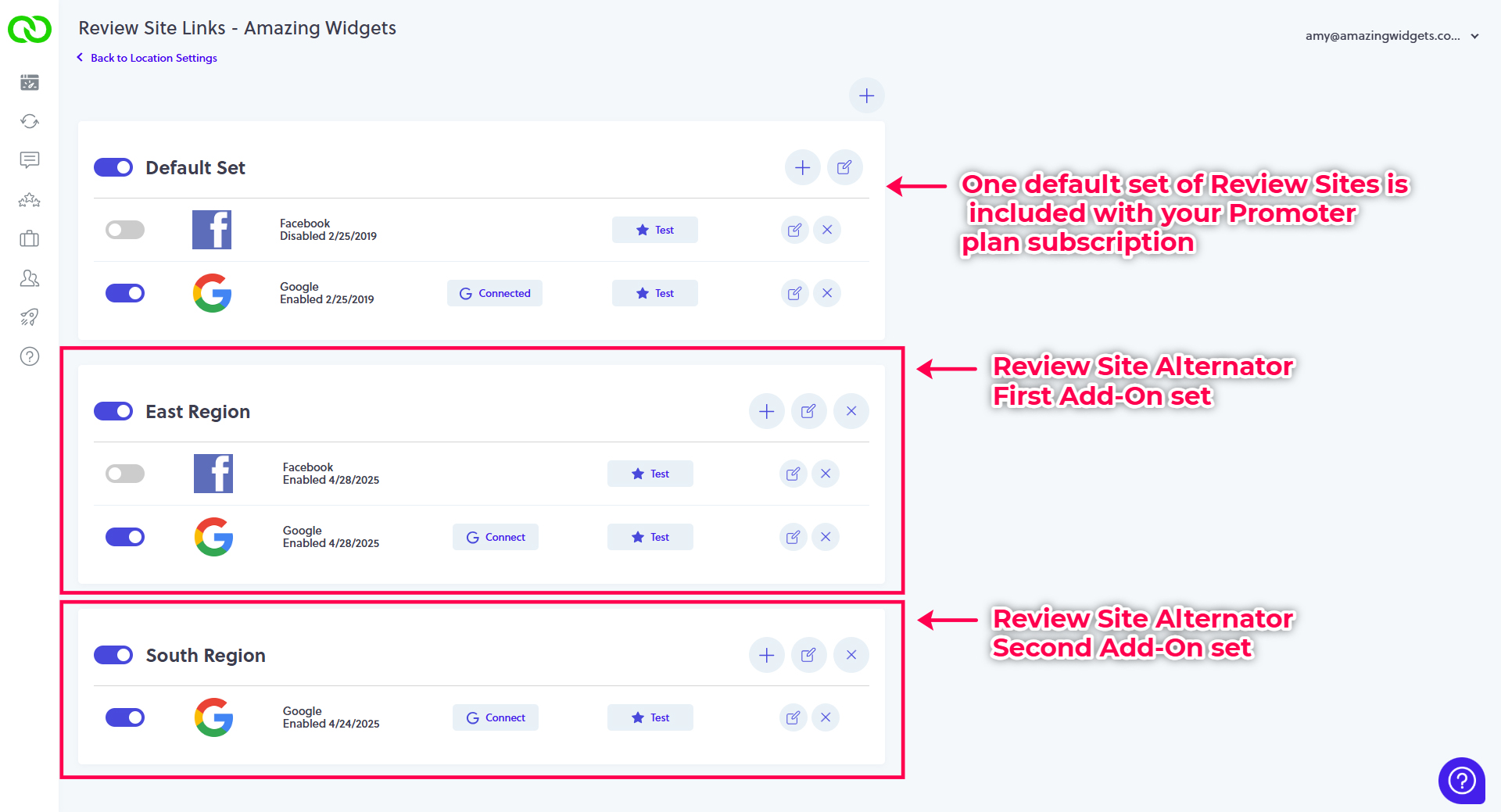
While LoyaltyLoop Promoter and Premier plans include one set of review sites (such as one Google Profile and one Facebook page), the Review Site Alternator Add-On allows you to add additional review sets to your subscription.
"Maintaining and developing Google Profiles is akin to growing plants: they all require care, feeding and attention, otherwise they will wither and die."
How It Works
- Complete Control: Each review set allows you to toggle specific review sites (like Facebook or Google) as active or inactive.
- Randomized Balancing: LoyaltyLoop will randomly present one of your active review sets to customers when asking for reviews.
- Equalized Growth: This mechanism balances review requests across all your active sets, ensuring a steady stream of feedback across all your online profiles.
Example: If you have three Google Profiles but want to focus on just two, simply disable the third. LoyaltyLoop will then alternate requests randomly between the two active profiles.
Survey-Level Flexibility
Each review set is tied to a specific survey within LoyaltyLoop. If you run multiple campaigns—such as one survey for Product Sales and another for Service Sales—each survey receives its own default set of review sites. You can add separate Review Site Alternator Add-On sets to each individual survey to match your specific goals.
Ready to see it in action?
Give each Google Business Profile the love, care and feeding they need to thrive, so your brand thrives too.
Schedule a DemoMaster your online reputation
Reply to your Google reviews right from the convenience of your LoyaltyLoop account.
Engage with Your Customers Where It Matters Most
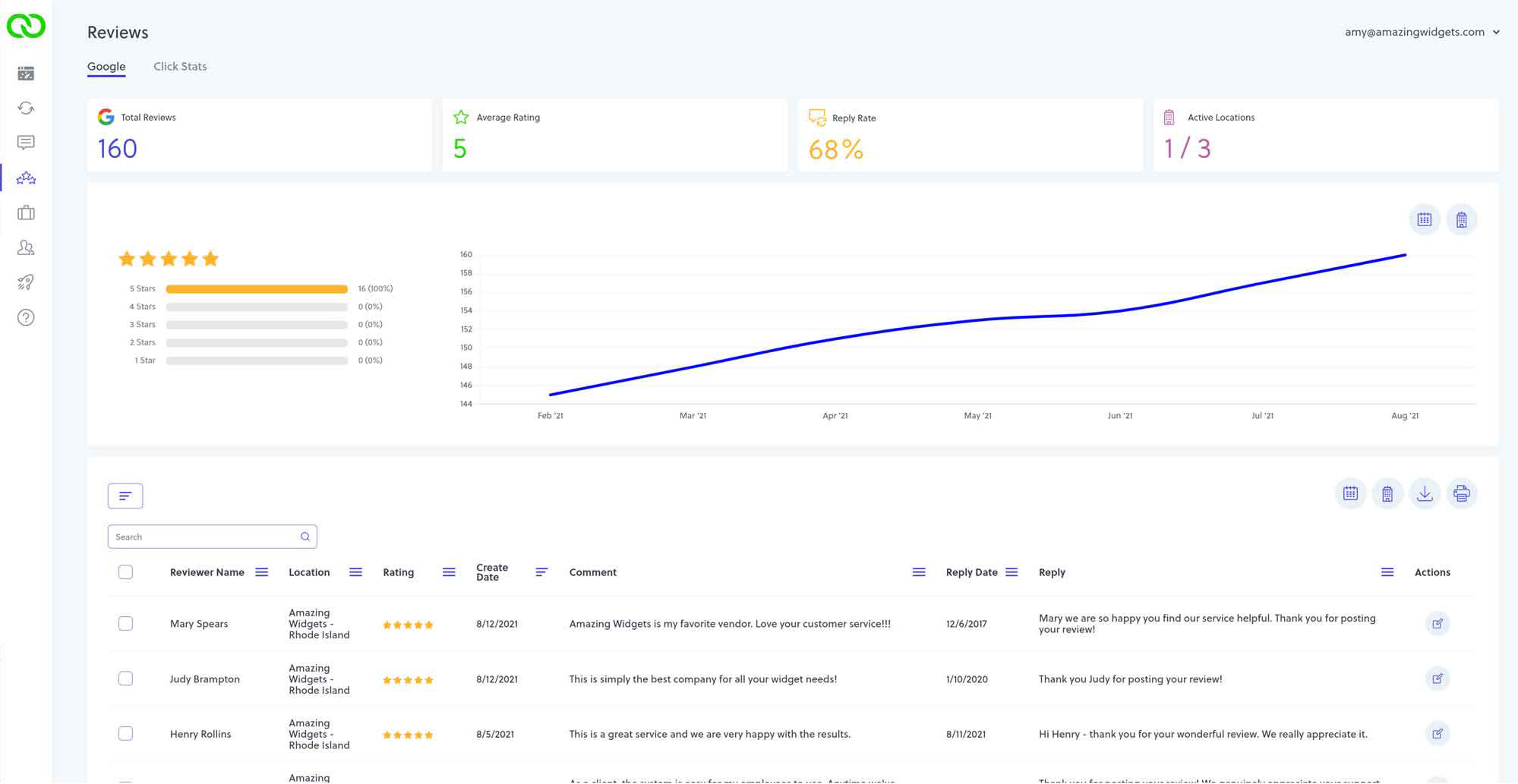
Getting reviews is only half the battle; how you respond to them defines your brand. With LoyaltyLoop, you can monitor and reply to your Google reviews directly from the convenience of your account. By showing the world and your future prospects that you appreciate every piece of feedback, you build the kind of trust that drives growth.
Streamlined Management at Your Fingertips
Stop jumping between tabs. Simply connect your Google Business Profile to LoyaltyLoop to unlock a centralized hub for your online reputation.
- Complete Visibility: View all review activity and read individual customer feedback in one place.
- Effortless Replies: Respond to reviewers without ever leaving your LoyaltyLoop dashboard.
- Smart Automation: Our AI-suggested replies (available on the Premier plan) make crafting the perfect response faster than ever, complementing our powerful Promoter and Pilot features.
Collaborate and Conquer
Managing a reputation shouldn't be a solo task. LoyaltyLoop allows you to delegate the reply process to other team members. You can easily track activity and ensure that no customer is left unheard, all while maintaining a consistent and professional brand voice.
AI-suggested replies to Google reviews
Save time and improve customer engagement with LoyaltyLoop’s AI-suggested replies.
Effortless Engagement: AI-Suggested Replies for Your Google Reviews

We know that staying on top of customer feedback is vital, but finding the right words to respond to every Google review can be time-consuming. If you’ve ever struggled with "writer's block" when replying to customers, you’re going to love this exclusive feature of the LoyaltyLoop Premier plan.
Our AI-suggested replies act as your personal writing assistant, helping you maintain a professional online presence while saving you valuable time.
How It Works
Responding to your customers is now easier than ever, right from your LoyaltyLoop dashboard:
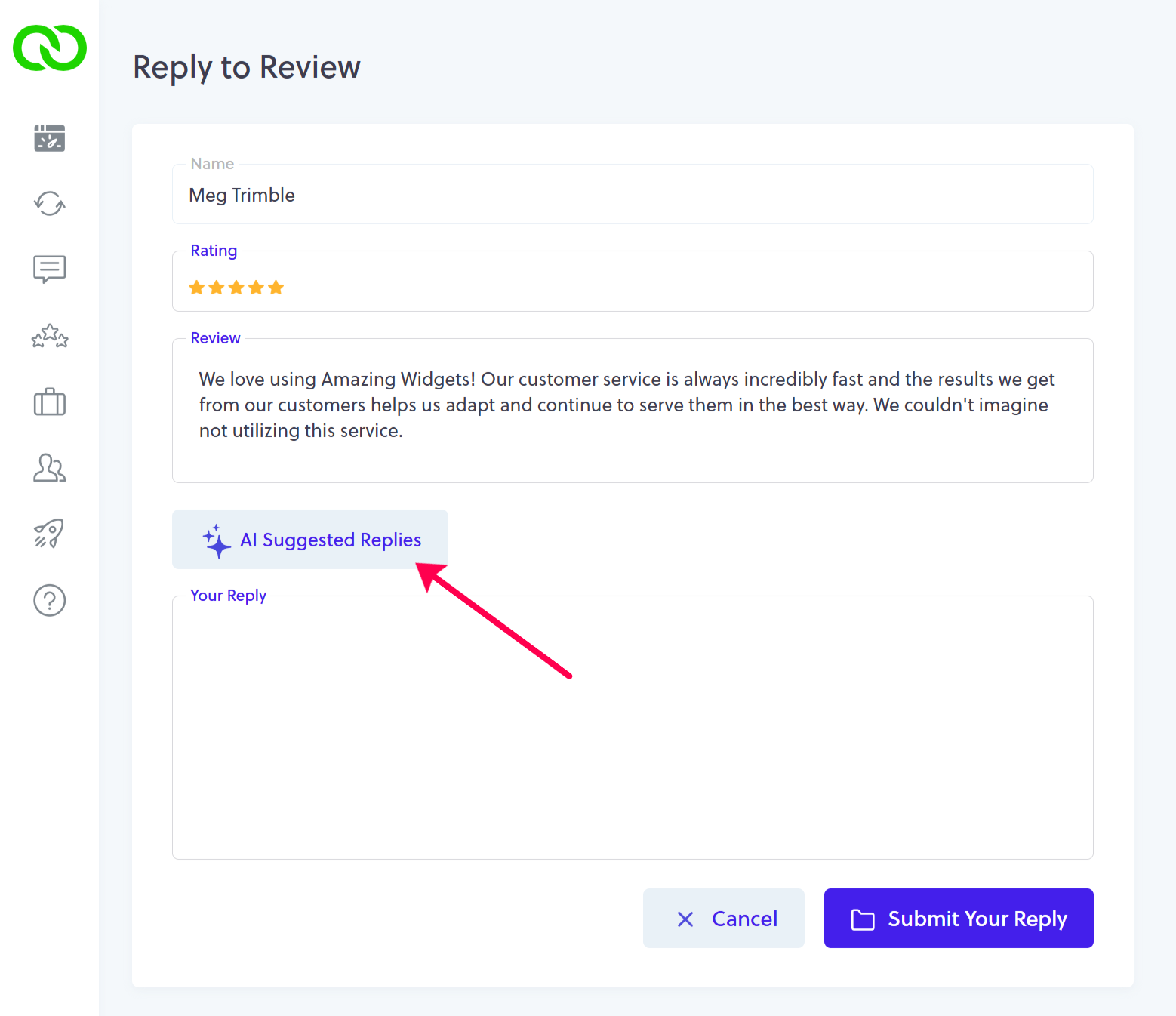
- Access the Review: From your Review tab, simply click the Reply button next to any Google review.
- Generate Suggestions: On the reply screen, you’ll see a new button labeled “AI Suggested Replies”.
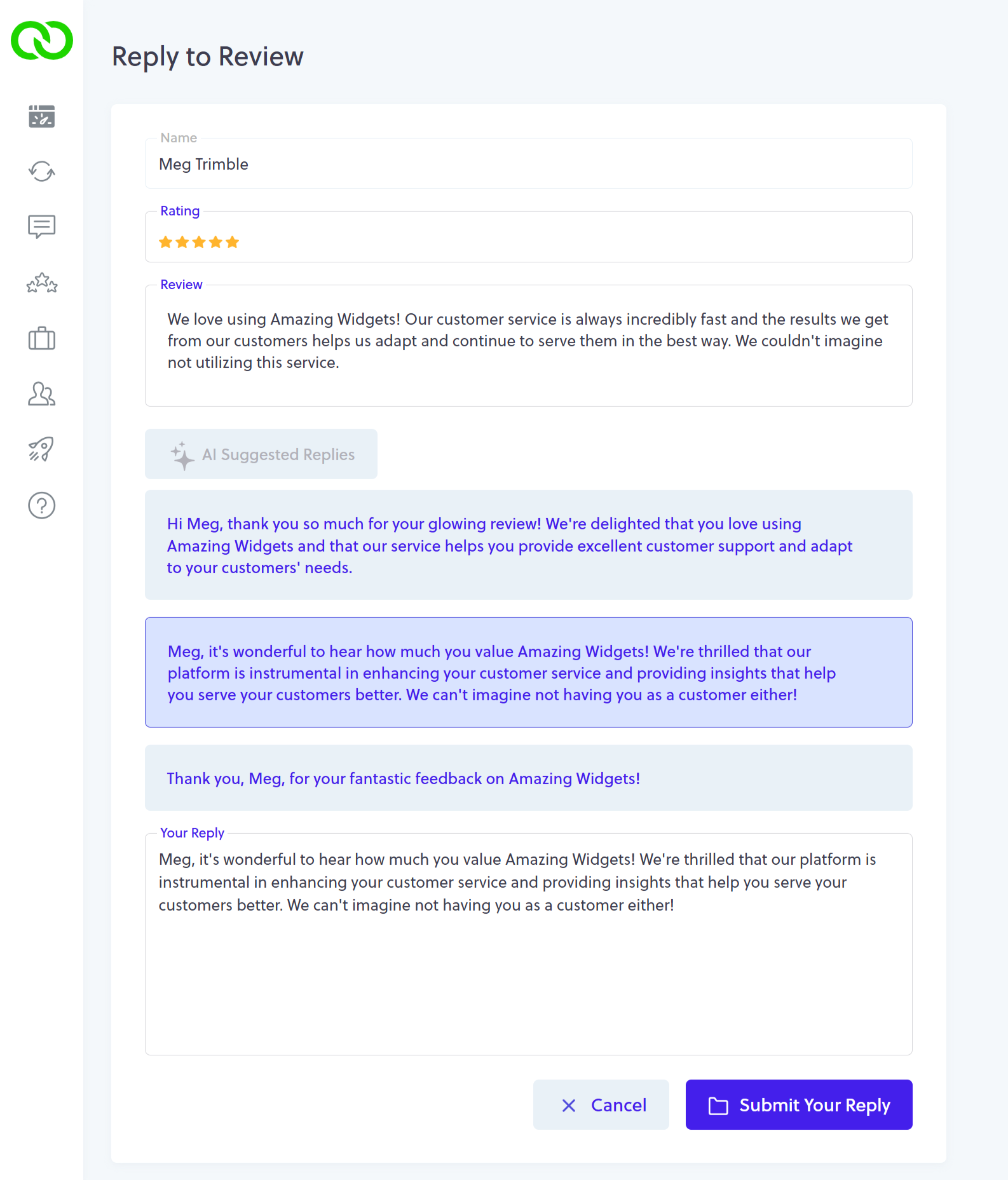
- Choose Your Favorite: Click the button, and LoyaltyLoop will instantly generate 3 different suggested replies to serve as a perfect starting point.
- Edit & Post: Select the reply you like best; it will automatically populate the "Your Reply" box for you to review, polish, and submit directly to Google.
Smart Personalization
Our AI is designed to make your life easier by analyzing the context of the review:
- Contextual Awareness: The algorithm looks at your most recent replies to ensure new suggestions aren't repetitive.
- Human Touch: Our AI works hard to identify if a reviewer’s username is a person or a company to help personalize the greeting.
- Full Coverage: Suggestions work for all reviews, even those left without comments. In these cases, the AI smartly references the user’s name and their star rating.
A Helpful Note on AI
While our AI is a powerful tool, it’s always best to keep a human in the loop. Because AI doesn't "know" your specific daily business operations, it might occasionally replicate a customer's misspelling or misidentify a non-human name. We always recommend a quick read-through to ensure the sentiment perfectly matches your brand before you hit post.
Ready to see it in action?
Show your customers and prospective clients that you value their feedback. Let LoyaltyLoop help you manage your reputation with ease.
Schedule a DemoSupercharge your Google reviews with on-demand campaigns
Compliment your automated review requests with on-demand campaigns.
Automated review requests are the backbone of a solid reputation, but sometimes your strategy needs a targeted boost. By layering On-Demand Review Campaigns over your existing LoyaltyLoop automation, you can strategically nudge customers who haven't yet shared their experiences online.
Why Run On-Demand Campaigns?
While automation keeps the feedback flowing, manual campaigns allow you to target specific customer segments with precision.
- Target "The Gaps": Reach out to customers who provided internal feedback but skipped the Google review.
- Leverage ReviewMatch: Our new ReviewMatch feature identifies "respondents" (those who gave feedback) who have left a Google review, and hence those who did not.
- Drive Growth: Focusing on these specific respondents is one of the most effective ways to rapidly increase your review count.
How to Configure Your Campaign
Ready to boost your ratings? Follow these steps to launch your targeted campaign in minutes.
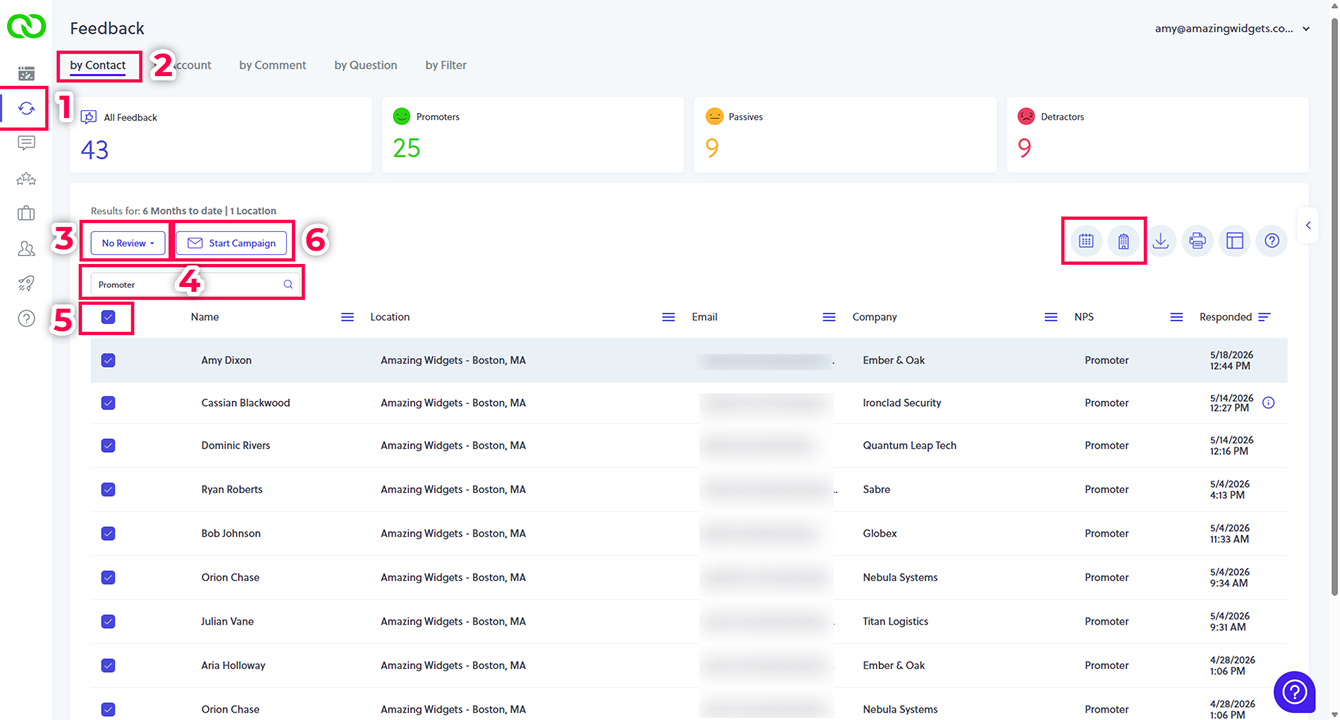
- Select Feedback: Navigate to the left main menu in your LoyaltyLoop dashboard.
- Select Contacts: Ensure you are on the Feedback By Contact tab.
- Isolate Your Audience: Set your filter to "No Review". This uses ReviewMatch to find customers who haven't posted a public review.
- Refine Your List (Optional): Narrow your results further by selecting Promoters, specific date ranges, or locations.
- Select & Launch: Click the "Select All" checkbox to include all filtered customers, then click Start Campaign to finalize your setup.
Note: This process requires a pre-existing campaign email template. If you haven't created one yet, please refer to our How to Set Up Email Templates for Campaigns" video before starting.
If you need a refresher on campaigns, please refer to "How to Launch Follow-Up Campaigns" video.
Capture the moment with multimedia testimonials
Gathering feedback is about more than just learning and improving, it’s a cornerstone of marketing your business and building a brand that people trust. With Multi-Media Testimonials, you can now share those glowing reviews with the world using the full impact of images and videos.
Whether a customer is highlighting a success story or providing visual context to a specific experience, multi-media feedback offers a level of authenticity that text alone cannot match.
Why Go Multi-Media?
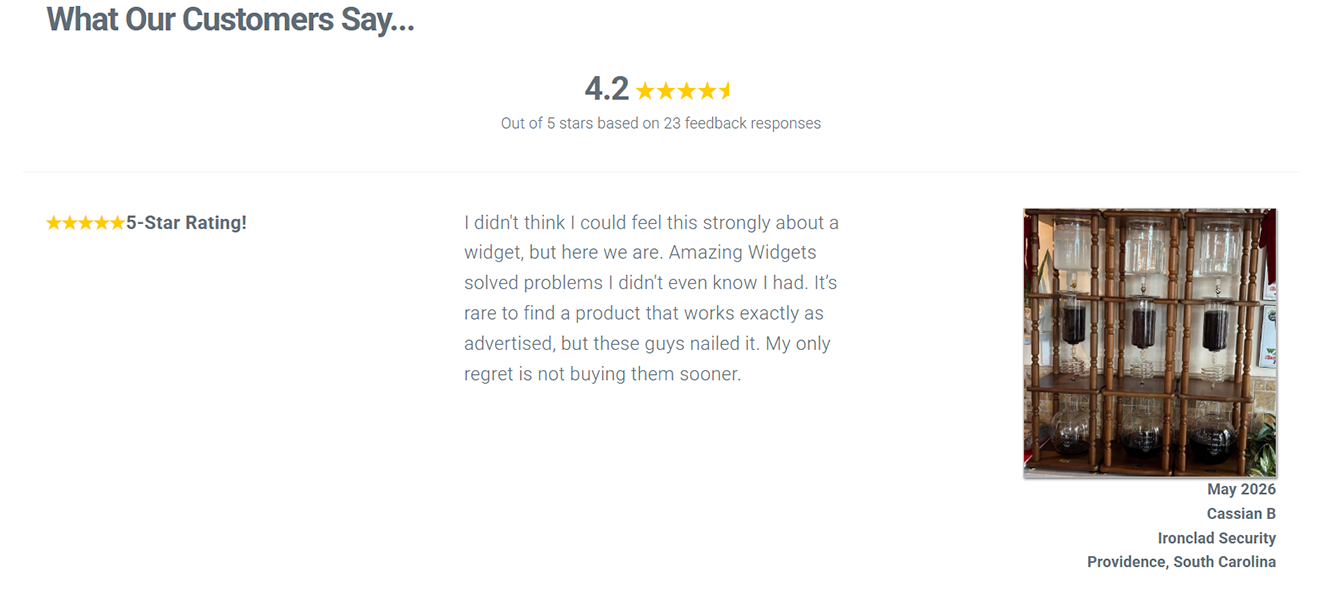
- Powerful Social Proof: Allow your customers to become your best advocates by including images and videos with their feedback.
- Visual Problem Solving: High-quality visuals are incredibly helpful for identifying specific issues or showcasing perfect results.
- Seamless Integration: Use our Testimonial Publisher widgets or API to display comments directly on your website or share them across social media.
- Complete Control: You curate the testimonials you want to highlight; with a single click, they are live for the world to see.
Available for Pro Growth: This feature is exclusively available to customers on Promoter and Premier plans.
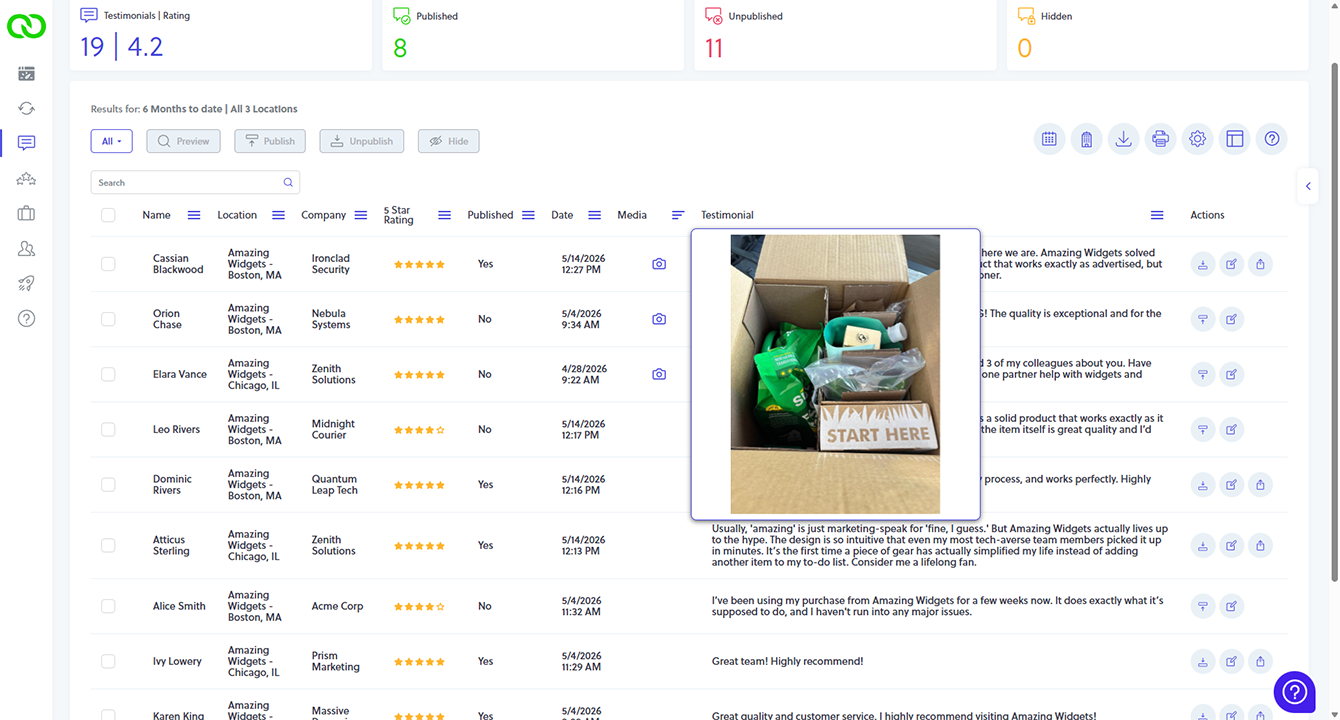
Using either the LoyaltyLoop Testimonial Publisher widgets or our API, you can easily display your glowing customer comments right on your website, share on social, and elsewhere. You curate the Testimonials you wish to display, and with a click of a button they're live.
Engage via Email or SMS All plans
Email is the default communication method which comes standard with all our plans. When using the SMS Add-On, set your customer's communication preference to either email or SMS. Once set on your customer record, LoyaltyLoop will automatically engage the right contacts in the right method.
SMS Add-On Explained
How does it work?
When you add SMS to your plan, you'll select a local phone number that will be used to send your feedback and review requests. Just like how you can configure your LoyaltyLoop emails with personalized messages, you can personalize SMS messages too. However, unlike email, each SMS message is limited to 160 characters. You can still send longer messages, but it will be sent as more than one SMS. When your customer clicks the link in the text message, it will open your survey. Since SMS messages are mostly used on mobile devices, when you add SMS we'll ensure your survey is using our mobile-friendly template.
How much does it cost, and how does billing work?
SMS can be added to any LoyaltyLoop plan at only $15 per month, and includes 500 Base Credits per month, where one (1) credit equals one (1) SMS sent. If your message is longer than 1 SMS, it will use multiple credits. On the first of each month your Base Credits reset to 500.
As LoyaltyLoop engages customers for feedback and reviews, any customer you set to receive SMS will be engaged via SMS. Remember, there are multiple messages that can be sent to a single customer during a single survey launch sequence. For example, a customer would be sent your initial request for feedback (1 credit), but if you have the 7-day reminder turned on and this customer did not respond to the first SMS survey message, the system will automatically send the reminder SMS (1 credit). If you have the Review Reminder turned on, this customer may be sent that SMS message too (1 credit). Your Base Credit balance decreases with each SMS sent.

Photo by Eugene Chystiakov on Unsplash
What happens if I run out of credits during the month?
Don't worry. In your SMS Settings you can choose to either have LoyaltyLoop revert to sending email when you run out of Base Credits, or you can opt to let LoyaltyLoop continue sending SMS. If you exceed your Base Credits but opted to keep sending SMS, you will generate an SMS Overage.
Overages are billed at the same per-SMS rate as your Base Credit plan, and are automatically added to your next month's bill. Want to set an Overage upper limit? No problem. In your SMS Preferences, you can set an Overage upper limit, after which the system will automatically revert to sending via email.
Survey Scale Options Reference Guide
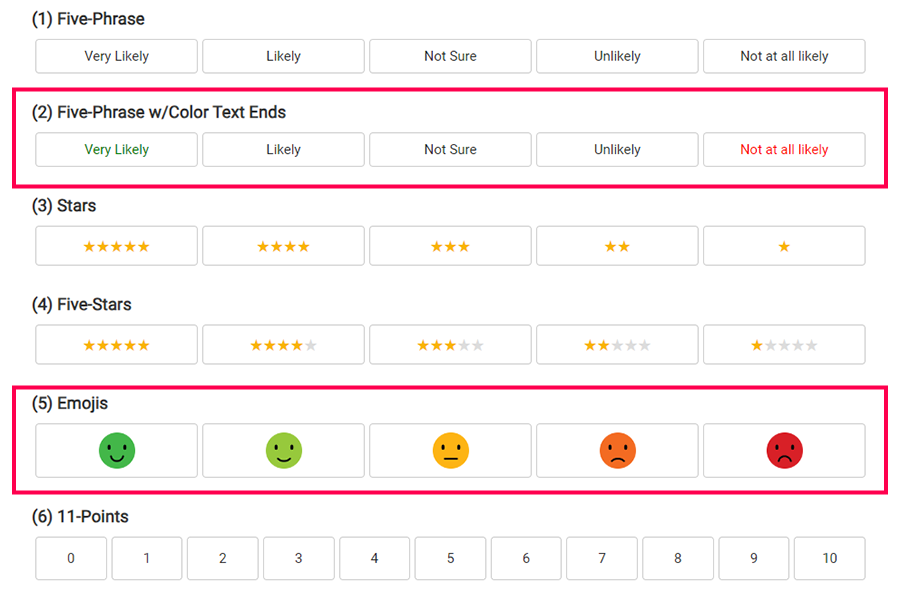
Below, you'll find a number of standard scale options, and our recommended ones outlined in red. For LoyaltyLoop surveys, we recommend using either a 5-choice or 11-numerical scale. Both give you sufficient granularity in choices, without being too cumbersome on the respondent. The 11-point scale is the traditional Net Promoter Score scale, but can be used on other customer experience (CX) questions, too. You're also not limited to the graphics shown. We find these to be effective in communicating choices to the respondent, but if you wish to use different emojis labels or graphics, just let us know.
Simple Scales
For single question surveys, these simple scales can be effective and minimalistic. Notice the subtle, but important, difference between "Stars" and "Five-Star" scales. Some customers confuse 1-star as being the positive end of the scale, which is harder to do when using the "Five-Star" variant.
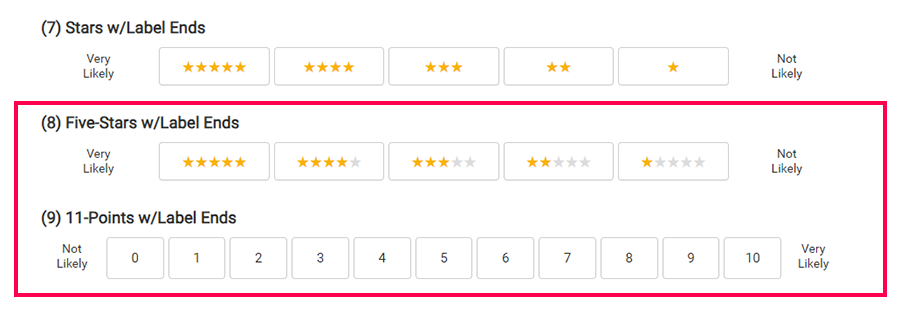
Label End Scales
These scales are also simple, but offer the additional label ends for aiding respondents in choosing the correct ends.
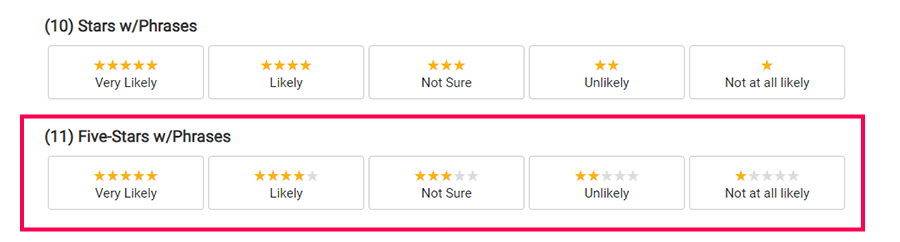
Stars & Labels Scales
These scales are are popular due to simplicity, and also effectiveness. Using the Five-Star variant can help reduce mistakes.
Emoji-Combo Scales
These scales combine the use of emojis and other indicators. Emojis help reduce mistakes by respondents, and can give your survey a friendly style.
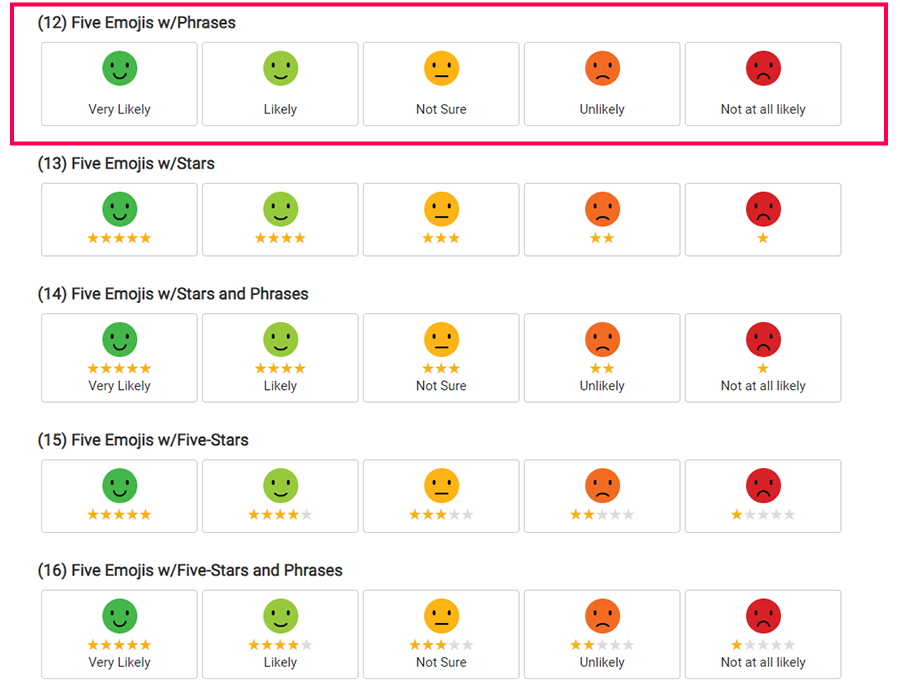
Emoji Ends - Professional
NOTE: #20 is our recommended and default scale. These scales utilize a thumbs up/down end indicator to aid respondents, and are combined with other elements.
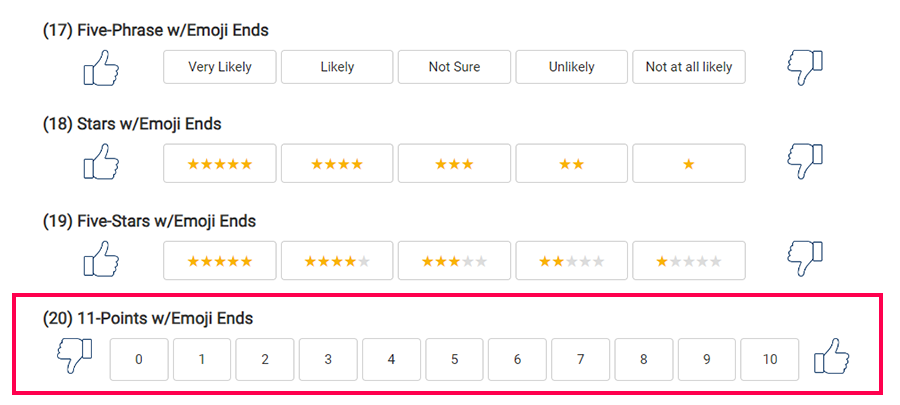
Emoji Ends - Casual
These scales use the casual happy-face and frown-face emojis to aid respondents, and are combined with other elements.
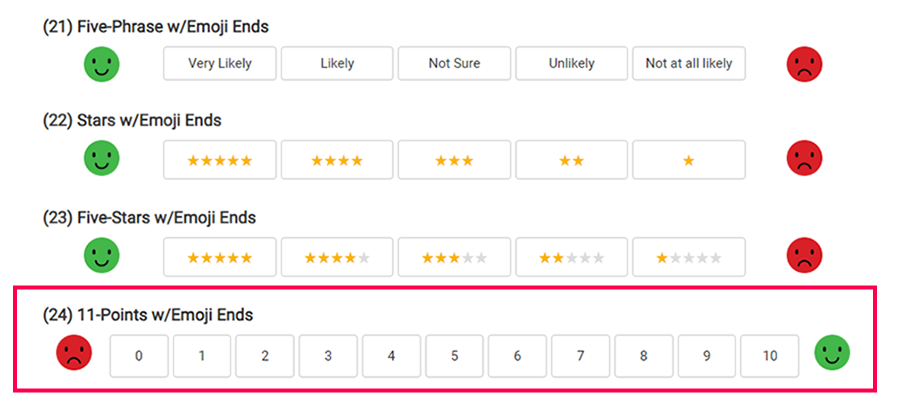
Temperature (gradient) Color-Coded - Universal
These scales use a color gradient, like a thermometer, to help the respondent understand the spectrum of choices from negative to positive. It can be combined with other elements, like graphical ends as shown.
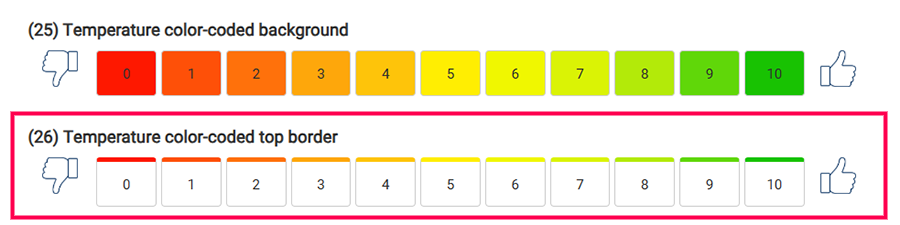
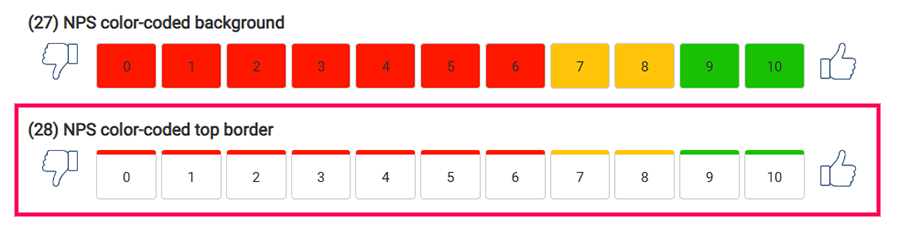
NPS Color-Coded
These scales use colors mapped to the choices directly relating to the components of Net Promoter Score, where red is a Detractor, yellow is a Passive, and green is a Promoter response. It can be combined with other elements, like graphical ends as shown. This scale works well when only asking the NPS question.