Google Review Management: DIY, Software, or Managed?
Your Google reviews matter and you know it. Still, you don't have time to monitor them, ask for new ones, or respond when they come in. So while you're busy running the business, your review count stays flat. Competitors pull ahead.
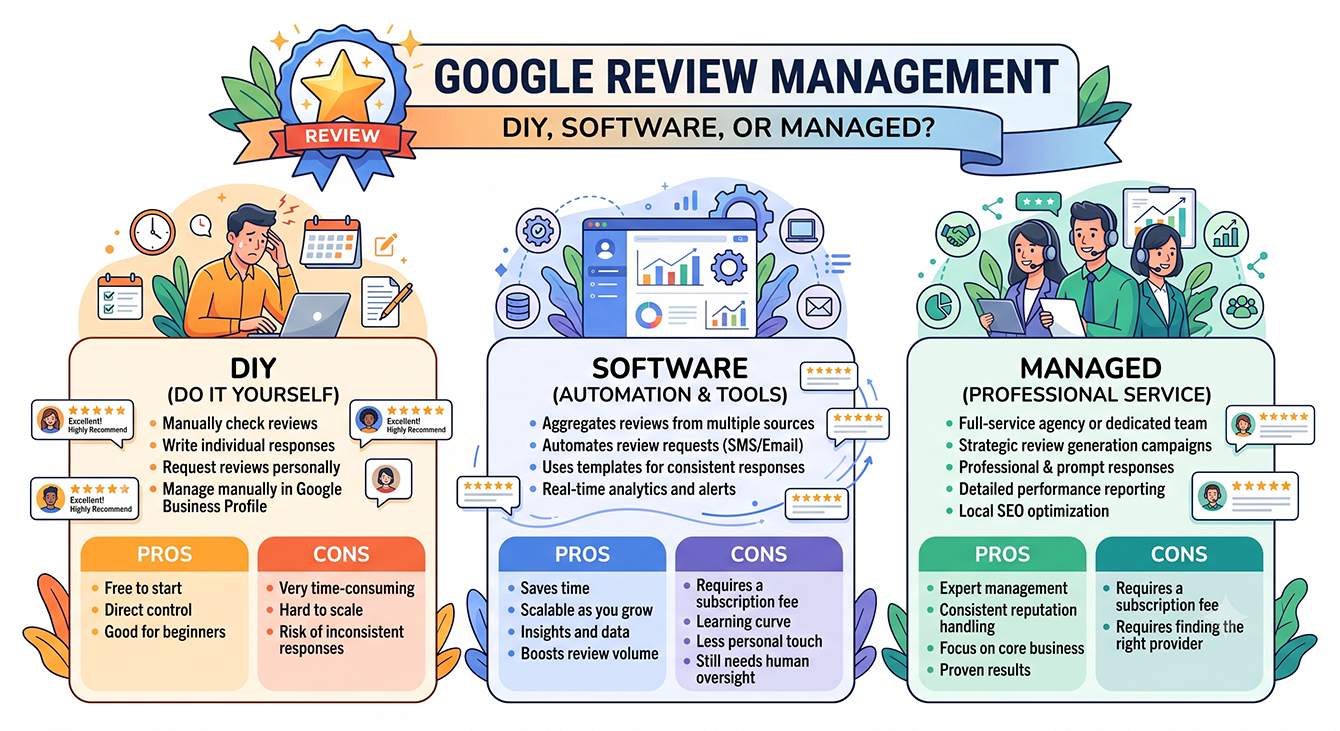
Most guides on google review management assume you'll run the program yourself. They skip the real question: should you do it yourself, invest in software, or hand it off? Three real approaches exist, each with tradeoffs most guides gloss over.
By the end of this one, you'll know which model fits your actual bandwidth. You'll also learn what Google's 2026 platform changes mean for your program and how the star-rating math works. That way, your review program keeps working even when you're busy.
Main Takeaways
- The right google review management approach depends less on your budget than on whether someone on your team can actually commit to it.
- Written reviews carry more ranking weight than star-only ratings. They give Google indexable keyword signals tied to local search queries.
- Google's enforcement removed hundreds of millions of reviews in 2025, and its April 2026 policy update banned several common solicitation tactics. A sudden drop in your review count may trace back to Google's filters rather than to unhappy customers.
- Review signals carry roughly 20% of local ranking weight in the 2026 Whitespark survey, with review recency ranked among the top five individual factors.
- Track four numbers to know your program is working: review velocity, average rating trend, response rate, and response time.
Written Reviews Outrank Star Ratings. Here's How to Ask for Them.
Star-only ratings leave ranking value on the table. Getting customers to write takes a different ask, and this guide walks through exactly how to make it.
Why Google Reviews Matter More in 2026
Google reviews drive trust, new customer growth, and local search visibility. After all, 81% of consumers use Google to read reviews before choosing a local business, according to BrightLocal's 2024 Local Consumer Review Survey, which makes Google the number-one review platform.
Reviews don't just influence customer decisions, either. They also affect where your business appears in local search. A 2026 Search Atlas study found they're one of the strongest factors in Google Maps rankings, second only to a searcher's proximity to a business. Review activity is a measurable ranking signal.
Why the Stakes Went Up
The way people discover local businesses is changing: 45% of consumers now use AI tools for local business tips. That's up from 6% in 2025, according to BrightLocal's 2026 research. AI surfaces your review reputation across channels you don't control. This means a thin or stale review profile follows you beyond Google itself.
At the same time, the Federal Trade Commission (FTC) Consumer Reviews and Testimonials Rule took effect in October 2024. It bans buying, selling, or fabricating reviews and allows civil penalties for violations, and the FTC sent its first warning letters under the rule in December 2025. Compliance is now a legal requirement for every review solicitation workflow you run.
The bottom line? Weak review management in 2026 costs you more than social proof. It costs you AI visibility, local ranking signals, and FTC enforcement exposure.
What Changed with Google Reviews in 2026?
Google made three material changes to how reviews work in 2025 and 2026. Each one affects how you request, monitor, and respond to reviews on your Google Business Profile (GBP).
Change 1: Enforcement reached a new scale. Google blocked or removed over 292 million policy-violating reviews in 2025, blocked 79 million inaccurate or unverified profile edits, and took down 13 million fake Business Profiles, according to a 2026 Google Blog post. Enforcement this aggressive can catch real reviews in the filter, so it's wise to watch for sudden drops in your review count.
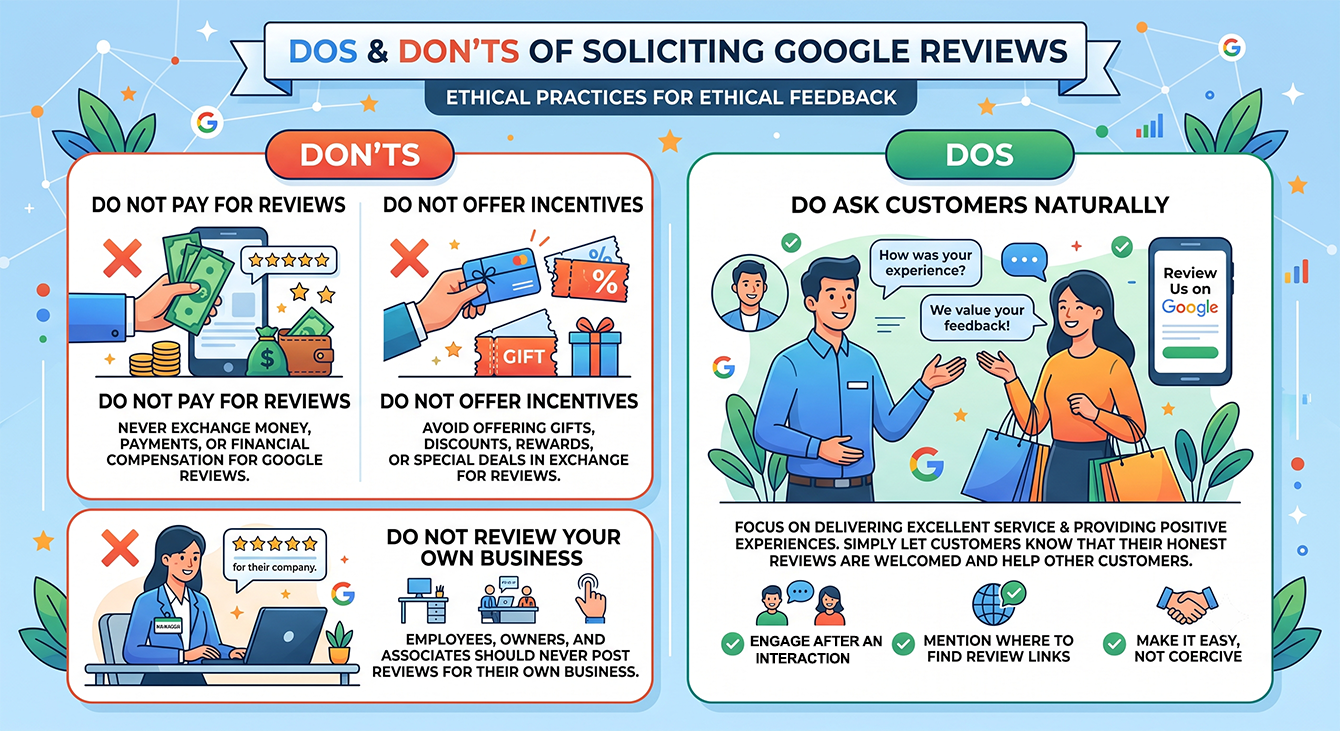
Change 2: Google banned several common solicitation tactics. In April 2026, Google added new clauses to its Maps review policy that explicitly prohibit directing staff to hit review quotas or to solicit reviews mentioning staff names or other specific content. The same update reinforced existing bans on pressuring customers to review on-premises, review kiosks, and offering incentives for reviews, and deployed Gemini models to block review extortion scams before they go live.
Change 3: Google now alerts you directly. Verified profile owners receive proactive email alerts when something happens to their listing, such as suspicious edits. That's a new monitoring surface worth building into your routine.
What to Do Differently Now
Check your solicitation practices against the new rules first. Here's where the line sits after the April 2026 update and the FTC rule:
Now prohibited: paying or offering discounts for reviews, discouraging or prohibiting negative reviews or selectively soliciting positive reviews, directing staff to hit review quotas, asking customers to mention staff by name, pressuring customers to post while on-site, and review kiosks.
Still allowed: asking every customer for honest feedback, sharing a direct link to your review form, sending timed follow-up requests by email or SMS, and responding to every review.
Next, if you're using review request links or QR codes, test that they still resolve to your review form. Google has retired features and reworked review link documentation over the past two years, and old links may send customers to dead pages.
Finally, take a second look at your collection cadence. Steady, compliant review flow matters more than volume spikes. Google's system can pause reviews during suspected spam attacks. A burst campaign of 30 requests in one afternoon looks suspicious. A steady cadence of real customer reviews protects your profile better. It keeps your review count growing without triggering filters.
How Google Reviews Affect Your Local SEO Rankings
Review signals carry roughly 20% of local ranking weight, one of the strongest categories you can control, according to the 2026 Whitespark Local Search Ranking Factors survey, with review recency ranked among the top five individual factors. Knowing what's behind each signal tells you what kind of review program drives visibility.
The Four Review Signals That Drive Local Pack Rankings
Review velocity measures how many new reviews you earn per month, a different signal from your lifetime total. Google treats it as evidence that your business is active and customers are engaging. A business that earned 10 reviews last month is more likely to outrank one that earned 50 two years ago and stopped.
Recency weighting supports this: Google gives more weight to recent reviews. So a 4.5-star rating built on reviews from the last six months carries more ranking value than a 4.8 built on reviews from 2022.
Review response rate is the share of reviews you reply to. It works as both a ranking signal and a trust signal. High-visibility brands respond to 80.5% of their Google reviews within 2.1 days. Average-visibility brands respond to 45.1% in six days, according to the SOCi Local Visibility Index.
Written review content gives Google something star clicks alone can't: text it can index. A review that says "best emergency plumber in Westlake" helps you rank for that phrase. A silent five-star rating never will. (More on how to earn written reviews below.)
Three Ways to Handle google review management: DIY, Software, or Fully Managed
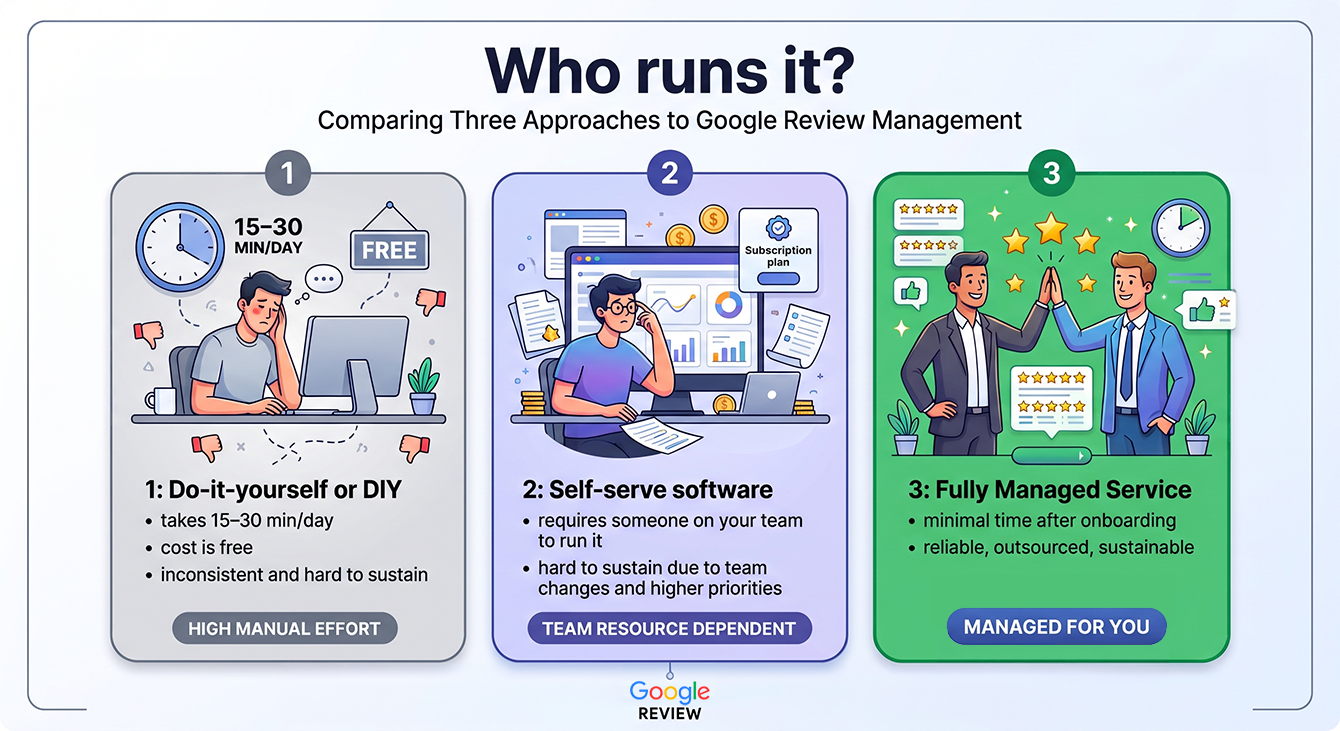
Every business managing Google reviews falls into one of three approaches. You do it yourself with free Google tools. You run self-serve software. Or you hand it off to a fully managed service. Each comes with honest tradeoffs in time, cost, and consistency. Here's a closer look at all three.
DIY with Google's Free Tools
Do-it-yourself (DIY) means logging into your Google Business Profile to read reviews, respond one by one, and ask customers for reviews via email, text, or printed cards. Google's built-in tools are free, but they require you to check, respond, and request each time. This fits single-location businesses with low review volume and an owner who has 15 to 30 minutes daily for reviews.
Self-Serve Review Management Software
Self-serve google review management software automates review alerts and centralizes responses across locations. These tools can also send review request campaigns. You still configure, monitor, and maintain the tool yourself. This fits businesses with internal marketing staff who can own the program. Multi-location operators who need dashboard visibility but have someone to run it also benefit.
The table below breaks down seven popular self-serve review management tools, along with the integrations and onboarding process you can expect.
| Tool | Best For | Starting Price for One Location | Free Trial | Integrations | Support & Onboarding |
|---|---|---|---|---|---|
| Birdeye | Multi-location brands automating at scale | Must request a quote | No | Google Business Profile, Salesforce, HubSpot | Support center and services |
| Chatmeter | Multi-location brands with 100+ locations | Must request a quote | No | Google, Apple Maps, Power BI | Dedicated support with service level agreements |
| GatherUp | Agencies with white-label needs | $99/month | Yes | Google, Salesforce, Zapier | Guided onboarding and chat |
| GBPPromote | Local businesses and agencies managing GBPs | $16/month | Yes | Google Business Profile, Zapier, Stripe | Automated onboarding and live support |
| Reviewflowz | Teams working from Slack, Teams, or Zendesk | $50/month | Yes | Slack, Microsoft Teams, Zendesk | 24/7 chat and onboarding |
| ReviewInc | Multi-location brands that want centralized monitoring | Must request a quote | No | Google, Facebook, Zapier | US phone, email, chat |
| ReviewTrackers | Enterprise and franchise brands | $89/month | Yes | Google Business Profile, Salesforce, Zapier | Training and enablement |
No matter which platform you choose, the requirement stays the same. If you opt for self-serve google review management software, you or someone on your team will still be responsible for your review program.
Fully Managed Review Management Service
A google review management company runs the entire program on your behalf:
- Setup and review monitoring
- Review request workflows
- AI-suggested reply drafts to start from (Premier plan)
- Adapting to platform changes like Google's 2026 updates
Replying to your Google reviews stays with you, because the reply should come in your voice. You compose and submit your replies from inside LoyaltyLoop®, and we post them to Google. On the Premier plan, the system suggests three replies as starting points, which you personalize before submitting. The rest of the program, including requesting, monitoring, and reporting, is handled for you. LoyaltyLoop operates in this category, managing review programs for businesses that don't have the bandwidth to run them internally.
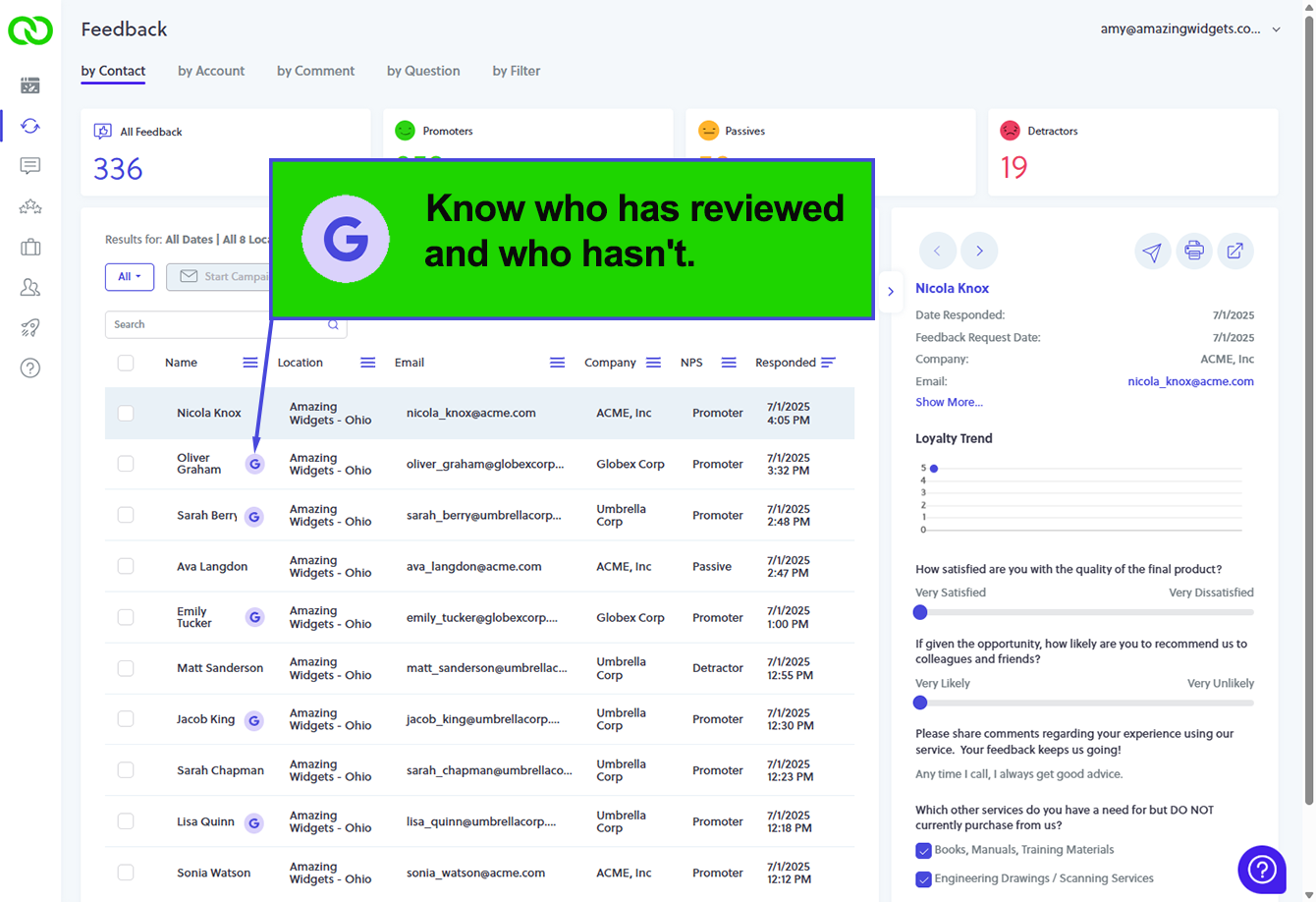
Like self-serve options, LoyaltyLoop integrates with the systems you already run. You can plug directly into your existing workflows through connectors like Datto Autotask, CoreBridge, QuickBooks, and Zapier. Google review monitoring and ReviewMatch℠ come built-in. ReviewMatch matches Google reviews back to your known customer records, even when a reviewer's Google account doesn't display their real name, so you always know who has reviewed and who hasn't, and can target follow-up at the customers who haven't. Onboarding is just one 45-minute call. Support is available by phone, email, and in-app knowledge base, so you're never flying solo. Let us do the heavy lifting for you.
Comparison Table: How DIY, Self-Serve, and Fully Managed Stack Up
The table below compares the three approaches across the factors that matter most when you're deciding how to handle google review management.
| Dimension | DIY (Free GBP Tools) | Self-Serve Software | Fully Managed Service |
|---|---|---|---|
| Monthly cost | Free | $50–$500+/mo depending on locations | Varies; sometimes higher than software-only |
| Time investment | 15–30 min/day | 5–15 min/day (setup + ongoing) | Minimal after onboarding; you handle review replies |
| Review request automation | Manual | Automated campaigns you configure | Automated campaigns managed for you |
| Response handling | You write every response | Templates + AI drafts you approve | You reply from inside the platform and it's posted to Google for you; AI-suggested reply drafts on Premier |
| Multi-location support | One profile at a time | Dashboard across locations | Centralized management across all locations |
| Adapts to Google changes | You track changes yourself | Vendor updates (varies) | Service provider tracks and adapts |
| Best for | Solo operators, low volume | Teams with marketing bandwidth | Businesses without internal bandwidth |
The right approach depends more on your bandwidth than your budget. A free tool you never log into costs more in lost reviews than a managed service you don't have to think about.
How to Respond to Google Reviews (Positive and Negative)
Your public response to every Google review is a message to the reviewer and to every future customer who reads it. And responding to everyone matters: far fewer consumers will use a business that replies only to positive reviews (45%) or only to negative ones (47%), according to BrightLocal's 2026 survey. The approach differs for positive and negative reviews.
Responding to Positive Reviews
Thank the reviewer by name or reference their specific experience. Skip the generic "Thanks for the review!" A personal response shows future readers that a real person is paying attention. Mention the specific service or product they referenced. This adds keyword-rich content to your profile that supports local SEO without feeling forced.
Responding to Negative Reviews
Respond within 24 to 48 hours. Acknowledge the issue without being defensive. Offer to resolve it offline by providing a direct contact. Keep the public reply short. The goal is to show future readers you take problems seriously rather than to win the argument.
Three things to avoid:
- Never offer compensation publicly. It invites copycat complaints.
- Never dispute facts in the review thread.
- Never use a template that reads like a template. Generic or templated replies put off 50% of consumers, per BrightLocal's 2026 survey. If your replies all start with "We're sorry to hear about your experience," readers notice.
Every response you post is indexed by Google. AI tools summarizing your business see it too. A pattern of thoughtful, specific replies builds trust at scale in ways a star rating alone can't.
One more way to get value from positive customer feedback: put it to work beyond Google. Great feedback can be showcased on your website, shared on social media, and woven into sales conversations, where it keeps converting long after it's given. LoyaltyLoop handles testimonial publishing as part of the managed program, turning the permission-based testimonials customers provide through your survey workflow into published content prospects can see, without you copying and pasting.
See What a Managed Review Program Looks Like
Automated requests, AI-suggested reply drafts you personalize and submit, and multi-location visibility in one dashboard. Evaluate whether LoyaltyLoop fits how your business actually operates.
Explore LoyaltyLoop's Google Review Review Management Service
How Do I Remove an Unfair Google Review?
You can't delete someone else's Google review. But you can report reviews that violate Google's policies. Here's the process that gives you the best chance of removal.
- Open your Google Business Profile and go to the Reviews section. You can also use Google Maps to find your business listing.
- Find the review you want to report. Click the three-dot menu icon next to it.
- Select "Report review" and choose the policy violation that applies. Options include spam, fake content, off-topic, conflict of interest, or offensive language.
- Submit the report. Google typically reviews flagged content within several days. Complex cases can take longer.
- If Google declines your report, use the Reviews Management Tool to submit a one-time appeal. Include added context explaining the policy violation.
What to Do While You Wait
First, respond publicly to the review in a professional, factual tone. Future customers will see your response if the review stays up. Don't reference the flag or appeal in your public reply.
Then, generate new reviews from recent customers to dilute the impact on your overall rating. A steady flow of real reviews pushes unfair ones down the page. It also offsets the star-rating damage.
Businesses that make feedback easy to give through a structured workflow hear about problems sooner. When a customer has a direct channel to tell you something went wrong, the issue often gets resolved in a conversation instead of a one-star review. Prevention outperforms removal.
How to Turn Five-Star Clicks into Written Reviews
Written reviews carry more algorithmic weight than star-only ratings because they give Google indexable keyword content. A star-only rating tells Google your customer was satisfied. A written review that mentions your service, location, or specialty gives Google keyword signals it can match to local search queries. The gap between "★★★★★" and "Best same-day screen repair in downtown Austin" is the gap between a rating and a ranking signal.
Getting customers to write requires a different ask than getting them to click five stars. Use a specific prompt in your review request instead of a generic "Please leave us a review." Try asking: "What made you choose us over other options?" Or: "What would you tell a friend about working with us?" These give the customer a starting point and produce richer content.
Make it easy by sharing a link that opens directly to the Google review form. Some review management workflows, such as LoyaltyLoop, offer review requests as part of the same survey workflow and pre-copy the customer's survey comments to their clipboard, making it easy to paste as their Google review. One workflow, low friction. Time the ask within 24 to 48 hours of the completed service, while the experience is fresh. Requests sent a week later produce fewer responses and less detail.
How to Manage Google Reviews Across Multiple Locations
Multi-location review management is a different challenge from running one profile, and it needs its own structure. Review volume variance, brand reputation risk, and response consistency all come into play.
Review volume and rating vary by location. According to BrightLocal's 2024 survey, 91% of consumers say local branch reviews affect their overall view of the brand. One location falling behind doesn't just hurt that location. It drags down how customers see every location.
So, set per-location targets for review count, response rate, and response time. Dashboard these metrics centrally so you can spot which locations are slipping before the star rating reflects it.
Assign clear ownership, too. Either a person at each location responds with brand guidelines and approved templates, or a centralized team or managed service handles responses across all locations. The worst outcome is no one owning it and reviews going unanswered for weeks.
What to Measure to Know Your Review Program Is Working
Four metrics tell you whether your google review management program is producing results.
- Review velocity: How many new reviews you earn per month. A steady or rising velocity signals a healthy program. A declining velocity means your request workflow is breaking down.
- Average rating trend: The direction of your average star rating over time. Track the direction over 90-day windows. A 4.3 trending up is better than a 4.6 trending down.
- Response rate: The share of reviews you respond to. Target 80% or higher to match high-visibility brand benchmarks.
- Response time: How quickly you reply after a review posts. Same-day or next-day responses are the standard for top performers.
These four numbers give you an early warning system. If any one slips, you can find and fix the problem before your star rating or local ranking reflects it.
Choosing the Right Google Review Management Approach for Your Business
The right approach to google review management depends on three questions:
- Do you have someone who will log into your review dashboard at least three times a week?
- Can that person respond to every review within 48 hours?
- Will they sustain this for the next 12 months?
If you answered no to any of them, you've already narrowed your options to software with strong automation or a fully managed service.
If you have the time and your review volume is low, DIY with Google's free tools works. If you have a marketing person who can own the program, self-serve software gives you automation and visibility. If no one on your team has the bandwidth, and you know it, a fully managed service takes review management off your plate.
The worst choice is picking an approach that assumes bandwidth you don't have. A software tool you never log into costs you the subscription and the reviews you're not generating. Every month without a steady review program is a month your competitors are building review velocity and earning local ranking signals. They're showing future customers a pattern of responsiveness you can't match after the fact.
google review management is an ongoing function rather than a project with a finish line, and the approach that works is the one you'll actually sustain.
Start Managing Google Reviews with LoyaltyLoop
Every business needs a way to earn reviews consistently and respond when customers speak up. The difference is how much of that work you want to own. Some businesses are happy to manage another platform. Others would rather hand it off and focus on serving customers. Understanding Google's ranking signals and tracking the right metrics is the first step. The next is choosing a review management approach your team can follow through on.
We built LoyaltyLoop as the fully managed option for businesses that know reviews matter but don't have internal bandwidth to run the program. Every location generates steady review flow without you configuring alerts. You don't have to track Google's constant platform changes. Instead, you get clear reporting on an all-in-one dashboard that shows the impact of reviews on your business.
Discover the Difference a Fully Managed Review Program Can Make
No bandwidth? No problem. See how LoyaltyLoop handles google review management for businesses that don't have the time or team size to do it themselves.
FAQs about Google Review Management
Q: How many 5-star reviews does it take to cancel out a 1-star review?
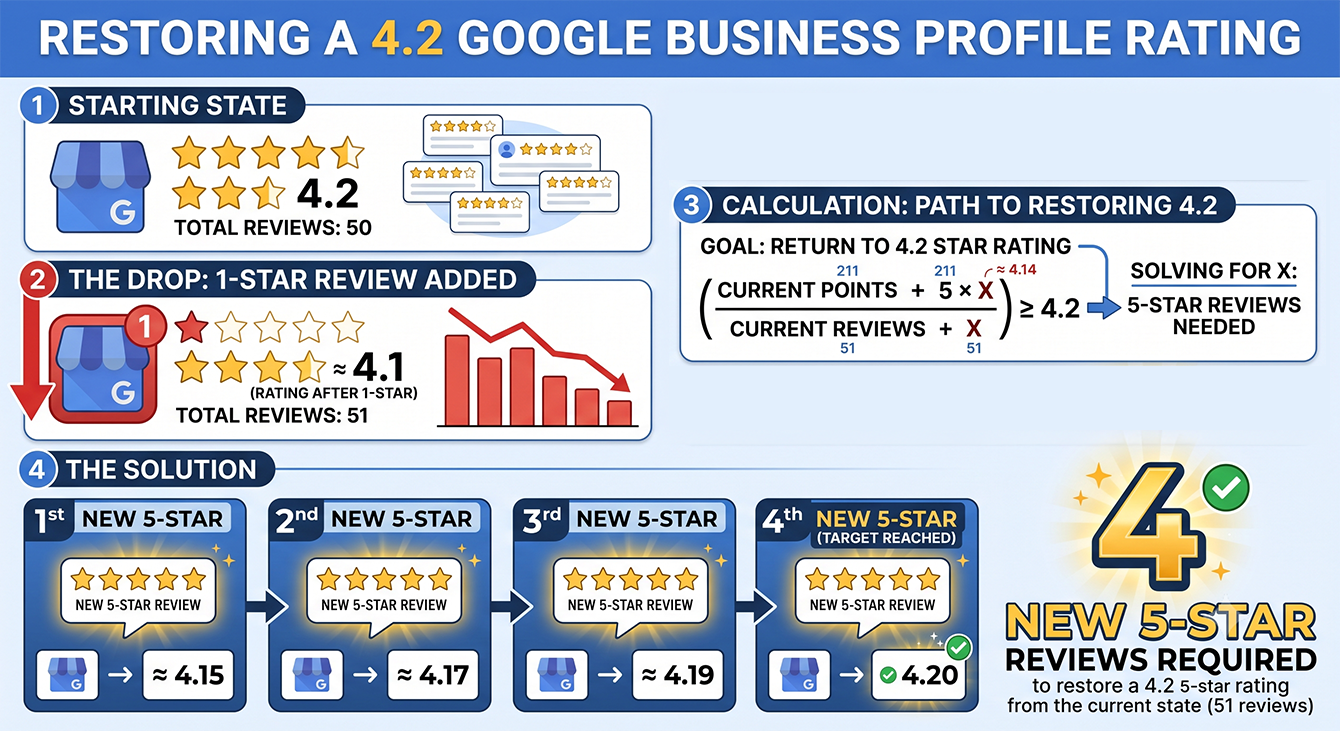
A: It depends on your current rating and total review count. Google calculates your average using weighted math: (current average × current count + new rating) ÷ (current count + 1). As your total review count grows, each rating has less impact. For instance, a business with 50 reviews at a 4.2-star average needs four 5-star reviews to offset one 1-star and return to 4.2. One hundred reviews dilutes a 1-star hit more than 20 reviews does. Steady review velocity prevents the problem better than reactive recovery.
Q: Do I need different Google Business Profiles for each location, or can one profile cover multiple addresses?
A: Every location where customers visit you or transact business with you needs its own Google Business Profile. Google's guidelines require one profile per location. Trying to cover multiple addresses with one profile will get flagged or suspended. Service-area businesses without a customer-facing storefront are the exception. They can use one profile with a defined service area. Once you have separate profiles, multi-location review management tools let you monitor and respond across all of them from a single dashboard.
Q: What happens if I respond to a negative Google review and the customer edits their review afterward?
A: Your original response stays visible under the customer's edited review. Google doesn't delete your reply when they edit. That means your response may no longer match the updated context. If the customer's edit changes the complaint or adds new info, post a follow-up reply. Customers can edit reviews multiple times. Enable alerts on your Google Business Profile so you know when an edit happens.
Q: Can I ask customers to remove or change a review after I've resolved their complaint?
A: You can ask, and some customers will update or remove a review after you've fixed the problem. You can't require it or offer compensation in exchange. That violates both Google's policies and the FTC's Consumer Reviews and Testimonials Rule, which bans tying review changes to compensation. Frame the ask as an invite: "If we've addressed your concerns, we'd welcome an updated review."
Q: What's the difference between feedback-first and review-first workflows?
A: A feedback-first workflow collects private customer feedback before the review request goes out, giving your team a window to follow up on a poor experience before the customer is asked to post publicly. A review-first workflow sends the review request earlier in the customer journey, which builds review volume faster. Both are compliant approaches; the right one depends on how much service variability your business has and how prepared your team is to act on negative feedback quickly. Some platforms, including LoyaltyLoop, support both workflows and can be configured to match how you prefer to engage customers.
Q: How does LoyaltyLoop's managed service handle Google review management differently than self-serve software?
A: We run the entire review program on your behalf. That includes survey timing, review request workflows, AI-suggested reply drafts on the Premier plan, and adapting to Google platform changes. Self-serve software gives you the tools but requires you to configure, monitor, and maintain the program yourself. The managed model removes the setup and ongoing upkeep entirely. It's the right fit for businesses where no one on staff has the bandwidth to own the program week after week.