
Franchise Review Management Without Adding Headcount
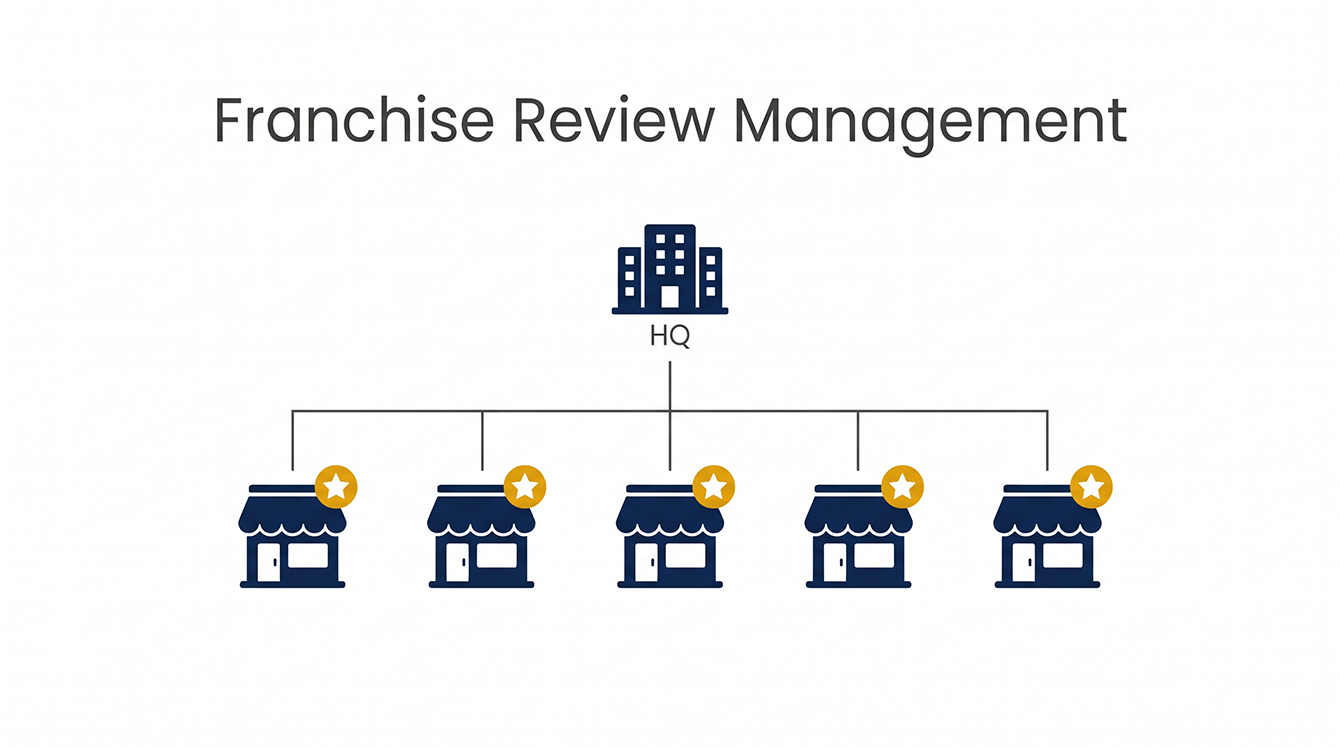
You own a network review target, but nobody's assigned to run the program. Each location manager handles reviews their own way, or doesn't handle them at all. One location replies within a day. Another hasn't touched its Google profile in months. It's a problem franchises recognize all too well.
Franchise review management stalls when no one owns the daily work. Multi-location reputation management then multiplies that gap across every Google profile you oversee.
The usual approach assumes you have the hours to run it yourself. More often than not, you don't, and you don't need to. A managed operating model can carry the daily work, so you can hit a network-wide review target without new hires or chasing location managers. Here's how to do just that.
Main Takeaways
- Franchise review programs stall when no one owns monitoring, reply drafting, escalation, or reporting. Each task needs exactly one named owner.
- Choose to centralize, localize, or outsource based on brand risk, franchisee experience, and how many hours headquarters (HQ) and locations have.
- Six pillars cover the program: monitoring, response management, review generation, governance, analytics, and risk handling.
- Track star rating, new reviews per month, response rate, and response time. Call any location that underperforms on two or more metrics for two straight months.
- AI speeds up reply drafting and trend spotting, while people keep governance, escalation decisions, fake review disputes, and franchisee relationships.
Why Is Franchise Review Management Harder Than Single-Location Work?
Running reviews for one shop is a task you can fit into a slow afternoon. Spread that same work across a franchise network, and it breaks in places a single location never reaches.
The Multi-Location Complexity Problem
Multi-location reputation management is harder because every location shares one brand name. Yet each one brings its own Google Business Profile, its own manager, and its own habits. A 1-star review in one town still carries the brand's name. HQ wants control, and location managers want room to run their own shops.
At 20 locations, that's 20 profiles to watch. At 200, it becomes a full-time job that nobody was hired to do. Networks keep growing, too. The International Franchise Association's 2026 Franchising Economic Outlook projects U.S. franchise establishments will rise from 832,521 to about 845,000 this year.
Execution quality also swings from one franchisee to the next. Some locations actively collect and respond to reviews, while others barely touch their profiles. HQ has to bring some consistency to the process without taking over every location's daily operations.
The obvious fix is to hire someone to own reviews. Yet franchise economics rarely allow it. Even at large companies, marketing budgets sit at just 7.8% of revenue in 2026. Also, 56% of chief marketing officers (CMOs) say they lack the budget to deliver their strategy, according to Gartner's 2026 CMO Spend Survey.
That means your program likely has to run on the team you already have. Your governance, workflows, and tools carry the load, and the size of your team matters far less. Most programs stall in the gap between what the work demands and what you can staff.
Who Owns What: The HQ vs. Franchisee Responsibility Matrix
Franchise review programs tend to fail at the same spot. Nobody wrote down who monitors reviews, who drafts replies, who approves escalations, or who pulls reports. Everyone assumes someone else has it covered. In reality, nobody does.
So, use the matrix below as a starting template for your network. Adjust the split to fit your franchise agreement and your tolerance for brand risk. It also shifts depending on whether you run the program in-house or with a managed partner.
| Task | HQ / Brand | Franchisee / Location Manager | Managed Partner |
|---|---|---|---|
| Multi-platform monitoring | Sets alerts and dashboards | Checks location dashboard daily | Monitors Google reviews across all locations |
| Response drafting | Creates approved templates | Drafts replies using templates | Flags reviews that need a reply (locations or HQ compose and post) |
| Approval workflow | Approves escalated replies | Submits sensitive replies for approval | Routes flagged replies to HQ |
| Escalation handling | Owns crisis and legal escalation | Flags reviews meeting escalation triggers | Identifies and routes escalation cases |
| Review generation | Sets network-wide process and cadence | Executes at point of service | Manages outreach and automation |
| Reporting | Reviews network-level metrics monthly | Reviews location scorecard monthly | Delivers consolidated reports |
| Template creation | Builds and updates template library | Suggests edits based on local context | Recommends template updates |
| Platform administration | Owns Google Business Profile access and permissions | Maintains accurate location info | Flags listing issues for HQ or locations to fix |
When to Centralize, Localize, or Outsource
- Centralize when brand risk runs high and your locations lack capacity. HQ controls replies, and HQ or a managed partner runs review generation.
- Localize when your franchisees are seasoned operators who want ownership. HQ supplies the templates and governance, and the locations do the work.
- Outsource when neither HQ nor your locations have the hours. A managed partner runs the daily program, and HQ keeps governance and reporting oversight.
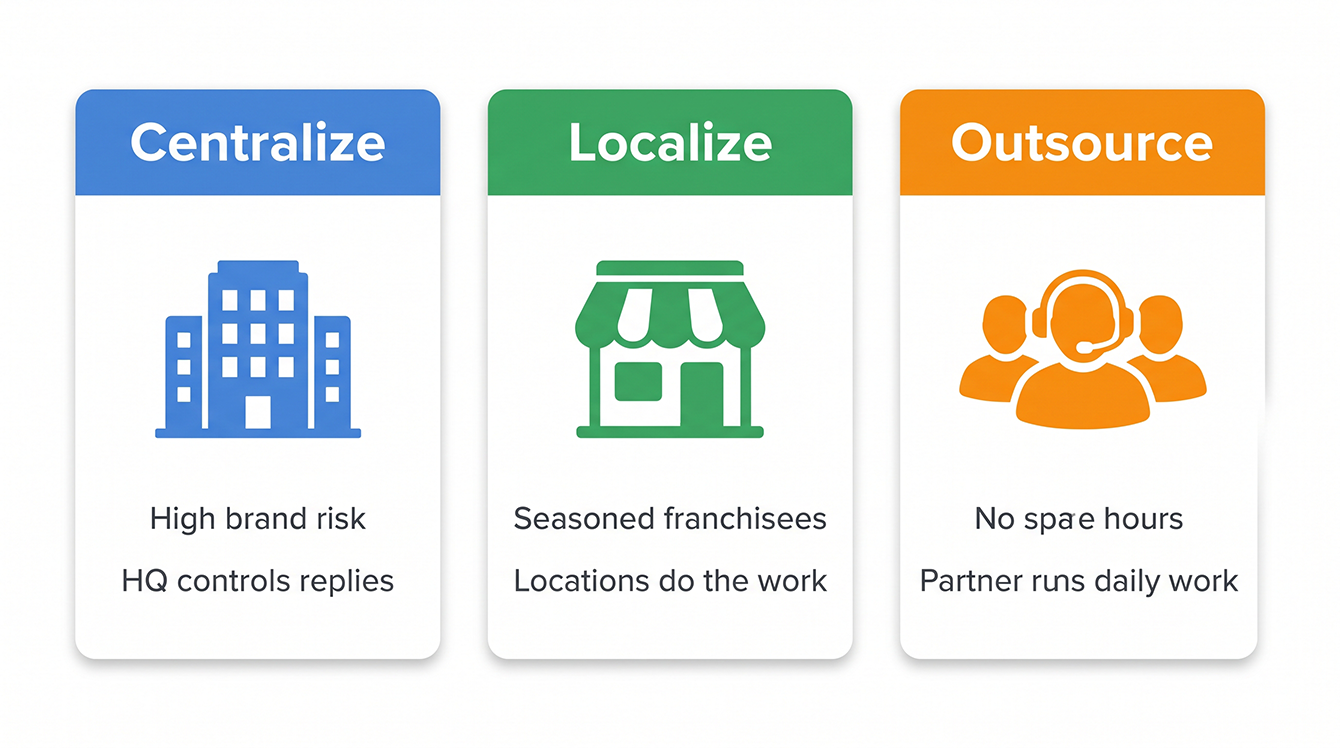
Most networks land on a hybrid. HQ sets the guardrails and templates. A managed partner or HQ team watches reviews and handles escalation. Location managers add the personal details that only someone on site would know. Whatever mix you choose, give every task exactly one owner so nothing slips while your team is stretched.
Six Pillars of a Franchise Review Management Program
Every franchise reputation management program stands on six operational pillars. Each one needs a named owner and a working process, and a software feature alone won't cover it.
- Monitoring. Set up central alerts across Google, Yelp, Facebook, and Apple Maps so no review goes unseen. Google usually matters most for local shoppers, so start there.
- Response management. Give locations approved templates, a response-time service-level agreement (SLA), and a clear path for sensitive reviews.
- Review generation. Ask for reviews the same way after service at every location. Then volume stops depending on which manager remembers to ask.
- Governance. Write down brand-voice rules, approval steps, and compliance guardrails. That includes the Federal Trade Commission's (FTC) 2024 rule banning fake reviews and Google's fake engagement policy, which bans fake reviews and review incentives.
- Analytics. Track ratings, review activity, and feedback trends on location-level dashboards. Then add response rate and response time for each location.
- Risk and crisis handling. Document how you handle fake review disputes, review-bombing, and legal escalation.
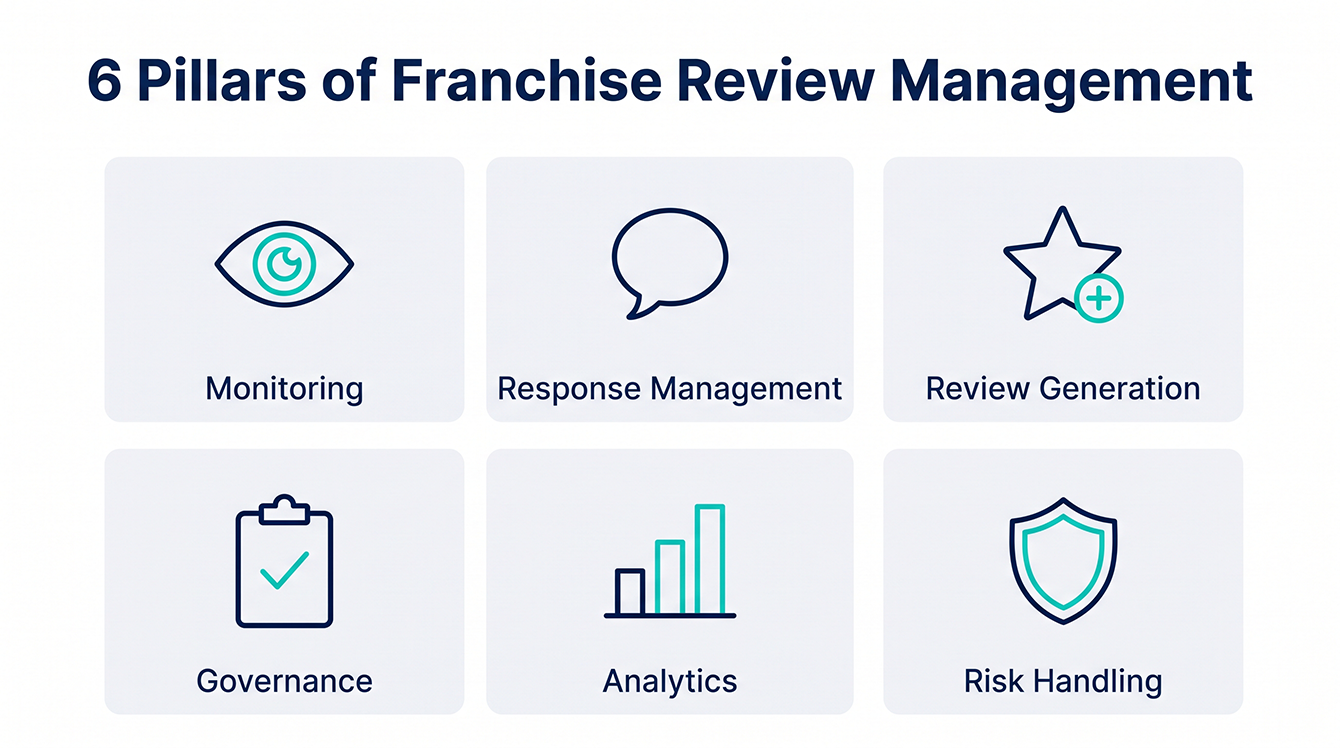
You can run any pillar in-house, hand it to a managed partner, or set it up to run on its own. You can't skip one. So the real choice is who runs each pillar. Go back to the matrix and put one name beside every row.
Feedback First vs. Reviews First: Choosing Your Review Generation Workflow
Make one big call before you set up a franchise review program. You can collect private feedback before the review request. Or you can send customers straight to a review site.
Reviews First
Reviews First sends customers directly to Google or another review site after service, with no private feedback step. It fits locations with strong ratings of 4.2 stars or higher, mature operations, and few complaints. You get speed and volume. The tradeoff is that you may first hear about a service problem when it shows up in a public review.
Feedback First
Feedback First is a review generation workflow that sends customers a short satisfaction survey before the review request. When someone reports a problem, the team gets an internal alert so they can follow up quickly.
This workflow suits locations rated below 4.2 and new franchisees still finding their rhythm. It also fits brands where hearing about service problems quickly matters most, such as healthcare, legal, and financial services.
The survey gives you a chance to hear about a problem quickly and fix it. A fast fix also gives the customer a better experience to share.
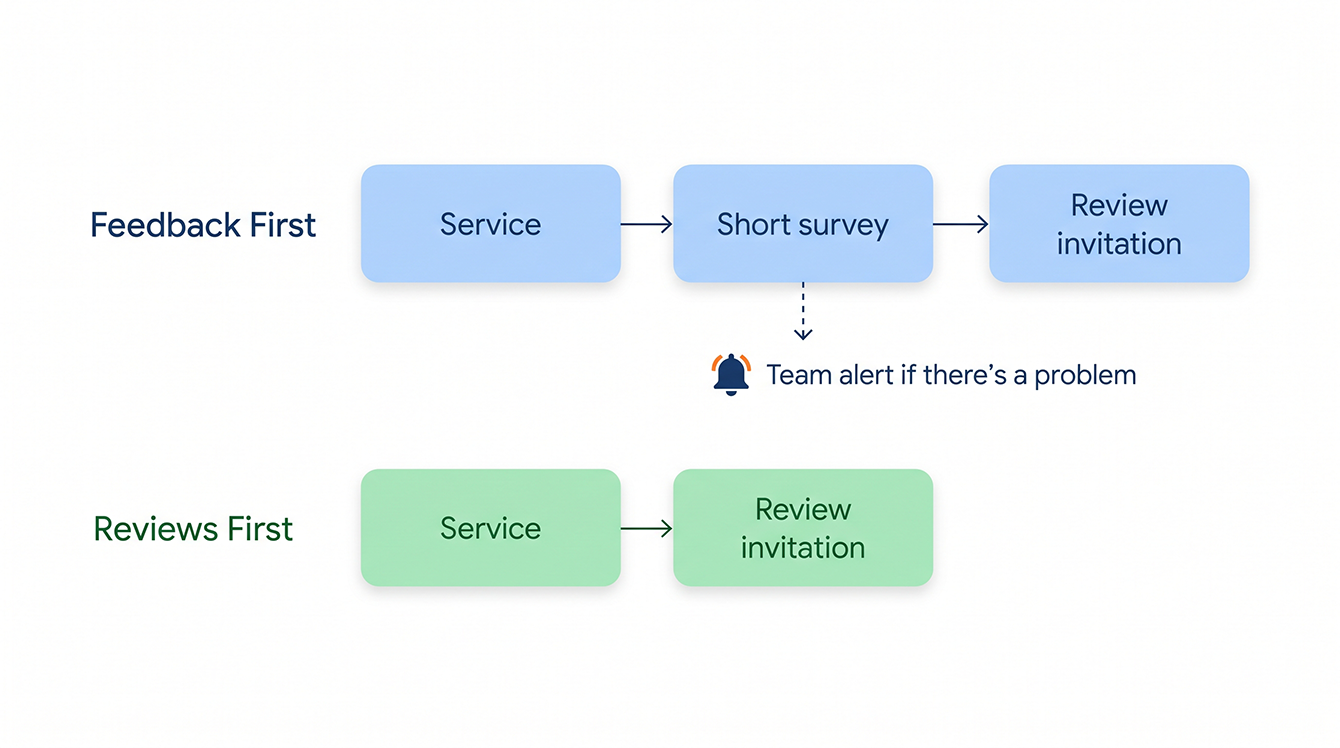
Make the choice at the network level, and let it vary by location maturity. Some networks run Feedback First at new locations for the first 12 months. Once a location holds steady above 4.2 stars, it moves to Reviews First. Write those rules down so nobody decides location by location on a hunch.
Your choice shapes review volume, average rating, and how fast you hear about service failures. Base it on where each location stands today.
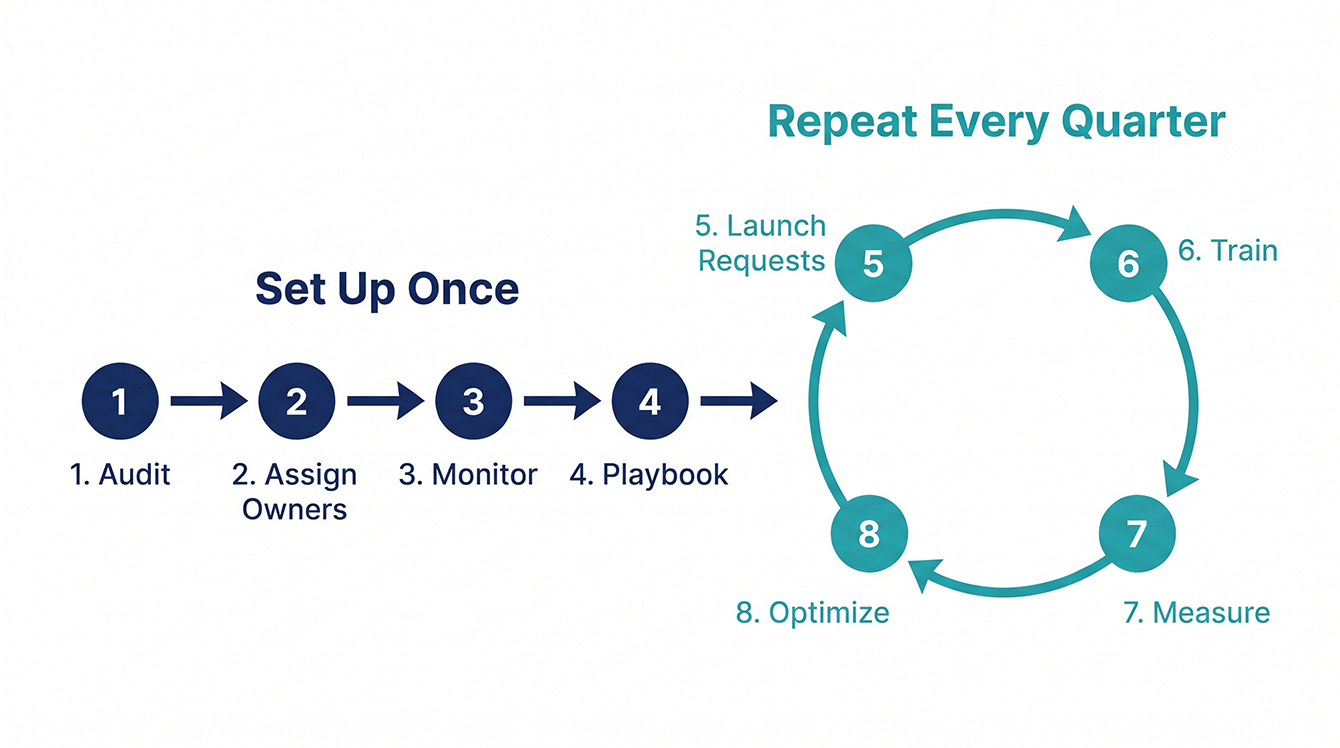
How to Manage Reviews Across Franchise Locations in Eight Steps
These eight steps take you from first audit to steady optimization. Hand this franchise review management playbook to your team or a managed partner. You can have it running within 30 days.
Steps 1–4: Foundation
- Audit every location's review profile. Pull the star rating, review count, response rate, and recency for each Google Business Profile. Flag any location under 4.0 stars or with no reviews in the past 90 days.
- Document governance and ownership. Use the HQ vs. franchisee matrix to assign every task. If you work with a managed partner, map their duties into the same grid.
- Set up centralized monitoring. Connect every location profile to one dashboard. That way HQ or your partner sees new reviews within hours instead of days. Give each location manager access to their own location's dashboard too.
- Build your response playbook. Write approved templates for positive, neutral, and negative reviews. Add escalation triggers for legal, health and safety, and PR-risk cases. The playbook section below shows what goes in it.
Steps 5–8: Execution and Optimization
- Launch your review generation workflow. Pick Feedback First or Reviews First, covered in the section above. Then use the same trigger and channel at every location and set up the outreach to run on its own.
- Enable and train franchisees. Give each location manager a one-page standard operating procedure (SOP). It should cover what to do when a review lands, when to escalate, and how to use the templates. A 10-minute video and a cheat sheet beat a full webinar.
- Monitor and measure monthly. Track the key performance indicators (KPIs) from the measurement section below. Send each franchisee a monthly scorecard that puts their numbers beside the network average.
- Optimize quarterly. Look at network-wide trends and update templates based on recurring themes. Adjust the request cadence for lagging locations, and close any governance gaps.
Franchisees tend to push back on anything that adds to their day. Their own data is the strongest lever you have. Showing a location its numbers beside the network average creates healthy competition that no HQ memo can match.
Pair that visibility with a short daily routine. Fewer steps means more managers actually follow it. For example, a location manager only needs two steps each morning: open the dashboard and reply to any review flagged in the past 24 hours.
Build a Feedback Program That Actually Gets Run
Most franchise feedback programs stall because no one owns the follow-through. This guide covers the four-stage process, the KPIs that matter, and who should run each piece.
Read the Feedback Management GuideThe Review Response Playbook Your Locations Actually Need
A working playbook gives location managers four things. They get voice guardrails, response-time targets, escalation triggers, and approved language they can post without waiting on HQ.
Brand-Voice Guardrails and Response-Time SLAs
Start with tone. Replies stay professional and grateful, and they never get defensive. Each one uses the reviewer's name and mentions something specific from their visit. Acknowledge complaints with an apology, then move the fix offline with a direct contact line.
Set your response-time SLA at one business day. According to Google's tips for Business Profile owners, replying to reviews shows customers you value their feedback. Timely replies also signal active management to potential customers reading the profile.
Sample Reply Templates
Here's a positive reply your locations can adapt. The location manager should swap in real details before posting:
“Thanks so much, Dana! We're glad Chris got your order ready a day early for your event. Quick, friendly service is exactly what we want every customer to get. We'll see you next time.”
For a negative review, own the problem and move the fix offline.
“Mark, we're sorry your appointment started so late. You planned your morning around us, and we let you down. Please call me directly at [phone number] so I can make this right. We're already reworking our scheduling to keep it from happening again.”
Some reviews should go to HQ before anyone replies. A managed partner can flag these for HQ:
- Mentions of legal action or a lawsuit
- Health or safety issues
- Claims of discrimination or harassment
- Threats to go to the media or post on social media
- Reviews that look like they came from a competitor or a fake account
The templates matter less than the confidence they create. Location managers reply faster once they know their words meet brand standards.
How to Measure Franchise Review Performance Across Locations
Track four KPIs at every location and set thresholds that separate healthy units from struggling ones.
The Four KPIs and Their Thresholds
You can copy the framework below straight into a monthly report. Treat these thresholds as a starting baseline and tighten them as your program matures.
| KPI | Healthy | Needs Attention | Underperforming |
|---|---|---|---|
| Average star rating | 4.2+ | 3.8–4.1 | Below 3.8 |
| New reviews per month | 5+ per location | 2–4 per location | 0–1 per location |
| Review reply rate | 75%+ | 50–74% | Below 50% |
| Median response time | ≤ 1 business day | 2–3 business days | 4+ business days |
Volume and freshness carry real weight in local search. According to Google's local ranking guidance, more reviews and positive ratings can help a business's local ranking. A steady flow of new reviews also signals to customers that your business is open and active.
Reporting Cadence and Intervention Triggers
Send each franchisee a monthly scorecard with their four KPIs beside the network average. Then hold quarterly reviews with location managers who lag behind. Seeing their numbers against peers creates natural accountability.
Set a clear trigger for stepping in. Any location stuck in "underperforming" on two or more KPIs for two straight months gets a phone call. Skip the email. A call gets to the root issue faster, whether it's a process hiccup, staff buy-in, or an on-site service problem that needs operational support.
How to Handle Fake Reviews Targeting a Franchise Location
Fake reviews aimed at one location are an operational risk with a known fix. You follow a written process: spot them early, gather your proof, file the dispute, and post a calm public reply while you wait.
Spotting and Documenting Fake Reviews
Watch for these warning signs:
- The reviewer has no other reviews, or all their reviews arrived in one burst
- The review mentions a service you don't offer
- It names an employee who doesn't work at that location
- Several reviews with the same pattern appear within hours
- The wording matches templates that review-attack services use
Before you file a fake review dispute, gather your evidence:
- Screenshot the review with its timestamp
- Capture the reviewer's profile and review history
- List any factual errors, such as the wrong service, location, or employee name
- Search your customer relationship management (CRM) or point-of-sale (POS) system for a matching customer record, because a missing record is evidence too
Filing the Dispute and Managing the Interim
Flag the review inside Google Business Profile and pick the policy violation that applies, then submit your evidence. In 2025, Google blocked or removed 292 million policy-violating reviews, Google reports.
Extortion needs its own route. If a reviewer demands payment to take a review down, use Google's merchant extortion report form.
Post a calm public reply while the dispute is pending. Say you take all feedback seriously and that you've reported the review for investigation because you can't find a record of their visit. Invite them to contact the manager directly with details.
Remember, Google isn't the only platform with fake reviews, either. Yelp's software didn't recommend roughly 24% of all submitted reviews in 2025, according to its 2025 Trust & Safety Report. Yelp also placed 1,385 Consumer Alerts on business pages for questionable review activity, including suspicious review spikes and compensated reviews.
Each platform runs its own dispute process and timeline. So, your governance docs need a dispute SOP for Yelp, Facebook, and Apple Maps alongside Google.
See How Managed Review Programs Work Across Locations
Our team sets up review requests, alerts, and location dashboards for your whole network, so HQ gets one view without adding hours to anyone's week.
Explore Google Review ManagementManaged vs. Self-Serve: How to Choose Franchise Review Management Software
Settle one question before you compare feature lists. Can your team run a self-serve platform? Or do you need a managed program that handles the daily work for you?
The Managed vs. Self-Serve Decision
Self-serve software hands you dashboards, templates, and tools that run on their own. Your team still has to handle setup, teach location managers how to use it, write replies, and pull reports. If you have someone dedicated to running franchise reputation tools, self-serve works well.
If you hold a review target with no extra headcount, the managed model is often the practical pick. At LoyaltyLoop®, we run franchise review programs as a managed service. Our team configures your accounts, handles day-to-day operations, and escalates only what needs local context. That way your team keeps control of brand standards without adding hours to anyone's week.
Franchise Review Management Tool Choice Criteria
- Multi-location governance controls: Role-based access, approval steps, and template libraries that HQ controls.
- Review generation: SMS and email requests that go out on their own after service, with room for local edits.
- AI-assisted replies: AI drafts fast. Your team still edits and posts each reply.
- Location-level analytics: Dashboards that show each location's four KPIs and roll up to the network.
- Links to your systems: CRM, POS, or franchise tool links that trigger review requests after service.
- Managed service access: A full option where the vendor's team runs the program, beyond a help desk.
Choose the tool that fits how your team works day to day.
What AI Changes (and What It Doesn't) in Franchise Review Management
AI speeds up reply drafting, scores review sentiment, and spots trends across locations. Governance, escalations, fake review disputes, and franchisee trust still need people.
Three changes stand out:
- AI-drafted replies speed up response time, but a person still reviews and posts each reply.
- Sentiment scoring across hundreds of locations catches patterns a human reader would miss. For example, it can spot wait-time complaints spiking at five locations at once.
- Google now offers Gemini-written place and review summaries, built from user reviews, to the apps and websites that use its Maps data. So review quality and recency shape how your locations look in AI-sorted results.
Plenty still needs a human. Someone has to decide who can post and what gets escalated. Someone picks up the phone when a franchisee stops using the tool. And someone builds the case to remove fake reviews.
Let AI carry the daily work, and keep people on governance and franchisee ties. That split lets a franchise manage thousands of reviews without hiring a large team.
Common Mistakes That Stall Franchise Review Programs
Franchise review programs usually stall on unclear ownership, uneven execution, and treating an ongoing operating model like a one-time software purchase.
- No documented ownership. Without a responsibility matrix, every task turns into someone else's job.
- Launching without a response playbook. Location managers freeze at a negative review with no approved language, so they never reply.
- Treating review generation as optional. Without a standard workflow, volume depends on which franchisees happen to care.
- Reporting without thresholds. Dashboards that never define healthy or underperforming give nobody a reason to act.
- Ignoring platform-specific rules. Each platform handles disputes, formatting, and moderation differently, and one blanket approach invites compliance risk under each platform's policies and the FTC's 2024 rule.
If your program is stalling, audit the operating model before the software. Every mistake here is an ownership or workflow gap, and none of them gets solved by buying another tool.
What a Working Franchise Review Program Actually Looks Like
A working program is an operating model. Owners are written down, workflows match across locations, and someone watches the system every day.
Here's a normal week once it's running. Someone at HQ or a managed partner watches every location profile from one dashboard. New reviews get drafted replies within a few hours. Tricky reviews reach HQ before anyone posts. Customers get a review ask after every completed service, either straight to Google or right after a quick survey. Every location manager gets a monthly report that shows their numbers beside the brand average. The locations that slip get a call and an action plan.
That steadiness is what shoppers notice. They find current reviews and real replies at every location. Over time, that steady work builds the brand's local search presence and protects the customer experience across the network.
Here's a simple test for your own setup. If keeping the program alive means hiring someone new, the operating model needs work, not the headcount.
Run Your Franchise Review Program with LoyaltyLoop
You now have what you need to run a network-wide review program. Every task has an owner. Every location follows the same workflow. And you measure what matters.
At LoyaltyLoop, we run franchise review programs as a fully managed service, so setup never lands on your team. We connect your locations, run review generation workflows, set up alerts, and give you one view of the network. Your locations get the reviews and customer insights they need, and HQ keeps brand consistency without adding a single hire.
See how we manage franchise review programs across multi-location networks without adding to your team's workload.
See a Managed Franchise Review Program in Action
Get a walkthrough of how our team sets up review requests, alerts, and location dashboards across your network.
Schedule a DemoFAQs About Franchise Review Management
Q: How Often Should Each Location Send Review Requests?
A: Send them on a steady schedule after finished services or purchases, so volume doesn’t swing month to month. What you control is timing and frequency. Set one network-wide rule for when requests go out, and cap repeat asks. LoyaltyLoop's Touch Frequency Filter℠ handles that cap, with a 90-day default.
Q: What Should I Do When a Location Sits Below the “Healthy” Thresholds for Several Months?
A: Find the cause before you fix it. Call the location manager, then check whether the gap comes from process, adoption, or service quality. Re-train or reassign ownership for process and adoption gaps. Bring in operations when the reviews are accurate and the service needs work. Set a 60- to 90-day check-in to give the location time to recover.
Q: How Do I Tell Whether My Review Program Is Actually Driving Results Versus Just Producing More Reviews?
A: Review count alone proves little. Compare each location's rating, recency, and response time against its own baseline from the step 1 audit. Check again at 90 days and six months. Then look for movement in results you already track, such as calls, direction requests, and bookings. Review growth supports local visibility, but rankings rarely move for a single reason.
Q: What If a Franchisee Won't Use the System or Keeps Replying Off-Script?
A: Stop relying on the franchisee to comply. Shift monitoring and escalation routing to HQ or a managed partner. Have HQ pre-draft replies from approved templates, so the location manager only approves and posts. Show the location its own scorecard first, then add approval rules for repeat off-script replies. Check what your franchise agreement lets you require.
Q: Can I Run Franchise Review Management Through a Managed Partner Without Losing Control of Brand Standards?
A: Yes, if you set it up right. HQ keeps governance: approved templates, brand-voice rules, escalation triggers, and reporting access. The partner handles daily monitoring, review request outreach, and reporting, while your team writes and posts replies. Before you start, confirm who owns Google Business Profile access, who approves flagged replies, and how reports reach leadership.