
Voice of the Customer Template: 12 Free Examples to Copy
You built the survey. It looks good. Customers started answering, and then the responses sat in a spreadsheet nobody opened. Meanwhile, customers kept having the same problems, and no one knew which ones needed attention. Most owners think a good survey template is the whole program. It isn't.
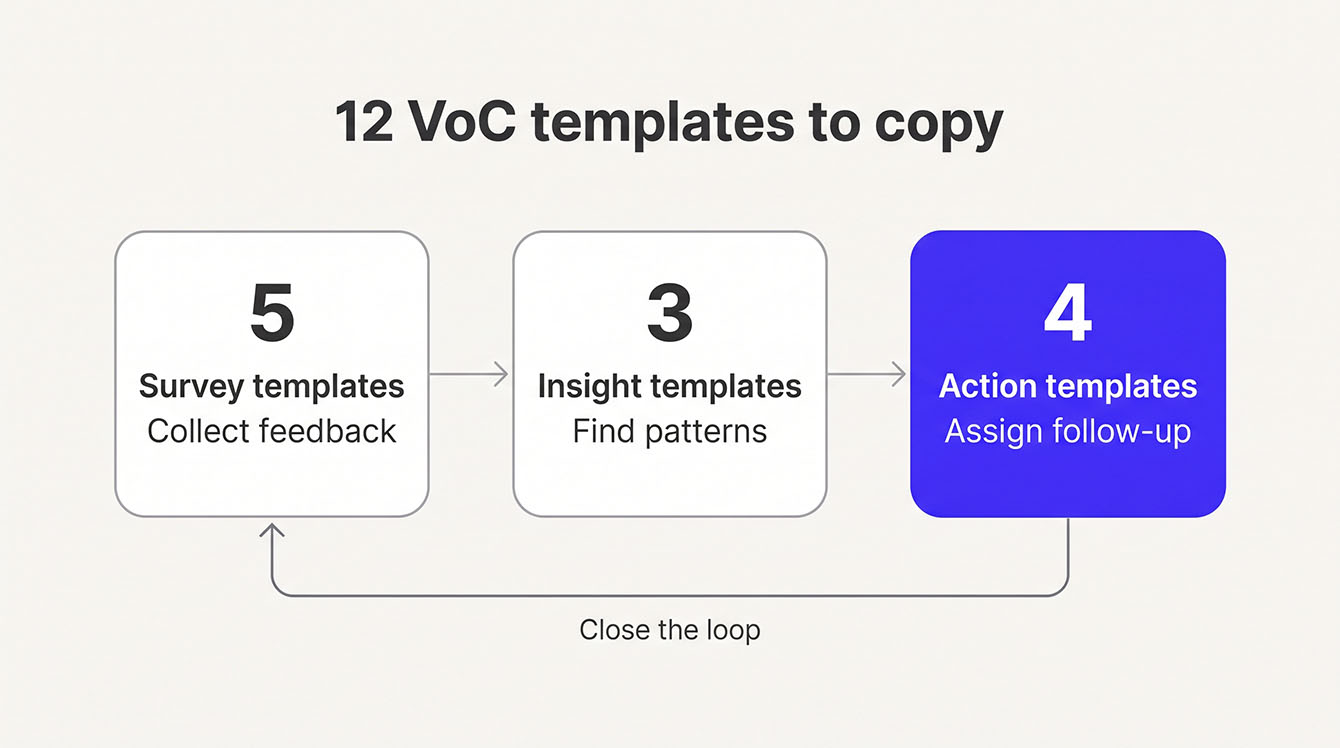
A voice of the customer template needs to cover three jobs. The survey collects feedback. The insight sheet finds patterns. The action tracker assigns follow-up, so customer concerns don't get lost after the survey closes. Together, they turn single responses into a process your team can actually use.
Templates alone won't keep that process running, though. You also need named owners, clear deadlines, and a regular reporting schedule so feedback leads to action. Below, you'll find ready-to-use templates you can copy, plus a practical operating model for closing the loop with customers.
Main Takeaways
- A voice of the customer template covers three jobs: a survey collects feedback, an insight sheet finds patterns, and an action tracker assigns follow-up.
- Every template needs a named owner, follow-up deadlines, and a regular report, or it becomes one more unused file.
- Each template should include six items: objectives, feedback sources, raw voice, key issues, critical requirements, and an action plan.
- Choose a format by team size and bandwidth. A spreadsheet you open weekly beats a survey tool nobody maintains.
- Close the loop on every negative response with a trigger, owner, 48-hour deadline, next step, resolution note, and customer follow-up.
What a Voice of the Customer Template Covers
A voice of the customer (VoC) template is a structured document for handling customer feedback. Your team uses it to collect feedback, sort it into patterns, and assign follow-up. It can be a survey, an analysis worksheet, or an action tracker. Most teams need more than one, so every comment reaches someone who can act on it.
The catch? None of those documents do anything on their own. A template earns its place when one person owns it, steady deadlines drive it, and a regular report shares the results. Without that rhythm, it turns into one more file in a shared drive.
Why VoC Templates Still Matter
Customer experience (CX) can turn around quickly when a business pays attention. In Forrester's 2026 CX Index, 26% of North American brands made significant gains, while just 7% declined. The stakes are high on the other side, too. Zendesk found 63% of consumers will switch to a competitor after just one bad experience, a share that grew 9% from the year before.
A simple template that someone enforces gives a small team a way to catch those moments early. You fix the problem before it becomes a public complaint or a quiet cancellation.
Three VoC Template Types: Survey, Insight, and Action
Voice of the customer templates fall into three main categories: survey templates, insight templates, and action templates. Each plays a different role in turning customer feedback into real improvements. The table below shows how they work and who usually manages each one.
| Type | What It Does | Example Formats | Who Owns It |
|---|---|---|---|
| Survey | Collects raw feedback from customers | Net Promoter Score℠ (NPS®) survey, post-service survey, interview guide, survey log | Marketing or ops lead |
| Insight | Organizes feedback into themes and priorities | Translation matrix, theme tracker, voice of customer dashboard | Analyst or ops lead |
| Action | Assigns follow-up owners, SLAs, and resolution steps | Closed-loop tracker, escalation template, weekly report | Ops lead or account manager |
Each type covers a gap the other two leave open. With only a survey template, you're collecting data nobody acts on. With only an action template, you're putting out fires without seeing the pattern behind them. You don't need to build all three from scratch. Start with one of each, using the 12 examples below as a guide. Keeping these functions connected prevents the most common VoC problem: feedback that never leads to action.
6 Components Every VoC Template Should Include
Whatever form your template takes, it needs the same six parts. Each one does a specific job:
- Objectives. Name the question you want answered, like "Why are Q2 renewals declining?" A goal like "improve satisfaction" is too vague to act on.
- Feedback sources. List exactly where feedback comes from, such as post-service surveys, review sites, support tickets, sales calls, or interview transcripts.
- Raw voice. Record the customer's exact words before anyone reads meaning into them or summarizes them. This raw voice column keeps your analysis honest.
- Key issues. Group raw voice entries into recurring themes. For example, "slow response time" might show up in 14 of 50 comments.
- Critical requirements. Turn each key issue into a measurable fix. "First response within four hours" gives your team a clear target, and "be faster" gives it nothing.
- Action plan. Give every critical requirement an owner, a deadline, and a resolution step. Skip this, and the template stays a report.
Write Survey Questions That Get Honest Answers
The right questions decide whether your feedback is useful or just noise. This guide covers 20 tested questions grouped by what they measure.
12 Voice of Customer Template Examples
Below are 12 VoC templates grouped by type. Each one includes when to use it, who owns it, the follow-up deadline, and the exact questions or columns to copy. Start with the templates that match your biggest gap today, then add the rest as your process grows.
Survey Templates
1. Net Promoter Score℠ (NPS®) survey with open-ended follow-up
Send this soon after a completed service or transaction, while the experience is fresh. For recurring service, send it on a set schedule instead of after every visit. The score sorts customers by priority. The open-ended answer tells you what happened. This two-question survey gives you plenty to act on by itself. When you want feedback on a specific interaction, like a service call or onboarding, pair it with a CSAT or CES question.
- Owner: Ops lead
- Follow-up deadline: 48 hours for detractors (scores of 0 to 6)
- Question 1: "On a scale of 0 to 10, how likely are you to recommend us to a friend or colleague?"
- Question 2: "What's the main reason for your score?"
- Log columns: Customer name, date, location, score, reason, owner, follow-up due, status
2. Post-service satisfaction survey
Use this when you want feedback on one specific job, not the whole relationship. Send it shortly after the job wraps up, while the details are still fresh.
- Owner: Service manager
- Follow-up deadline: 48 hours for any rating of 1 or 2
- Question 1: "How satisfied were you with [service] on [date]?" (1 to 5)
- Question 2: "What's one thing we could have done better?"
- Question 3: "May we contact you about this service?" (Yes or no)
- Log columns: Service date, service type, rating, comment, permission to follow up, owner, follow-up due
3. Onboarding feedback survey
Send this 7 to 14 days after a new customer's first use of your product or service. Early friction is easier to fix than late churn.
- Owner: Customer success lead
- Follow-up deadline: 2 business days for any answer scored 1 or 2
- Question 1: "How easy was it to get started?" (1 to 5)
- Question 2: "How did the experience compare to what you expected?" (Better, same, or worse)
- Question 3: "What almost stopped you from getting started?"
- Question 4: "How likely are you to keep using [product] over the next three months?" (1 to 5)
4. Customer interview guide
Use this with your highest-value accounts, about once a quarter. Interviews reveal reasons a survey can't capture. Plan 30 minutes per call.
- Owner: Account manager or ops lead
- Summary deadline: Send the summary within 2 business days, and log actions within 5 business days
- Questions:
- "What problem were you trying to solve when you started working with us?"
- "What's the hardest part of working with us today?"
- "If you could change one thing, what would it be?"
- "What would make you recommend us, or stop recommending us?"
- "What do you wish you'd known sooner?"
- Log columns: Question, verbatim answer, interviewer notes, theme tag, follow-up action, owner, due date
5. Survey log
This tracks every survey you send, who got it, and what came back. It stops double-surveying and shows your response rate. Check the log before every send. Set a minimum gap between surveys to the same customer, such as 30 days.
- Owner: Ops coordinator
- Review cadence: Weekly
- Log columns: Customer name, survey type, send date, response date, score, status (open or closed), owner, next step
Insight Templates
6. VoC translation matrix
This converts raw customer language into requirements your team can measure. It connects what customers said to what you'll do about it.
- Owner: Analyst or ops lead
- Review cadence: Weekly
- Columns: Raw voice (exact quote, such as "I called three times and nobody picked up."), key issue (grouped theme, like "Phone responsiveness"), critical requirement (measurable fix, such as "Answer or return every call within two hours"), priority (high, medium, or low), owner, due date
7. Feedback theme tracker
Use this to count recurring issues over time. Patterns show up here before they become crises.
- Owner: Analyst or ops lead
- Review cadence: Weekly or monthly
- Columns: Theme name, frequency count this period, count last period, trend (up, down, or flat), example verbatim, linked action, owner
- Escalation rule: If a theme rises two periods in a row, send it to leadership.
8. Voice of customer dashboard
This is your report for leadership. A shared spreadsheet works fine for teams under 20 people.
- Owner: Ops lead
- Review cadence: Monthly for leadership, weekly for the program owner
- Sections: NPS trend (last four periods), response rate, top three themes, detractor count, closed-loop completion rate (alerts closed within your service level agreement, or SLA, divided by total alerts), and reviews generated
Action Templates
9. Closed-loop action tracker
This manages every detractor or negative response from alert to resolution. Most teams skip it, and it's the template that keeps feedback from going nowhere.
- Owner: A named person for each alert, not "the team"
- Deadline: 48 hours for first contact with detractors, 72 hours for passives
- Columns: Trigger (score or comment keyword), owner, SLA deadline, next step (call, email, escalate, or meeting), resolution note, customer follow-up sent (date), status (open or closed)
10. Escalation template
Use this when a response needs someone above the front-line owner. Common triggers include a refund request, a safety concern, or an issue still unresolved after two business days.
- Owner: Manager or escalation owner
- Deadline: Assign an escalation owner within 1 business day
- Columns: Original feedback, severity (low, medium, or high), escalation owner, escalation deadline, resolution path, customer communication log
11. Review invitation template
Use this to turn good service into public reviews. Reviews carry weight, and so do your replies. BrightLocal found that 88% of consumers would use a business that replies to all its reviews.
- Owner: Marketing or ops lead
- Deadline: Send the invitation within a few days of a completed service
- Rule: Invite every eligible customer. Private feedback goes to Template 9 on a separate track.
- Columns: Customer name, service date, invitation sent (date), review link, review posted (yes or no), testimonial captured with permission (yes or no), reply posted (date)
12. Weekly VoC report
This keeps ops, location managers, and leadership informed without a dashboard login. Send it every Monday morning.
- Owner: Ops lead
- Recipients: Location or account managers, plus leadership
- Subject line: "VoC weekly: week ending [date]"
- Fields: Week ending date, total responses, NPS, top detractor theme, closed-loop status (alerts closed within SLA, out of total), open items with owner and due date, reviews generated
You don't need all 12 on day one. Start with one survey template, one insight template, and one action template. Add the rest as your process matures.
Which Template Format Should You Use?
Plenty of people search for a VoC template in Excel, Word, PDF, or a survey tool. The best format depends on how your team plans to use it. A spreadsheet may be enough to track feedback by hand, while a dedicated survey tool can handle collection at a larger scale. Before choosing, consider how much time your team can realistically spend keeping the process going.
The table below compares common formats by best use and ongoing workload.
| Format | Best For | Team Size | Maintenance Burden | Limitation |
|---|---|---|---|---|
| Excel / Google Sheets | Manual tracking, translation matrices, theme analysis | 1 to 5 | Medium: requires manual updates | No automation, version control issues |
| Word / Google Docs | Interview guides, report templates, standard operating procedures (SOPs) | 1 to 10 | Low: static documents | Not built for ongoing data collection |
| Sharing finalized reports or templates externally | Any | None: read-only | Can't be updated or filtered | |
| PowerPoint / Slides | Quarterly business reviews, leadership presentations | Any | Low: periodic updates | Not a daily tool |
| Survey tool | Automated collection, scoring, basic dashboards | 5 to 50 | Medium: requires setup and monitoring | You own setup, upkeep, and follow-up |
| Managed program | Surveys, alerts, reporting, and review requests run for you | Any | Low: vendor handles daily work | Monthly cost; less DIY control |
The more automated your setup becomes, the more it matters who will manage it. Even dedicated survey tools need someone to maintain the program and respond to incoming feedback. They also carry some vendor risk. For example, Qualtrics shut down its Delighted survey tool on June 30, 2026, which left businesses that relied on it to migrate their programs and export their data.
If your team doesn't have the bandwidth for that work, a fully managed program offers another option. A provider handles survey design, delivery, alerts, and ongoing reporting, and your team handles the customer conversations. That's how we run LoyaltyLoop®.
Ultimately, the best format is the one your team will keep using.
How to Analyze Voice of Customer Data
Analyzing VoC data takes four steps. First, you tag each response, then group the tags into themes. Next, you count how often each one appears. Finally, you prioritize the issues that cost you the most customers or revenue. Here's how these steps look in practice.
Tag, Group, and Quantify
Start by reading every response and giving it a tag. Examples include "slow response," "billing confusion," or "great technician." Related tags then roll up into themes. Count each theme over a set period so you can compare one stretch to the next. When you rank themes, frequency and severity matter more than an automated sentiment rating. A theme that shows up in a third of detractor comments and drives churn outranks one that rarely appears.
The VoC Translation Matrix
A VoC translation matrix is a table that converts customer language into structured requirements your team can act on. It uses four columns:
- Raw voice holds the customer's exact words.
- Key issue names the theme those words belong to.
- Critical requirement states a measurable fix.
- Priority ranks how urgent that fix is.
Here's one row in practice. A customer writes, "I called three times and nobody picked up." The key issue is phone responsiveness. The critical requirement is to answer or return every call within two hours, at high priority. This is Template 6 from the examples, put to work as your analysis method.
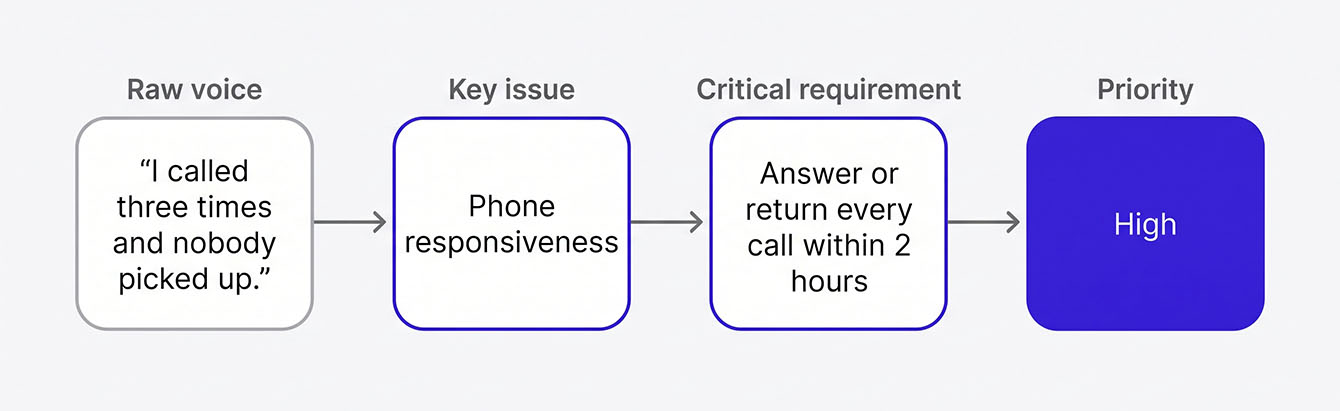
Analysis that skips this translation step produces reports nobody acts on. The matrix forces each complaint into a requirement that someone can own and finish by a deadline.
See How Feedback Alerts and Follow-Up Actually Run
Collecting responses is the easy part. See how a managed program sends detractor alerts, tracks CX metrics, and keeps your team accountable without a dashboard login.
The Closed-Loop Action Template: What Happens After Feedback Comes In
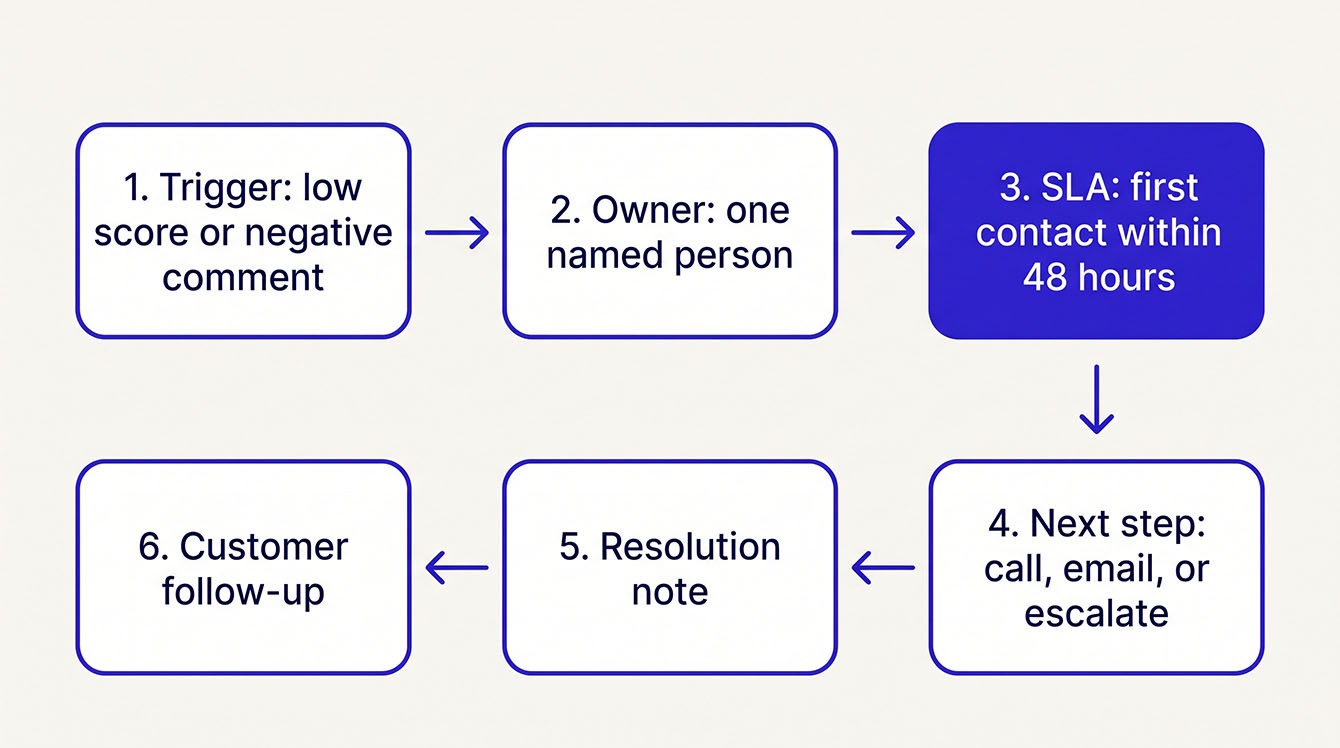
Closing the loop means every negative or at-risk response kicks off the same workflow. Someone gets the alert, someone owns the follow-up, a deadline applies, and the customer hears back. You document it every time.
The 48-Hour SLA and Why It Works
Fast follow-up protects customers you'd otherwise lose. Poor customer service is the second most common reason customers stop buying from a brand, according to Salesforce. A quick, personal response is the opposite of that experience. Treat 48 hours as your outer limit. After that, a detractor's frustration can harden into a negative public review or a quiet cancellation.
Closed-Loop Workflow Template
Copy these six steps into a spreadsheet as columns, and you've got a working tracker.
- Trigger: The event that fires the alert, such as an NPS score of 0 to 6 or a negative keyword in a comment.
- Owner: The person who gets the alert and owns the response. Use a name or a role, since "the team" means nobody.
- SLA: The deadline for first contact, set at 48 hours for detractors and 72 hours for passives.
- Next step: The specific action, whether that's a call, an email, an escalation, or a scheduled meeting.
- Resolution note: A record in the tracker of what you did.
- Customer follow-up: A message confirming you heard the customer and addressed the issue.
For step 6, keep the message short and specific. Here's one you can copy:
Subject: Following up on your feedback
Hi [First name],
Thanks for telling us about [the issue, in their words]. You were right to flag it. Here's what we did: [one sentence on the fix].
If anything still isn't right, reply to this email or call me directly at [phone number].
[Your name], [Your role]
Review requests need the same care. The FTC's 2024 final rule bans fake reviews and certain tactics that suppress negative reviews. Google's policy also prohibits selectively soliciting positive reviews. So send every review request the same way, and never let a customer's score decide who gets asked. Keep private feedback on its own track. Resolving a complaint privately is good practice, but it can't be used to stop an unhappy customer from leaving a review.
Industry-Specific VoC Template Examples
Generic templates miss the questions, metrics, and follow-up steps your industry cares about. These three versions fit franchise operators, field service and MSP teams, and service businesses.
Franchise and Multi-Location
A franchise with 15 or more locations needs to compare Net Promoter Score℠ (NPS®) by location. It also needs steady follow-up from managers who don't share a building. Ask, "How would you rate your experience at [Location Name]?" Then ask, "Was your issue resolved during your visit?" Track location-level NPS with a weekly roll-up to the franchise owner. Location managers call every detractor within 48 hours. The owner reviews open items in the Monday report. A customer journey map shows which touchpoints each location should survey.
Field Service and MSP
An MSP with 30 accounts needs to survey key buyers, not just help desk contacts. The goal is to catch account-health issues before renewal. Ask, "How confident are you that we're proactively managing your environment?" Follow with, "What's one thing we could do better before your next renewal?" Track key buyer NPS each quarter, and keep it separate from ticket-level satisfaction. The account manager reviews every passive or detractor response within 48 hours, then books a check-in call.
Service Businesses
A home services or expert services firm grows on repeat customers and referrals. Ask, "Would you refer us to a friend or colleague?" Then ask, "What almost stopped you from hiring us?" Each month, track your referral interest rate and how many reviews you generate. The owner or office manager follows up on every detractor within 48 hours. Every customer gets a review request that links to your Google Business Profile, whatever their score. When reviews come in, reply to the positive ones as well as the critical ones.
These templates work because customers recognize the questions as being about their own experience. A generic satisfaction question feels like it came from some other business. The same goes for review request emails.
How to Build a VoC Program That Actually Runs
A VoC program needs an owner, a reporting schedule, and a clear picture of what success looks like. Without that rhythm, your template becomes a file nobody opens after week two.
8 Steps to Create a Voice of Customer Strategy
- Define the objective. Pick the business question the program answers, such as retention, service quality, or referral growth.
- Choose your template types. Select at least one survey, one insight, and one action template from the examples above.
- Pick your format. Use the format table to match your team size and bandwidth.
- Name the owner. Make one specific person responsible for keeping the program running.
- Set survey timing. Use business rules, such as after transactions, quarterly for key accounts, or 7 to 14 days after onboarding.
- Build the closed-loop workflow. Use the closed-loop template to set triggers, owners, SLAs, and resolution notes.
- Set the reporting cadence. Decide who sees results, how often, and in what format, starting with the weekly VoC report.
- Define success metrics. Set targets for the program health metrics below so you can tell whether the program is working or drifting.
How to Know If Your VoC Template Is Working
Measure the program itself along with the feedback it collects. Five numbers tell you whether it's healthy.
- Response rate. Track it against your own baseline. A sharp or steady drop points to survey fatigue, bad timing, or a broken send list.
- Time-to-follow-up. Track how fast detractors hear from you. If it often runs past 48 hours, your owner assignment or alerts are broken.
- Review generation count. Count how many customers post a public review after you ask. A flat or falling count means your review invitation template needs work.
- Recurring-theme stability. When one theme dominates detractor feedback for three months or more, your action plan isn't working.
- Template drift. Unfilled fields or a weekly report that stops going out signal a dying program. Audit the template every quarter.
Who Needs to See Results (and When)
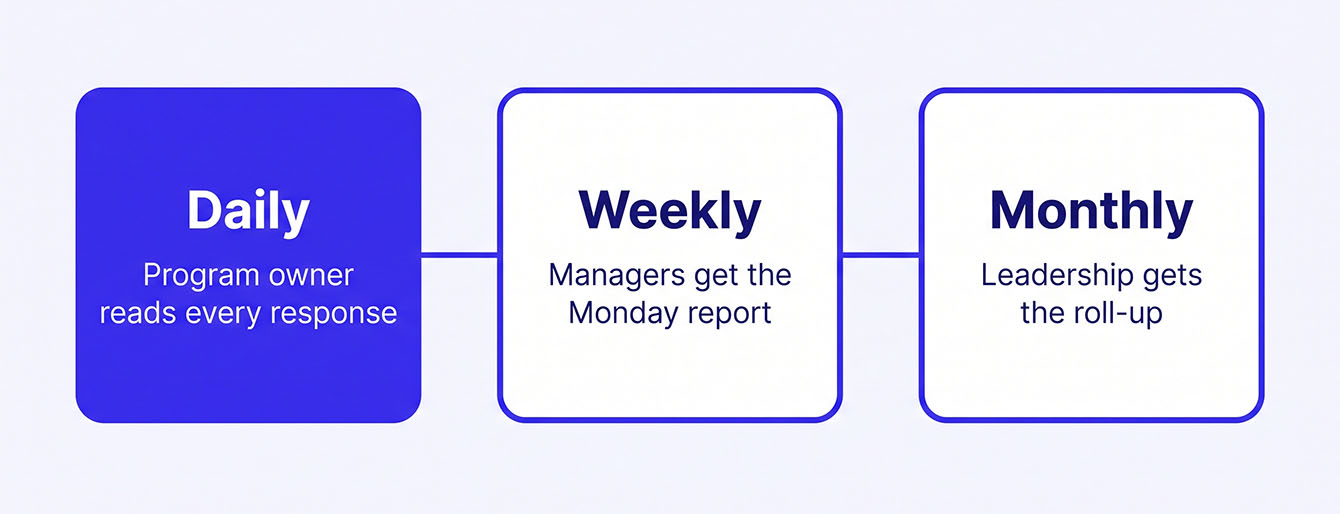
Each audience gets its own view on its own schedule. The program owner reads every response daily. Location or account managers get the weekly summary from Template 12. Leadership gets a monthly roll-up with the NPS trend, top themes, and closed-loop completion rate.
The point is to keep ops and location managers accountable without making them live in a dashboard. A five-line email every Monday does more than a dashboard nobody checks. For teams without that bandwidth, our managed program runs surveys, alerts, and scheduled reports.
Put Your Voice of the Customer Template to Work with LoyaltyLoop®
You can now choose the survey, insight, and action templates that suit your business. You can give each one a named owner and run a follow-up rhythm that keeps customers coming back. If managing that process feels like one more job on your plate, LoyaltyLoop can take most of it off your hands.
We run the program for operators who'd rather have the results than run the process. Every bad score triggers a Poor Feedback Alert, so your team can respond before it turns into a public complaint or a quiet cancellation. Weekly summaries show what customers said, right in your inbox.
See how our fully managed feedback program runs these templates for you.
Get Your VoC Program Running Without the Extra Work
See how LoyaltyLoop runs your surveys, alerts, and weekly summaries, so every template in this guide keeps working long after week two. We’ll walk you through it in a short demo.
Schedule a DemoFAQs About Voice of the Customer Templates
Q: How do I choose between starting with a survey, insight, or action template?
A: Start with the type you're missing today. If responses pile up with no owner, build the action template first. If you're collecting feedback but leadership doesn't see trends, build the insight template. If you're not asking customers anything yet, start with a simple post-service survey template.
Q: How do I know when a managed program makes more sense than running templates myself?
A: A managed program fits when your team has the intent to collect feedback but lacks the weekly bandwidth to handle list hygiene, survey triggers, rules, and alerting. If your internal team struggles to maintain a monthly send schedule, a managed service handles the operations so your team can focus entirely on responding to customers.
Q: How do I handle a response that's vague, like "it was fine," or an angry comment with no detail?
A: Log the comment in the raw voice column exactly as written, then send the customer one specific follow-up question. Don't ask them to fill out another form; ask them one direct question via email or phone. If they don't reply, tag the entry as "insufficient detail" and move on.
Q: What should I do if my response rate stays low after I've set up the survey?
A: Check timing, send list, and survey length before you change the questions. Send closer to the service moment. Confirm your emails reach inboxes and use a recognized sender name. Shorten the survey to three or four questions. Response rates improve when timing is right and effort is low.
Q: How do I report voice of the customer results to leadership if they won't open a dashboard?
A: Send a short weekly email with five fields: Net Promoter Score℠ (NPS®), response count, top detractor theme, closed-loop resolution rate, and one verbatim quote. Leadership reads short, consistent email summaries far more reliably than logging into a dashboard.