
B2B Customer Satisfaction Survey: A Complete Program Guide
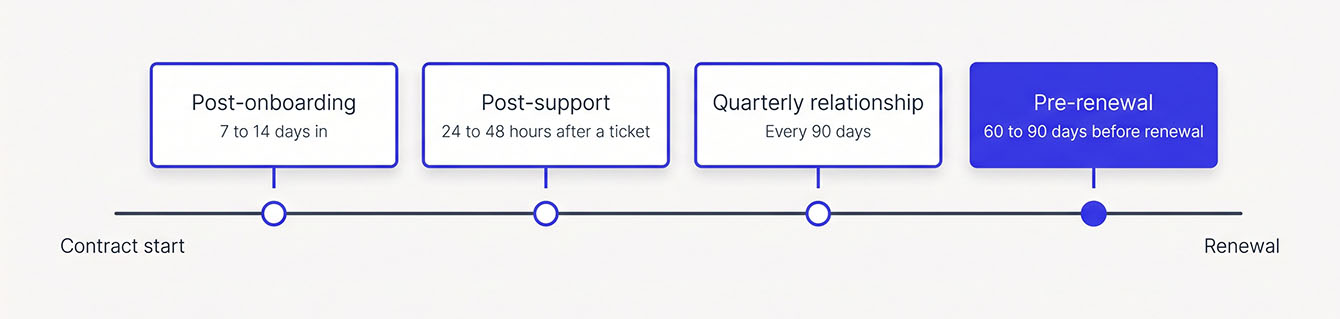
A key account can go quiet months before it cancels. No complaint, no warning score, just fewer replies until the contract lapses. By the time you realize something's wrong, you may have already lost a valuable customer, and one lost account like that costs real revenue.
A B2B customer satisfaction survey can help you catch those warning signs early. But surveying business clients isn't quite the same as surveying individual consumers. Your accounts often have multiple stakeholders, longer contracts, and more money on the line. A generic survey template may miss the issues that matter most.
That's why B2B survey design calls for a different approach. You need to think carefully about who receives your surveys, when they go out, and what happens when a key account reports a poor experience. Get those decisions right, and you catch renewal risk early, close the loop fast, and keep the accounts you'd otherwise lose.
Main Takeaways
- B2B surveys must reach several stakeholders per account. Match each survey to the person who lived the experience.
- Different metrics serve different purposes. Use Net Promoter Score℠ (NPS®) quarterly for relationship health, and use customer satisfaction score (CSAT) or customer effort score (CES) for support and onboarding moments.
- Keep surveys short and focused. Keep each survey to five to eight neutral questions, and cap contact at one request per 90 days.
- Send pre-renewal surveys to the economic buyer 60 to 90 days out. Treat the lower score as the real risk when stakeholders disagree.
- Act quickly on poor scores. A poor score protects revenue only if the account owner reviews it within 24 hours and calls the client within 48 hours.
How B2B Surveys Differ from B2C Surveys
B2B surveys measure your relationship with a whole account, which usually means several people. Each account may have several decision-makers with different experiences and expectations. Contracts also tend to run longer, and far more revenue walks out the door when one account leaves. That makes it especially important to gather feedback from the right people before problems threaten the relationship.
Why One Unhappy Account Changes Everything
A retailer barely notices one unhappy shopper, but one lost B2B account can take a real share of your year's revenue. Say you have 50 accounts, and your top 10 bring in half your revenue. For those 10, a survey program works as your early warning system, helping you spot dissatisfaction before it puts the relationship at risk. And catching those issues early pays off. Customer-obsessed firms grow revenue 41% faster and profit 49% faster, Forrester found. They also see 51% better retention.
The challenge is knowing when an account needs your attention. Unhappy B2B accounts rarely complain on their way out. They go quiet, stop answering emails, and let the contract lapse. By the time you notice, they've already made the decision. A structured B2B survey catches the slide while you can still do something about it.
Design Differences Between B2B and B2C Surveys
A B2B customer satisfaction survey must reach several people per account, over long contracts, with far fewer responses. Each account carries more revenue, so each score carries more weight. A B2C survey usually hears from one buyer per purchase and leans on volume to smooth out noise.
The people problem shows up first. In a typical purchase, 13 people inside the buyer's company and 9 outside participants weigh in, according to Forrester. And 73% of purchases cross three or more departments. Survey only the day-to-day user, and you miss the person who signs the renewal.
The next three differences come from how B2B relationships run:
- Contracts last months or years, so you time surveys to renewal milestones more than to purchases.
- Volume stays low, since you might have 80 accounts instead of 80,000 customers.
- Scores reflect the whole relationship. A 7 out of 10 from a B2B client often signals real risk.
Low volume gives every single response extra weight. A detractor from a top-five account calls for a different reaction than one detractor among thousands. That's why B2B programs need alerts and follow-up at the account level, since a dashboard alone won't save the renewal. Copy a B2C template into a B2B program, and these gaps give you bad data.
Choosing the Right Metric: CSAT vs. NPS vs. CES for B2B
Most B2B teams measure satisfaction with three common metrics: customer satisfaction score (CSAT), Net Promoter Score℠ (NPS®), and customer effort score (CES). Each one answers a different question about your accounts.
- CSAT measures how satisfied a client felt about one interaction, like onboarding or a support ticket.
- NPS measures relationship health and likelihood to recommend, tracked across the life of an account.
- CES measures how easy it was to get something done, like fixing a billing issue.
In practice, most B2B programs use NPS for quarterly relationship tracking and CSAT for feedback after transactions. The table below helps you match each metric to the right moment in an account relationship.
| Metric | What It Measures | B2B Use Case | Benchmark Range | When NOT to Use It |
|---|---|---|---|---|
| CSAT | Satisfaction with a single transaction | Post-onboarding, post-support, post-delivery | Higher is better; set your baseline from your first few rounds | Judging overall relationship health, since it's too narrow |
| NPS | Relationship health and likelihood to recommend | Quarterly or annual relationship pulse | Runs from -100 to +100; a positive score means more promoters than detractors | Right after a single interaction, since it blurs the moment with the relationship |
| CES | Effort and friction | After support tickets, billing issues, or onboarding steps | Lower is better; watch for effort creeping up over time | Strategic relationship insight, since it captures friction and misses sentiment |
Start with NPS as your relationship metric and send it quarterly. Then layer in CSAT or CES for transactional moments. You don't need all three on day one. Pick one relationship metric and one transactional metric, and build from there.
B2B Customer Satisfaction Survey Questions by Category
The best B2B customer satisfaction survey questions help you understand how clients feel about the relationship and where there's room to improve. Here are nine examples covering everything from renewal risk to day-to-day support:
- How likely are you to renew your contract with us?
- How likely are you to recommend us to a peer in your industry?
- How would you describe the overall health of our working relationship?
- How satisfied were you with the resolution of your most recent support request?
- How much effort did it take to get your issue resolved?
- Do you feel you're getting fair value for what you pay?
- Has our team been proactive in addressing your needs?
- What would need to change for you to consider switching providers?
- What's one thing we could do better?
Of course, you wouldn't send all these questions to every client. Strong B2B surveys match the questions to the right person and moment in the relationship. An end user may see your business very differently than an admin or executive sponsor does. The economic buyer, who controls the budget and signs the contract, may have different concerns altogether.
The six categories below sort these questions, plus a few more, by stakeholder and stage, from onboarding through contract renewal. Choose five to eight questions for each survey based on its purpose and who will receive it. Add an open-ended question or two to get the context behind the scores.
Onboarding Questions (End User, Buyer)
Onboarding sets the tone for the whole contract. Send these to the end user and the buyer soon after setup wraps:
- Was the setup process clear? Setup confusion is one of the earliest signs an account may not stick.
- Did you feel supported during setup? This tells you whether the client felt alone when the stakes were highest.
- How would you rate the time from signup to first value?
- Was anything missing from onboarding that you expected?
Support and Service Questions (End User, Admin)
The people who open tickets know your support team best. Send these to the end user or admin while the experience is fresh:
- How satisfied were you with the resolution of your most recent support request?
- How easy was it to reach the right person?
- Did we resolve your issue on the first contact?
- How would you rate the timeliness of our response?
- How much effort did you have to put in to get your issue resolved?
Product and Usage Questions (End User)
Daily users feel every gap in your product or service. These questions check whether you're still earning your place in their workday:
- How well does [product/service] meet your day-to-day needs?
- Which feature or capability do you use most?
- Is there anything you expected to do with [product/service] that you can't?
- How would you rate the reliability of [product/service] over the past quarter?
Billing and Commercial Questions (Buyer, Admin)
Billing friction quietly erodes trust with the people who approve payments. Send these to the buyer or the admin who handles invoices:
- How clear and accurate are your invoices?
- How easy is it to manage your account billing?
- Do you feel you're getting fair value relative to what you pay?
Renewal and Relationship Questions (Economic Buyer, Executive Sponsor)
These questions go to the economic buyer and the executive sponsor, the senior leader who backed the purchase. They control the renewal decision, so their answers carry the most weight:
- How likely are you to renew your contract? Use a Net Promoter Score℠ (NPS®)-style 0 to 10 scale or ask directly.
- How would you describe the overall health of our working relationship?
- Has our team been proactive in addressing your needs?
- Would you recommend us to a peer in your industry?
- What would need to change for you to consider switching providers?
Open-Ended Feedback Questions (All Stakeholders)
Scaled scores tell you where an account stands. Open-ended questions tell you why, and they surface context a number can't hold.
- What's one thing we could do better?
- What's working well that we should keep doing?
- Is there anything else you'd like us to know?
Your full bank spans six categories and four stakeholder types. Any one survey should draw from just one or two.
Write Survey Questions That Get Honest Answers
Neutral, well-timed questions produce scores you can act on. This question bank covers every metric and moment, with a ready-to-use template.
4 Ready-to-Use B2B Client Satisfaction Survey Templates
The four B2B client satisfaction survey templates below cover the most common moments in an account: post-onboarding, quarterly relationship health, pre-renewal risk, and post-support. Every table lists the question, its type, the scale, the stakeholder who gets it, and the send timing. Copy each customer satisfaction survey template and swap in your own product or service language.
Post-Onboarding Template
Send this one 7 to 14 days after onboarding wraps, to the end user and the buyer. It catches setup friction before it hardens into a pattern.
| Question | Type | Scale | Send To | When to Send |
|---|---|---|---|---|
| How clear was the setup process? | Scaled | 1 to 5 | End user | 7 to 14 days after onboarding |
| How supported did you feel during implementation? | Scaled | 1 to 5 | End user, buyer | 7 to 14 days after onboarding |
| How would you rate the time from signup to first value? | Scaled | 1 to 5 | Buyer | 7 to 14 days after onboarding |
| Was anything missing from onboarding that you expected? | Yes/no | Yes/No | End user, buyer | 7 to 14 days after onboarding |
| What would have made onboarding smoother? | Open-ended | None | End user, buyer | 7 to 14 days after onboarding |
Quarterly Relationship Health Template
This is your core relationship pulse. Send it every quarter to the economic buyer and executive sponsor, with the Net Promoter Score℠ (NPS®) question as the anchor.
| Question | Type | Scale | Send To | When to Send |
|---|---|---|---|---|
| How likely are you to recommend us to a peer in your industry? | Scaled (NPS) | 0 to 10 | Economic buyer, executive sponsor | Every 90 days |
| How would you rate the overall health of our relationship? | Scaled | 1 to 5 | Economic buyer, executive sponsor | Every 90 days |
| How well does our team communicate before you have to ask? | Scaled | 1 to 5 | Economic buyer, executive sponsor | Every 90 days |
| How would you rate the value you get for what you pay? | Scaled | 1 to 5 | Economic buyer | Every 90 days |
| What's one thing we should change next quarter? | Open-ended | None | Economic buyer, executive sponsor | Every 90 days |
Pre-Renewal Risk Template
Send this to the economic buyer 60 to 90 days before the contract renews. That window leaves you time to fix whatever it surfaces.
| Question | Type | Scale | Send To | When to Send |
|---|---|---|---|---|
| How likely are you to renew your contract? | Scaled | 0 to 10 | Economic buyer | 60 to 90 days before renewal |
| Are any unresolved issues affecting your renewal decision? | Yes/no | Yes/No | Economic buyer | 60 to 90 days before renewal |
| Are you currently considering other providers? | Yes/no | Yes/No | Economic buyer | 60 to 90 days before renewal |
| How fair is our price relative to the value you receive? | Scaled | 1 to 5 | Economic buyer | 60 to 90 days before renewal |
| What would need to change for you to renew with confidence? | Open-ended | None | Economic buyer | 60 to 90 days before renewal |
Post-Support Template
Send this to the end user or admin within 24 to 48 hours of ticket resolution. Anchor it with CSAT or CES.
| Question | Type | Scale | Send To | When to Send |
|---|---|---|---|---|
| How satisfied are you with how we resolved your request? | Scaled (CSAT) | 1 to 5 | End user or admin | 24 to 48 hours after resolution |
| How much effort did it take to get your issue resolved? | Scaled (CES) | 1 to 5 | End user or admin | 24 to 48 hours after resolution |
| Did we resolve your issue on the first contact? | Yes/no | Yes/No | End user or admin | 24 to 48 hours after resolution |
| Is there anything else we should know about this request? | Open-ended | None | End user or admin | 24 to 48 hours after resolution |
Best Practices for Writing Effective B2B Survey Questions
Your respondents are busy professionals, and they'll abandon anything that feels like homework. So keep questions short, neutral, and easy to answer on mobile. Aim for a survey that takes under three minutes. Every question past eight costs you completions. When you can't bring yourself to cut a question, move it to a different survey with its own trigger.
Avoid leading questions that nudge the client toward the answer you want. "How much did you enjoy our excellent onboarding?" can become "How would you rate your onboarding experience?" Also steer clear of double-barreled questions that ask two things at once. "How satisfied are you with our product quality and support team?" should become two questions, one for each. Neutral wording gets you honest answers you can act on.
Plenty of your clients will open the survey email on their phone, too. Use simple 1 to 5 or 0 to 10 scales that fit a small screen, and skip matrix grids. A good mix is three to five scaled questions with one or two open-ended ones. The scores show you the trend, and the comments tell you the story behind it. A tight six-question survey beats a sloppy 15-question one on completion rate and answer quality.
Survey Cadence and Timing: When to Send Each B2B Survey
Most B2B programs get a steady signal from two layers: a quarterly relationship survey that runs all year, and surveys tied to specific events that run alongside it. Together, they keep clients from feeling buried.
The B2B Survey Timing Matrix
When should you send a B2B customer satisfaction survey? It depends on what you're trying to measure. Relationship surveys typically go out quarterly, while surveys tied to specific events should follow soon after the experience. The matrix below shows recommended timing for each survey type, along with how often to contact each respondent.
| Survey Type | Timing | Recommended Frequency |
|---|---|---|
| Post-onboarding | 7 to 14 days after | One time per onboarding cycle |
| Quarterly relationship | Every 90 days | No more than once per 90 days per contact |
| Pre-renewal | 60 to 90 days before renewal | One time per renewal cycle |
| Post-support | 24 to 48 hours after resolution | No more than once per 90 days per contact |
Timing is only half the equation. You also need to consider how often each person receives a survey. A common guideline is one request per contact every 90 days, which keeps survey fatigue in check. That means coordinating surveys across the account instead of sending a new request every time an event occurs.
For example, a client who recently completed a relationship survey may not need another request after a routine support ticket. But you can still gather timely feedback from a different stakeholder who hasn't been surveyed recently. The goal is to collect feedback while the experience is fresh without overwhelming the people you're trying to hear from.
Avoiding Survey Fatigue
Survey fatigue sets in when clients start ignoring or resenting your requests. The 90-day rule stops it. No single contact gets more than one request in any 90-day window, no matter how many trigger events fire.
Say a contact got a post-support survey in March. Their quarterly relationship survey waits until June. LoyaltyLoop's Touch Frequency Filter applies this rule for you, with a 90-day default you can adjust, so nobody has to track it by hand.
How to Survey Multiple Stakeholders in One B2B Account
Start by naming the three roles. The end user works with your product or service every day. The economic buyer (the budget holder who signs the contract) decides on renewal. The executive sponsor is the senior leader who championed the purchase inside the company.
Each role judges you on different things. End users care about usability and support, while economic buyers care about value and return on investment (ROI). Executive sponsors care about strategic fit.
So, match each survey to the person who lived the experience. Post-support and usage surveys go to end users and admins. Quarterly relationship and pre-renewal surveys go to economic buyers and executive sponsors. Skip the support survey for the economic buyer, since they didn't open the ticket. And keep renewal-intent questions away from end users, who don't control the budget.
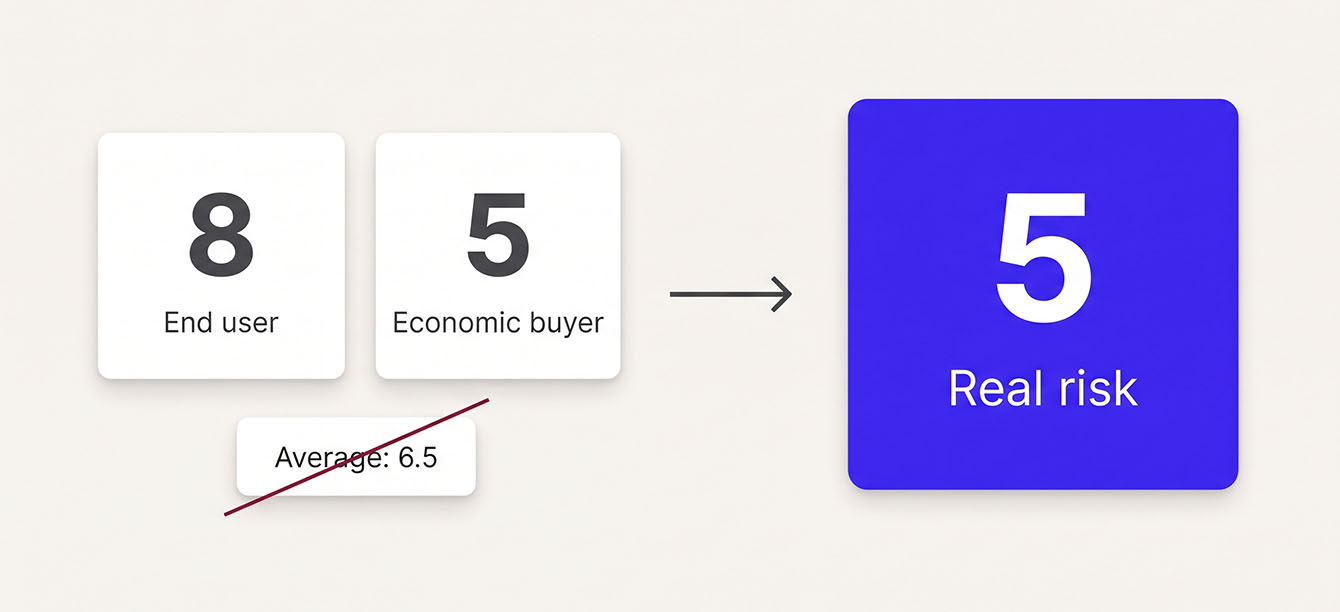
Mixed scores are where this pays off. Say the end user gives you an 8 and the economic buyer gives you a 5. That usually means the product works, but the buyer may not see enough value, strategic fit, or contact from your team. Averaging those into a 6.5 hides the problem, so treat the lower score as the account's real risk signal. Route it to whoever owns that relationship.
When stakeholder scores disagree, the disagreement itself is your most important data point.
See How a Managed Program Catches Renewal Risk
A poor score from a key account needs a same-day response. See how built-in frequency controls and real-time alerts keep your team ahead of renewal risk, quarter after quarter.
What to Do After the Survey: A Post-Score Action Playbook
A score protects revenue only when someone acts on it. What your team does in the 48 hours after a response lands decides whether the program saves accounts. Here's how that looks in practice.
Read Results by Account First
Before you react to any single score, sort responses by account. Line up each account's scores across stakeholders and next to its renewal date. A detractor at a top-ten account with a renewal in 60 days goes to the top of the list.
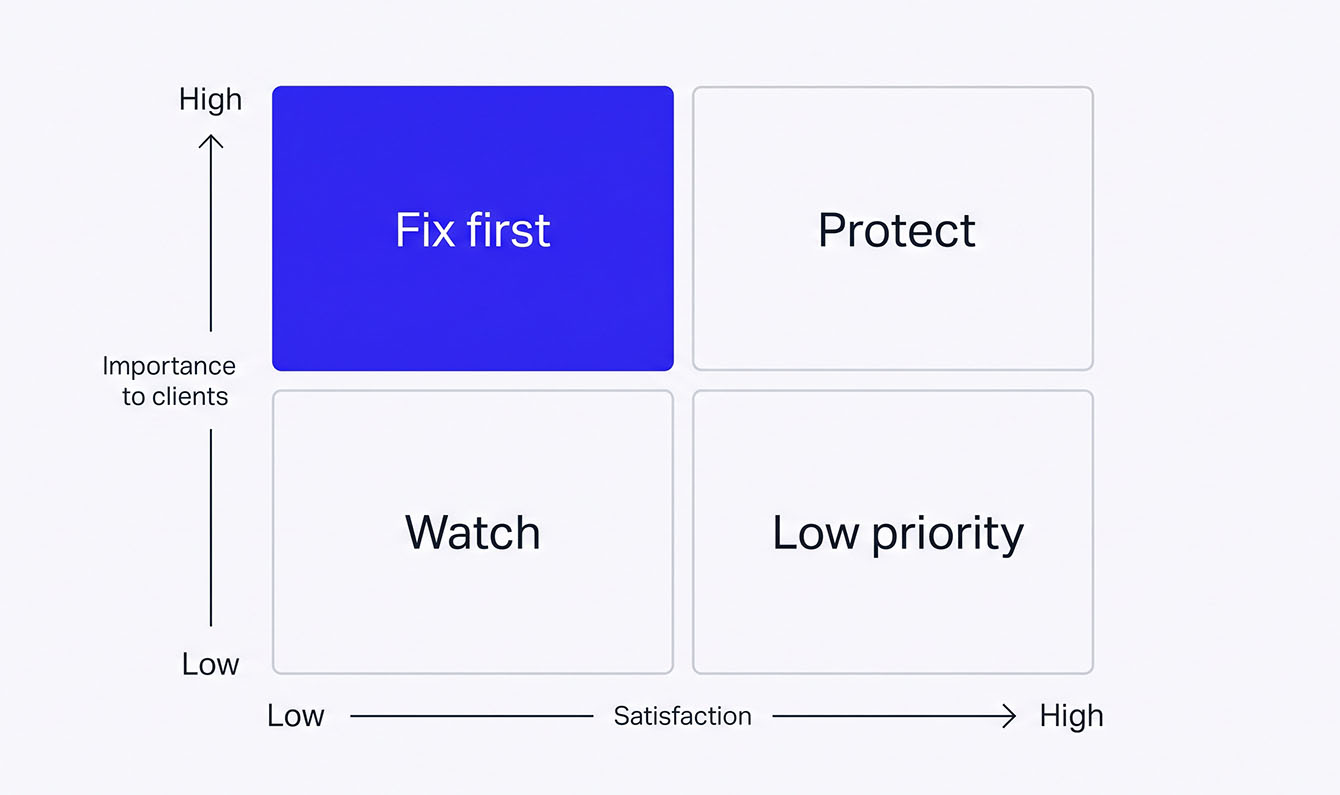
Then look across accounts for patterns in the comments. A simple way to rank what to fix is to compare how important each area is to clients with how satisfied they are. Once a year, ask clients to rate three to five areas, such as support, communication, and value, on both importance and satisfaction. Areas that score high on importance and low on satisfaction are your first fixes. Areas that score high on both are strengths to protect.
When a Client Scores Poorly: Detractor Recovery
When a B2B client gives a poor score, alert the account owner immediately. The owner reviews the score, comments, and account history within 24 hours. They call the detractor within 48 hours, find the root issue, and commit to a dated fix. Once the fix is in, they follow up to close the loop.
Here's how that sequence plays out step by step:
- The alert goes to the account owner or CS lead the moment the response arrives.
- Within 24 hours, the owner reviews the score, the open-ended comments, and recent account history.
- Within 48 hours, the owner reaches the client directly by phone or video. Email is too easy to skim past.
- Together, you identify the root issue, and the owner commits to a specific fix with a timeline.
- After the fix is in place, the owner checks back to confirm the client considers it resolved.
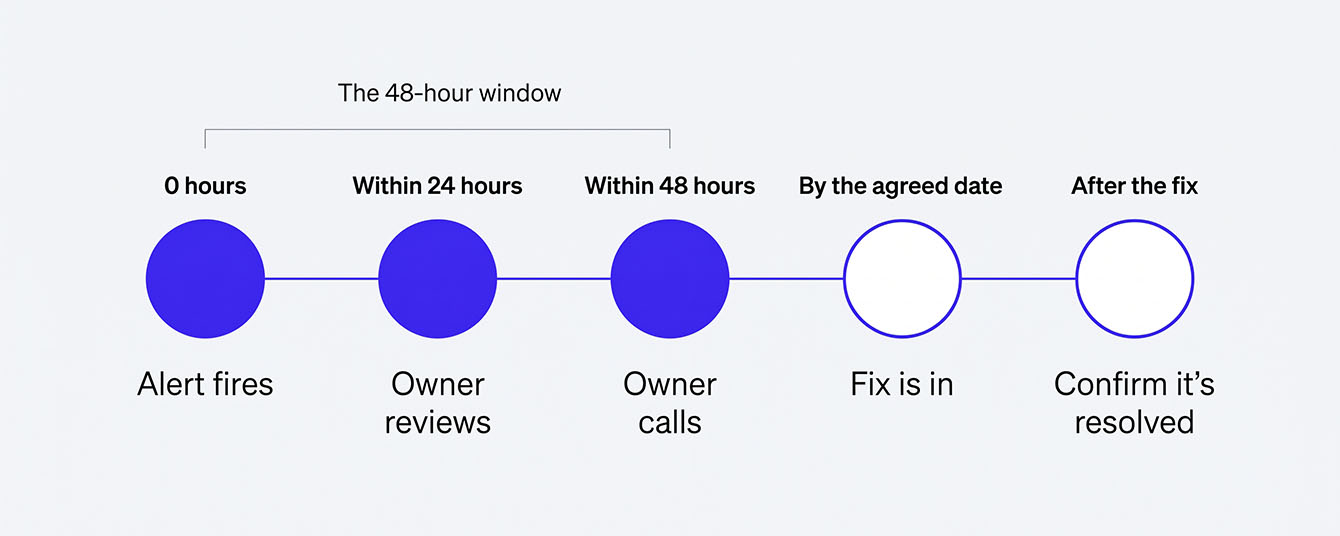
Speed matters because a B2B detractor rarely gives you a second warning. Closing the loop within 48 hours shows the client their feedback reached someone who can fix the problem, while the issue is still small. Wait a week, and the conversation often shifts from fixing the issue to whether they'll renew.
This workflow runs on real-time alerts. If your team learns about a poor score at Monday's dashboard review, you've already lost days. LoyaltyLoop's Poor Feedback Alert fires the moment a detractor response arrives, so the account owner can reach out that same day.
When a Client Scores Well: Promoter Follow-Up
High scores deserve action too. Thank promoters personally. Then ask whether they'd share a permission-based testimonial, make a referral, or take part in a case study. Promoters who feel thanked stay promoters. The ones who never hear back start to wonder why they bothered.
When a Client Scores in the Middle: Passive Response
Passive scores look safe but carry real danger. A 7 or 8 on Net Promoter Score℠ (NPS®), or "neutral" on CSAT, signals apathy. Those accounts are easy targets for a competitor's offer. Flag them for early outreach, like a check-in call or a value review. You can also ask what would move them from "fine" to "great."
B2B Survey Response Rates: What Good Looks Like
Across the B2B survey programs we run, external email surveys to business clients typically see response rates between 15% and 30%. Consumer surveys usually land lower, in the 10% to 20% range, as we cover in our customer satisfaction survey questions guide. Still, response rate alone doesn’t tell the whole story in B2B. Who responds matters just as much, especially when a single account has several stakeholders and you only have a few dozen accounts.
The Small-N Problem
B2B surveys often face what's called the small-N problem: a limited number of respondents can make response rates misleading. Say 20 of your 80 accounts respond, for a 25% response rate. That might seem reasonable, but the 60 silent accounts could include some of your biggest clients. If you have 30 to 200 accounts, watch which accounts respond as closely as the overall rate. A non-response from a top-10 account is worth looking into.
So track two numbers. First, your overall response rate against your own past rounds. If it stays below 15%, check your survey length, subject line, and send timing. Second, your coverage of top accounts: the share of your highest-revenue accounts where the economic buyer responded this quarter. The second number is the one that predicts renewals.
5 Tactics to Improve B2B Response Rates
- Send from a person the client knows. Your account manager's name beats feedback@company.com in the sender line.
- Keep it short. Aim for a survey they can finish in under three minutes.
- Time each survey to a real moment, like a closed ticket or an upcoming renewal. Arbitrary calendar dates get ignored.
- Get executive sponsorship. A short note from your CEO or VP on why the survey matters lifts response.
- Fix deliverability first. Verify your sending domain with SPF, DKIM, and DMARC. Under Google's 2024 Gmail rules, senders who don't comply may never reach the inbox.
Response rate trails the real drivers: sender recognition, relevance, and whether clients believe their feedback changes anything.
Managed Survey Program vs. DIY Survey Tool
Should you run your survey program in-house or hire a managed service? It comes down to ownership. Someone has to own setup, sends, analysis, and follow-up, month after month. A self-serve tool works when three things are true:
- You have a person or team who owns the program.
- You can set up the automations and integrations yourself.
- You have a clear internal process for acting on results.
The failure pattern is familiar. A team buys a tool, sets it up, sends the first round, and reads the results. Then the tool sits idle while nobody analyzes the data, chases poor scores, or sends the next round. When teams are stretched thin, survey programs are often the first thing to lose momentum.
A managed survey program takes most of that daily load off your team. The vendor handles survey design, send scheduling, response monitoring, and alerts. It also helps you set up email authentication, which you keep in place. Your account owners keep the part only they can do: talking to clients. Make the choice based on who will own the work.
Put Your B2B Survey Program to Work with LoyaltyLoop®
You're ready to run a B2B customer satisfaction survey program that reaches the right people at each account. It runs on a schedule your clients can live with. And when a key client scores poorly, your team already knows the next move. We built LoyaltyLoop around that same habit.
Our team runs the survey program for you, so cadence and alerts never wait on someone's spare time. Your key accounts get surveyed on time. A poor score reaches the right person while the renewal is still saveable. And your team spends its hours fixing what clients tell you.
If you're weighing how much of this to run yourself, explore how our fully managed custom surveys handle B2B feedback from setup through reporting.
Keep Your Key Accounts Talking to You
See how LoyaltyLoop runs B2B surveys on schedule, sends the right survey to the right stakeholder, and alerts your account owners the moment a client scores poorly. We’ll walk you through it in a short demo.
Schedule a DemoFAQs About B2B Customer Satisfaction Surveys
Q: Which survey metric should I start with if I can only run one?
A: Start with Net Promoter Score℠ (NPS®) as your single relationship metric, sent quarterly to the economic buyer and executive sponsor. It gives you a consistent, executive-level benchmark across every account. You can add CSAT or CES later for transactional touchpoints like onboarding or support.
Q: How do I know if my response rate is good when I only have 50 accounts?
A: With a small account list, which accounts respond matters more than the percentage. Twenty responses out of 80 accounts is 25%, but if those 20 include your top 5 revenue accounts, your account coverage is strong. Focus on reaching the key stakeholders across your most valuable accounts first.
Q: What if a client's end user and economic buyer give mixed scores?
A: Treat the lower score as the account's real risk signal, and don't average the two. The economic buyer controls renewal, so a low score from them is an immediate risk. An unhappy end user can also undermine adoption. Address both concerns separately based on each person's role.
Q: Can I send a survey to a client who already got one last month?
A: Hold the survey. No contact should get more than one request in a 90-day window. The exception is a poor score or open complaint, where follow-up is part of detractor recovery rather than a new survey.
Q: Can I run a B2B survey program with our existing helpdesk or CRM tools?
A: You can start with a helpdesk or CRM survey feature for post-support CSAT. It usually won't reach the economic buyer, enforce 90-day contact rules, or manage stakeholder roles across accounts. For full account coverage and automated alerts, a dedicated or managed survey platform is needed.