
8 Copy-Paste Customer Satisfaction Survey Email Templates
You send the survey, wait a few days, and check the results. Twelve responses. Hardly a broad sample. The results leave you with more questions than answers. You can't tell if the timing was off, the subject line killed it, or customers just don't care. There's no clear reason why some survey emails get responses and most don't.
That's the problem customer satisfaction survey email templates solve, up to a point. Copy-paste templates get you past the blank page. But they won't fix a send window that's too late. They won't fix questions that produce noise instead of signal. And they won't fix a response workflow that stops at the spreadsheet.
A survey program that works needs three things running together:
- Clear messaging before you send
- Schedule rules that prevent fatigue while it runs
- A defined follow-up workflow after responses arrive
Here you'll find eight email templates you can adapt today, along with timing rules and reminder sequences. Then we'll cover the response workflows that make them worth sending in the first place. If you'd rather have someone run all three for you, that's what a managed survey program does, and we'll show where it fits along the way.
Main Takeaways
- A survey email needs six elements to work: subject line, personalization, reason for the ask, time estimate, one call to action, and a real sign-off.
- Send timing matters more than send day. Customer satisfaction (CSAT) emails go out soon after the interaction, post-purchase emails go 1–3 days after delivery, and Net Promoter Score℠ (NPS®) emails go out quarterly.
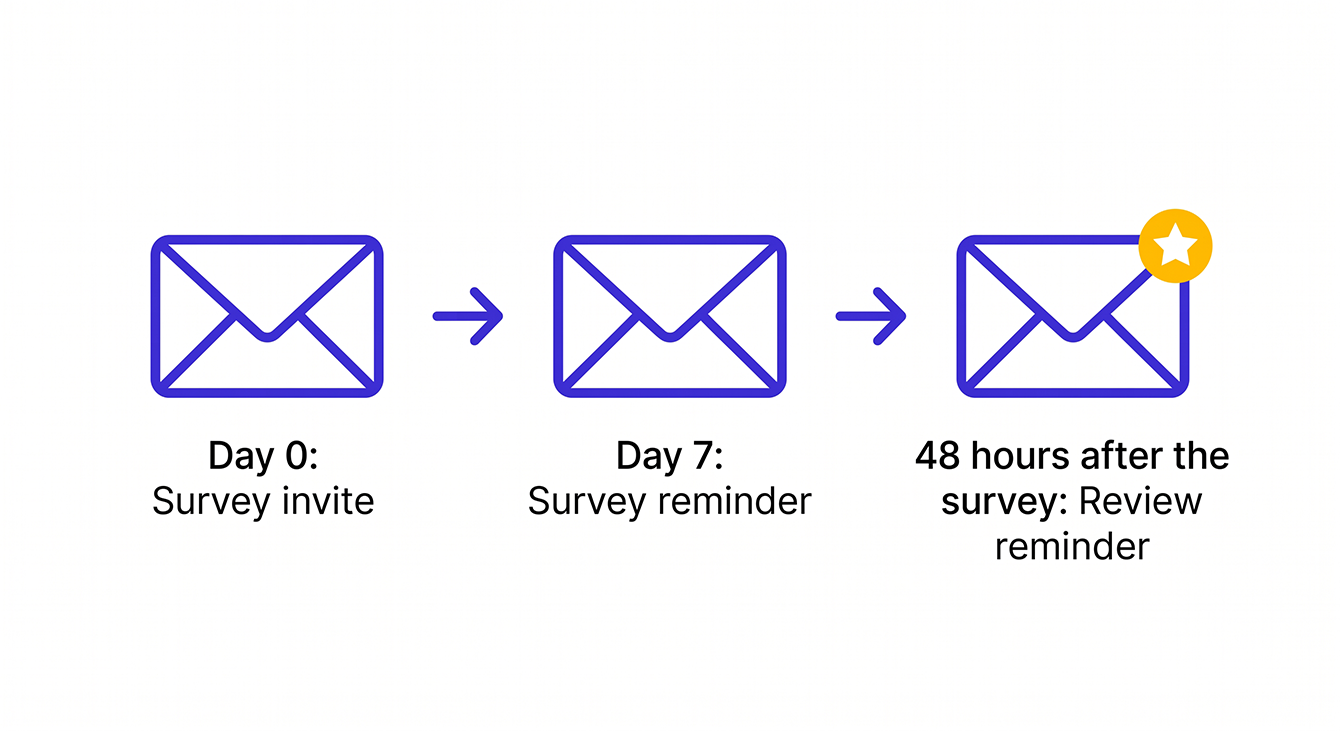
- A complete survey program runs three emails: the survey invite, one survey reminder to non-responders 7 days later, and a review reminder. The thank-you happens on a webpage customers see as soon as they finish.
- Follow-up depends on the response. Reach out to Detractors privately within 24–48 hours. Ask Promoters for permission to use their comments as testimonials.
- Track clicks and survey completions, not open rates. Privacy features register opens automatically, which makes open rates unreliable.
Lift Your Response Rates with 7 Proven Strategies
Templates get you started, but response rates depend on timing, personalization, and how you close the loop. These seven strategies cover all three.
Read the Survey Response Rate GuideWhat to Include in a Customer Satisfaction Survey Email
Every CSAT survey email needs six elements working together. Most survey emails fail because they're missing one or more of these pieces. The survey itself might be fine. The email that carries it is the problem. Use this as a pre-flight checklist before sending any of the templates that follow:
- Subject line. Make it specific to the interaction, keep it under 50 characters, and skip generic phrasing like “We'd love your feedback.”
- Personalization. Use the customer's first name and reference the specific product, service, or interaction with merge tags.
- Reason for the ask. One sentence telling the customer why you're asking and how their answer gets used.
- Time estimate. Give a concrete number like “2-minute survey” or “one quick question” so the reader knows the commitment.
- Call to action. One button or link. The button text should name the exact action, such as “Start the Survey.”
- Sign-off. A real person's name and title. People respond to people.
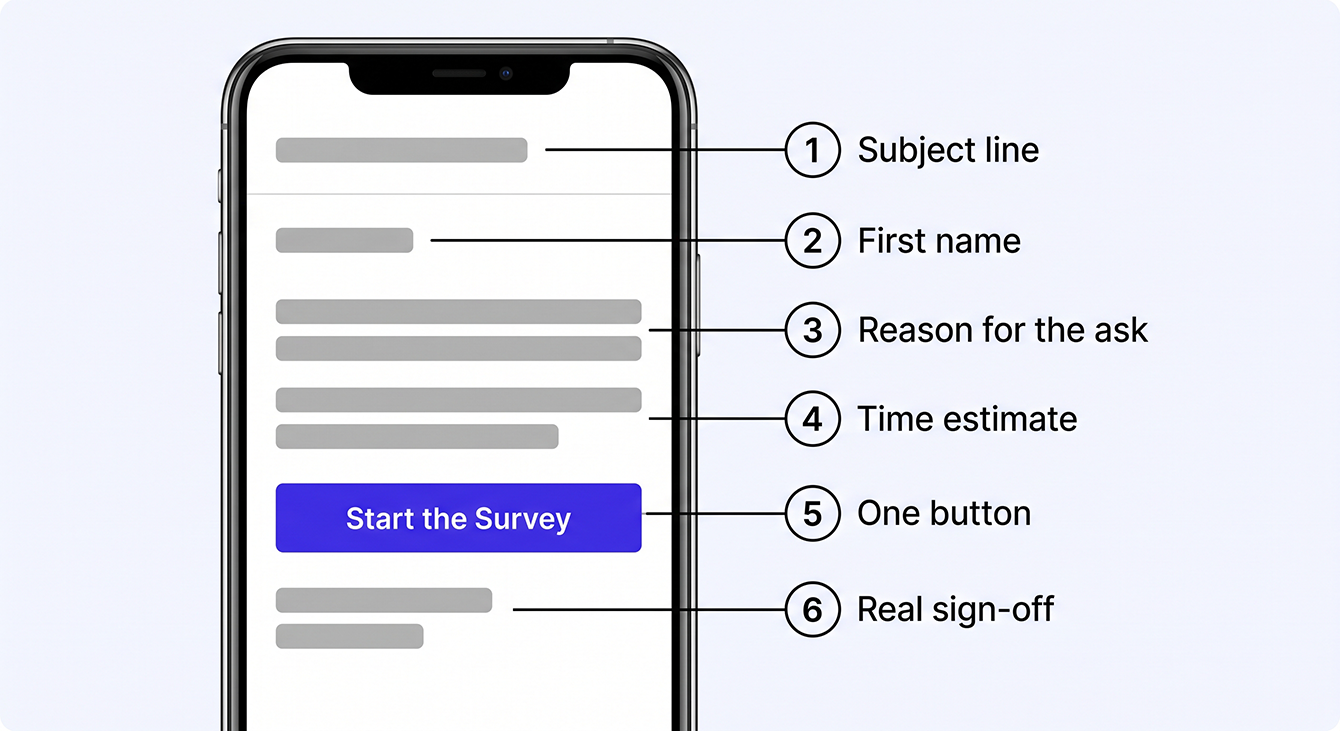
Nail all six and you've removed the most common reasons customers skip a survey email.
How to Write an Email for a Survey in 5 Steps
Survey emails don't need much copy to make the ask clear. The goal is to give customers just enough context to understand why you're reaching out and what you want them to do. Apply the six elements above as you draft.
- Write a subject line that names the interaction rather than the survey.
- Open with one sentence of context: what happened and when.
- Make the ask: tell them exactly what you need, such as “rate your experience” or “answer one question.”
- State the time: “Takes about 2 minutes” or “It's one question.”
- Close with a single CTA button and a real person's name.
People scan emails in order: subject line, opening line, the ask, then the button. Most people read survey emails on a phone, too. That means short copy and a single CTA are completion requirements, and style preferences come second. These five steps produce a draft you can send as-is or use as the skeleton for any template below.
When to Send Each Survey Email Type
The right send window depends on what you're measuring. Send too early and the customer hasn't formed an opinion. Too late and they've forgotten the details. Yet teams spend too much energy debating details like Tuesday versus Thursday. Research in the Journal of Survey Statistics and Methodology found that send day of the week “did not affect the likelihood of responding.” Matching the email to the interaction window matters far more.
| Survey Type | Send Window | Why This Window Works | Risk of Bad Timing |
|---|---|---|---|
| NPS® | Quarterly or semi-annually | Measures overall relationship health rather than a single interaction | Too frequent causes survey fatigue and trains customers to ignore you |
| CSAT | Soon after the interaction, typically within a day; recurring-service businesses often batch weekly | Captures the customer's reaction while details are fresh | Long delays lose recall and lower data quality |
| Post-Support | Within a day of the ticket closing (the default in most help desk tools) | The customer knows whether their issue was resolved | Too soon and the fix may not have held; too late and they've moved on |
| Post-Purchase | 1–3 days after services or delivery; 3–7 days for physical products | Customer has had time to use the product or service | Same-day sends arrive before the customer has experienced what they bought |
| Dormant Customer Check-In | After a defined period with no transactions (often 90 days or more) | Reaches the customer before they've fully moved on | Waiting until they've switched vendors makes the ask pointless |
| Follow-Up Reminder | About 7 days after initial invite | Catches non-openers without feeling aggressive | More than one reminder risks annoying the customer |
| B2B Account Check-In | Quarterly or at renewal milestones | Aligns with business review schedule and decision-maker availability | Mid-project surveys interrupt workflow and feel tone-deaf |
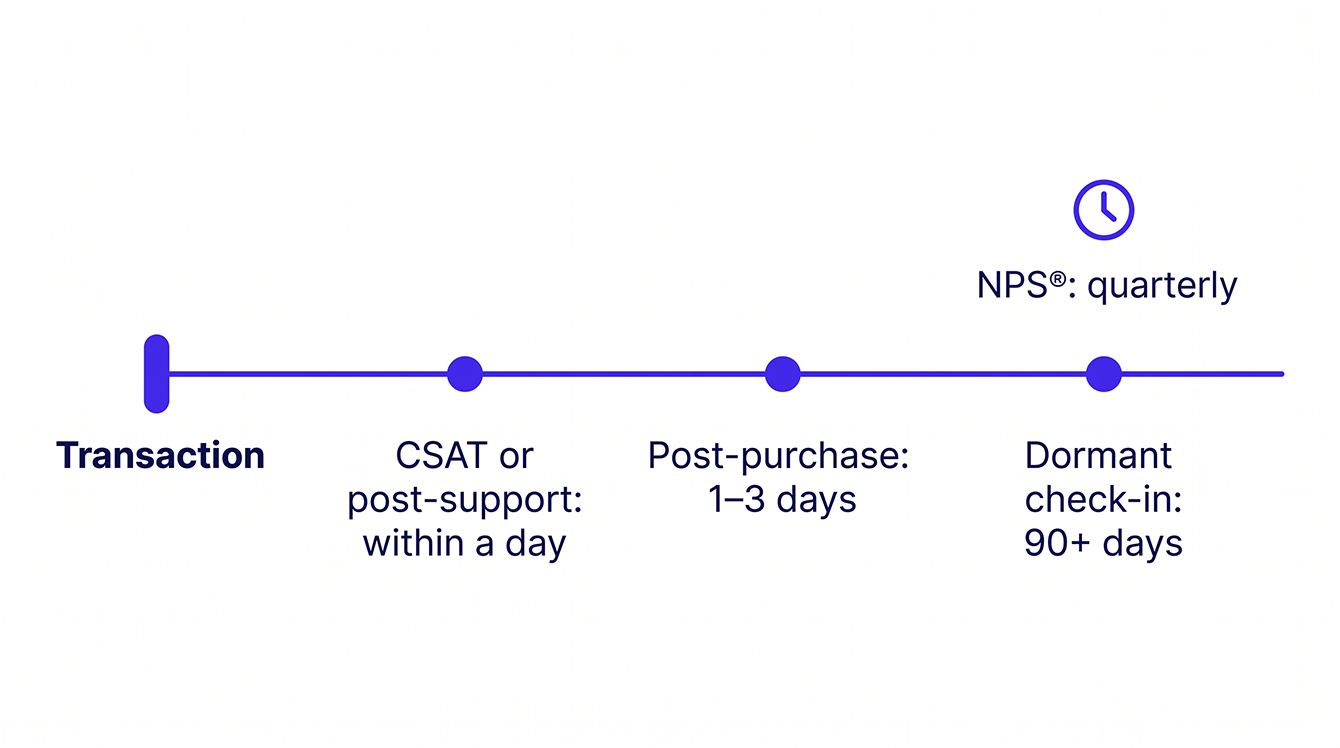
One rule sits above the timing table: decide who receives each survey before you decide when. Not every customer should get every email. A post-support survey goes only to the person who opened the ticket. A B2B check-in goes only to the decision maker on the account. An NPS® pulse goes to your active customer base, with anyone who got a survey in the last 90 days held out. Blasting your whole list with one survey buries the signal you're after and burns through goodwill you'll want later. Segment first, then time each send to the interaction that segment just had.
The goal isn't to find one perfect send day for every survey. Match the timing to the customer experience, then focus on giving them a reason to open the email.
15 Subject Lines for Every Survey Scenario
Your subject line can decide your open rate. Here are 15 subject lines organized by scenario, each under 50 characters, with personalization tokens where they earn their place.
Subject lines by scenario
NPS®
- One question about [Company Name], [First Name]
- How likely are you to recommend us?
- [First Name], quick check on your experience
CSAT
- [First Name], how did we do?
- Quick check-in on your recent [service/order]
Post-Support
- Your support ticket is resolved, one quick question
- [First Name], was your issue resolved?
Post-Purchase
- How's your [product]?
- [First Name], rate your recent order
Reminder
- Still want to share your feedback?
- Your opinion still matters, [First Name]
B2B Account Check-In
- [Company Name] quarterly check-in
- How are we doing for your team?
Dormant Customer Check-In
- [First Name], it's been a while
- Did we do something wrong, [First Name]?
Quick rules to keep in mind
Keep subject lines under 50 characters so they display fully on mobile. Tokens like [First Name] or [Company Name] automatically personalize the subject line with customer data. Use them when your data is clean. Personalized subject lines earn opens, but a broken merge tag shown as raw code is worse than no personalization at all. Avoid all-caps, exclamation marks, and the word “survey” alone. It reads like homework.
See How a Managed Survey Program Runs Itself
If your team can't maintain send timing, reminders, and follow-up consistently, a managed program handles all of it for you.
Explore the Online Customer Satisfaction Survey Tool8 Customer Satisfaction Survey Email Templates You Can Copy Today
Below are eight customer satisfaction survey email templates for different scenarios. Each comes with a subject line, email body, and call to action (CTA), and each one follows the six-element checklist from above. Copy the one that matches your scenario, swap in your details, and send.
Template 1: NPS® survey email
Best for: Quarterly relationship checks. Send to your full active customer base. This template isn't tied to a specific transaction, so it works as a standing pulse on overall loyalty. Pair the score with one open-ended “why” question. That combination tells you most of what you need to know.
Subject: One question about [Company Name], [First Name]
Body:
Hi [First Name],
You've been a [Company Name] customer for [time period], and your perspective matters to us. We have one question: How likely are you to recommend [Company Name] to a friend or colleague? It takes about 30 seconds to respond, and your answer helps us improve the experience for everyone.
[Full Name], [Title]
CTA Button Text: Rate Your Experience
Template 2: CSAT (post-interaction) survey email
Best for: Send soon after the interaction. Keep the scale simple: 1–5 or emoji-based for mobile. The closer you send to the experience, the more accurate the response. If you want to measure how easy the interaction was rather than how satisfying, swap the question for a Customer Effort Score (CES) prompt: “How easy was it to get what you needed?”
Subject: [First Name], how did we do?
Body:
Hi [First Name],
Thanks for working with us on [service/interaction] on [date]. We'd like to know how it went. On a scale of 1 to 5, how satisfied were you with your experience? It takes under 2 minutes to answer, and your feedback goes directly to the team that helped you.
[Full Name], [Title]
CTA Button Text: Share Your Rating
Template 3: Post-support survey email
Best for: Trigger within a day of ticket close. Reference the specific issue so the customer knows which interaction you mean. This works well for tech support and managed service providers (MSPs), where resolution quality varies. One caution for MSPs: the person who opened the ticket is often an end user. Make sure your relationship survey reaches the decision maker, too.
Subject: Your support ticket is resolved, one quick question
Body:
Hi [First Name],
Your support ticket [#ticket number] regarding [issue summary] has been resolved. We want to make sure it's fixed. Was your issue fully resolved? It's one question, and your response helps our support team get better at what they do.
[Full Name], [Title]
CTA Button Text: Was Your Issue Resolved?
Template 4: Post-purchase survey email
Best for: Send 1–3 days after delivery or project completion, or 3–7 days for physical products. The customer needs time to use what they bought before they can give you a meaningful answer.
Subject: How's your [product/service]?
Body:
Hi [First Name],
Your [product/service] was delivered on [date], and we'd love to hear how it's working for you. This 2-minute survey covers your experience from ordering through delivery. Your feedback shapes what we offer next.
[Full Name], [Title]
CTA Button Text: Start the Survey
Template 5: Review request email
Best for: Use this when you want to ask for a review without sending a survey first. If the customer just finished your survey, skip this email. Invite them to leave a review on the thank-you page instead, then follow up with the review reminder in the sequence below. Reviews build trust, and your replies reinforce it. BrightLocal found that 88% of consumers would use a business that replies to all its reviews, so respond to every review you receive.
Subject: Would you share your experience, [First Name]?
Body:
Hi [First Name],
Thank you for being a [Company Name] customer. A public review helps other people like you find us, and it takes about 2 minutes. If you're willing, the link below goes straight to our review page.
Warm regards,
[Full Name], [Title]
CTA Button Text: Leave a Review
Compliance note: Make it easy for any customer to leave a public review, and never remove, hide, or block negative ones. Don't tie incentives to leaving a review, and don't limit review requests to customers who scored you well. Google's policy prohibits selectively soliciting positive reviews. The FTC's Consumer Reviews and Testimonials Rule, effective October 2024, bans fake reviews, review suppression, and paying for reviews that express a set sentiment.
Template 6: Dormant customer check-in email
Best for: Send after a defined quiet period, often 90 days or more depending on how often your customers normally buy. This is the template most survey programs skip, and it's the one that finds revenue. Each answer needs its own follow-up: a no-pressure “we're here when you need us” for the first, a service recovery call for the second, and a win-back conversation for the third. Customers who've gone quiet rarely tell you why on their own. Asking is the only way to find out.
Subject: [First Name], it's been a while
Body:
Hi [First Name],
It's been [time period] since your last order with [Company Name], and we wanted to check in. Would you tell us which of these fits best? You don't need anything right now, something about your last experience fell short, or you're working with another company. It's one question, and your answer goes straight to me.
[Full Name], [Title]
CTA Button Text: Tell Us What Changed
Template 7: B2B account check-in email
Best for: This is a script for customer satisfaction survey conversations in B2B, adapted to email. B2B surveys go to the decision maker rather than the end user, and they cover the account relationship rather than a single transaction. Use the account manager's name in the from line and sign-off. Align send timing with quarterly business reviews or renewal milestones. You're writing to someone who evaluates your contract, and the wording should reflect that.
Subject: [Company Name] quarterly check-in
Body:
Hi [First Name],
As your account manager, I wanted to check in on how things are going with [Company Name]. You've been with us for [tenure], and this quarterly survey helps me understand what's working and where we can do better. It covers overall satisfaction and any unmet needs your team might have. Takes about 3–5 minutes.
[Account Manager Full Name]
[Title], [Company Name]
CTA Button Text: Share Your Feedback
Template 8: Multi-location or franchise check-in email
Best for: This template is critical for franchise and multi-location businesses where location-level data drives operational decisions. Make sure the “from” address and branding match the location as well as the parent brand. If routing responses by location sounds like more work than your team can take on, LoyaltyLoop® does it for you. We send each response to the right location's dashboard automatically, with a brand-level view for the home office.
Subject: How was your visit to [Location Name]?
Body:
Hi [First Name],
Thanks for visiting [Location Name]. We'd love to hear how your experience was. This 2-minute survey helps the local team maintain quality and gives us a clear picture across all our locations. Your feedback goes directly to the [Location Name] team.
[Full Name], [Title]
CTA Button Text: Rate [Location Name]
All eight templates follow the same six-element structure: subject line, personalization, reason for the ask, time estimate, CTA, and sign-off. Pick the one that fits your scenario and customize the details.
The Complete Survey Email Sequence: Invite, Survey Reminder, and Review Reminder
A survey program runs on three emails: the survey invite, a survey reminder for non-responders 7 days later, and a review reminder. The thank-you happens on a webpage customers see as soon as they finish the survey. For the invite, use whichever of the eight templates above fits your scenario. Here's how the other pieces work together.
Survey reminder email template
Best for: Send about 7 days after the initial invite. One reminder is usually enough. Research shows reminders matter more than which day you sent the first email. A second reminder rarely improves response rates and risks annoying the customer.
Subject: Still want to share your feedback, [First Name]?
Body:
Hi [First Name],
We know you're busy. A few days ago we asked about your recent experience with [Company Name], and we'd still love to hear from you. It takes about 2 minutes, and your feedback makes a real difference.
[Full Name], [Title]
CTA Button Text: Take the Survey
Review reminder email template
Best for: Send this about 48 hours after the customer finishes the survey, to everyone who finished it, whatever they scored. By then, they've had time to think it over, but the experience is still fresh. Lots of customers mean to leave a review and simply forget, so one friendly reminder goes a long way. Send it once, then stop.
Subject: [First Name], would you share a quick review?
Body:
Hi [First Name],
Thanks again for sharing your feedback about your recent experience with [Company Name]. If you have a minute, a public review helps other people like you find us. It takes about 2 minutes, and the link below goes straight to our review page.
[Full Name], [Title]
CTA Button Text: Leave a Review
Where the thank-you fits
You don't need a separate thank-you email. Send customers to a thank-you page the moment they finish the survey. They see it right away, while the experience is fresh, and it's one less email in their inbox. Use the page to thank them and tell them how their feedback gets used.
The survey itself is also the best place for a permission-based testimonial ask. When a customer leaves a positive comment, ask right there: “May we share your comments on our website?” Customers who say yes give you a testimonial you can publish without a follow-up request.
Best Practices and Mistakes to Avoid
The templates above work best when you follow a few basic rules. Skipping them risks tanking response rates or producing unreliable data. Before you hit send, use these dos and don'ts as a final check.
Do these 5 things
- Keep the email body under 150 words. Your job is to get them to the survey. Explaining why surveys matter can wait.
- Use one CTA. Every additional link competes with the survey link.
- Test on mobile before sending. Most surveys are completed on phones, so a broken layout kills completions. Use a mobile-friendly template.
- Personalize with merge tags (first name, company name, interaction reference), but audit your data first. A broken merge tag is worse than no personalization.
- Make sure your sending domain has DMARC, DKIM, and SPF set up. Gmail and Yahoo's 2024 bulk-sender rules require these for deliverability. According to Gmail Help, spam complaint rates above 0.3% put your mail at risk of being blocked.
Avoid these 4 things
- Don't survey after every transaction. You'll fatigue your list and train customers to ignore you. Use business rules to control frequency, such as no more than one survey per customer every 90 days.
- Don't offer incentives for feedback. They bias your data, attract completions from people who don't care about the answer, and can't be used for reviews at all under the FTC rule. A clear reason for the ask outperforms a gift card.
- Don't rely on open rates to measure survey email performance. Validity reports that 70% of all opens are now generated by Apple's Mail Privacy Proxy. Track clicks and survey completions instead.
- Don't use a generic “noreply@” sender address. Customers are more likely to engage when the email comes from a real person, and the sign-off should match the from line. Feedback also gets more candid when the request appears to come from an owner or senior leader rather than an automated system.
What to Do When Survey Responses Arrive
Collecting survey data without a response workflow is like running a test and ignoring the results. Every answer should trigger the right next step based on what the customer told you. This is the part we handle for LoyaltyLoop customers: responses route to the right person automatically, and alerts fire in real time so your team follows up on the signal instead of sorting spreadsheets. Here's what that workflow looks like whether you run it yourself or we run it for you.
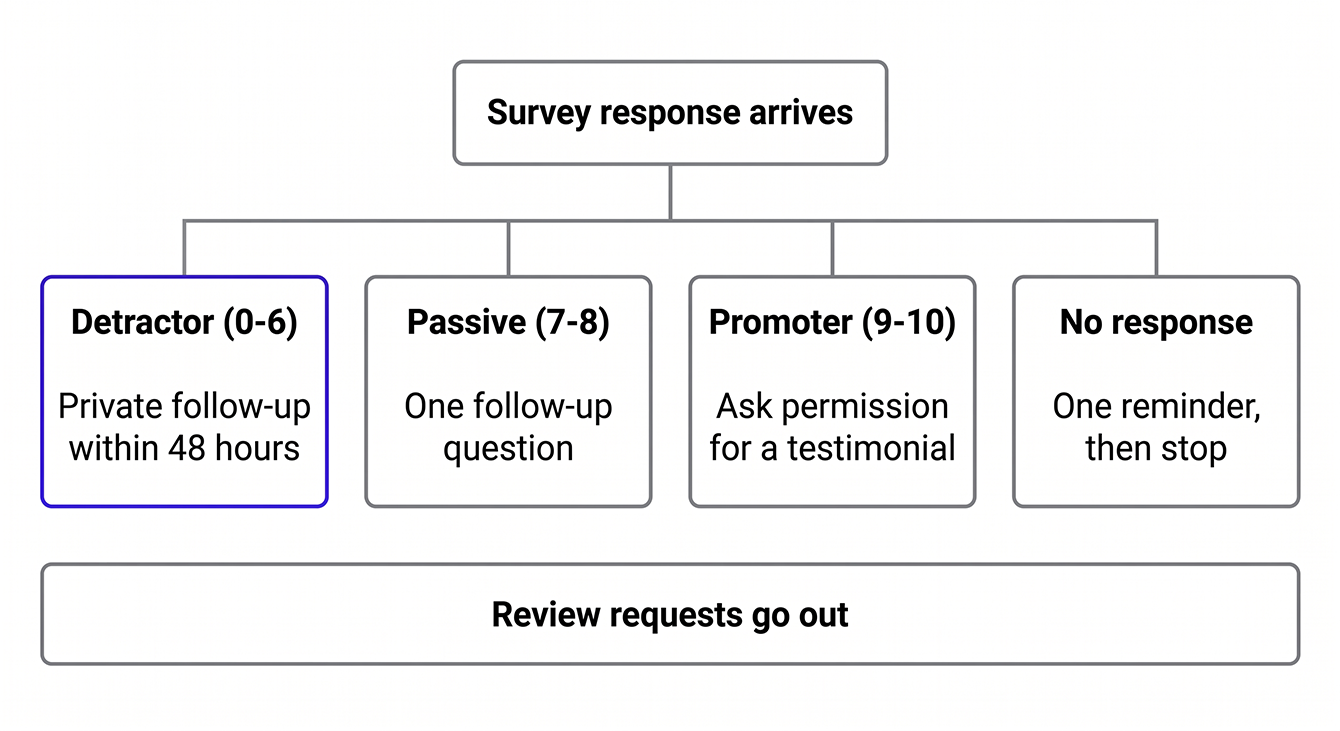
Detractors and negative feedback
A Detractor is a customer who scores low on your survey: 0–6 on NPS®, or 1–2 on a 5-point CSAT scale. Reach out to these customers within 24–48 hours. Speed matters more than ever. Forrester's 2026 CX Index found that 26% of North American brands improved their customer experience while only 7% declined, which means a small group of brands is pulling ahead while most stand still.
Acknowledge the issue and ask for specifics if the survey didn't capture them. Route the case to the person who can fix it. Follow up after resolution. Keep this conversation private. Detractors receive the same review invitation as everyone else in your workflow, and you never stop them from leaving one. The goal is to fix the problem before they feel the need to.
Passives and neutral feedback
A Passive scores in the middle: 7–8 on NPS®, or 3 on a 5-point scale. Satisfied but not loyal. Passives are your biggest churn risk because they won't complain before they leave. They'll just stop buying.
Thank them and ask one follow-up question to surface what would move them higher. Flag the account for early outreach at renewal or reorder time.
Promoters and positive feedback
A Promoter scores high: 9–10 on NPS®, or 4–5 on CSAT. They're already happy. Here's what to do:
- Thank them
- Ask if you can use their feedback as a testimonial, with their permission
- Watch for signals of interest in other services, and pass those to sales
- Consider a referral ask
When customers do leave reviews, respond to every one. Consumers strongly prefer businesses that reply to all their reviews, so that response is worth the two minutes it takes.
Non-responders
Non-responders aren't saying “no.” They're saying “not now” or “I didn't see it.” Send the survey reminder email from the sequence above. Then stop. If they don't respond after one reminder, wait until the next natural survey window. Don't add them to a drip campaign.
Start Building Your Survey Program with LoyaltyLoop
You now have templates, timing rules, and a response workflow. That's enough to launch a survey program that captures real feedback and routes it to the right person before a customer churns or posts publicly. We built LoyaltyLoop to run the entire program for you. Our team handles survey design, send timing, reminder sequences, and response routing.
Everything is managed end to end, so you collect feedback continuously without maintaining the system. Franchise and multi-location businesses get location-level data. Poor Feedback Alerts fire in real time, review requests run inside the same workflow, and dormant customers get a check-in before they're gone. These are results that need a system most teams don't have time to build. Let us do the heavy lifting for you.
Turn More Customer Responses Into Action
Don't let useful feedback end with a completed survey. See how a fully managed program handles send timing, reminders, and follow-up for you.
Schedule a DemoFAQs About Customer Satisfaction Survey Email Templates
Q: How long should I wait before sending a follow-up survey to the same customer?
A: Wait at least 90 days between relationship surveys like NPS® unless a specific transaction justifies a targeted CSAT or post-support survey sooner. Transaction-specific surveys can go out more often because they measure separate interactions. High-frequency customers still need protection from over-surveying. One relationship check per quarter is enough even if they transact weekly.
Q: What response rate should I expect from a customer satisfaction survey email?
A: Published benchmarks vary widely by industry, survey type, and how the rate is calculated, so treat any single number with caution. A well-timed survey with a clear subject line and mobile-friendly design produces a higher rate than a generic blast. B2B and post-support scenarios run higher. Post-purchase runs lower. If you're below 10%, the problem is usually timing, list quality, or survey length. One reminder sent about a week later can lift total response rates.
Q: Can I send a customer satisfaction survey if I don't have their email address?
A: You can't send an email survey without an email address. But SMS text surveys, in-person tablet surveys, or receipt-based surveys work if you capture phone numbers or use a point-of-sale system. Email works best for written feedback and review requests because it supports links, longer messages, and follow-up sequences. SMS works for quick one-question surveys and can fall back to email when you have both.
Q: How do I know if my survey email went to spam or got blocked?
A: Check your email platform's delivery and bounce reports to see if messages were accepted. If delivery rates are high but clicks are near zero, your emails may be landing in spam. Common causes include missing authentication records (DMARC, DKIM, or SPF) or a complaint rate above 0.3% (Gmail Help). Send yourself a test from your sending domain and check where it lands.
Q: What's the best call to action for a survey email?
A: Name the action and keep it under four words. “Rate Your Experience,” “Start the Survey,” and “Was Your Issue Resolved?” all work because the reader knows what happens after the click. Generic buttons like “Click Here” or “Submit” don't tell them anything. Use one button, put it after the ask, and make it the only link in the email. For a one-question survey, you can embed the question itself in the email so the first click records the answer and opens the rest of the survey.
Q: What should the opening line of a survey email say?
A: Name the interaction and the date in one sentence: “Thanks for working with us on your signage order on May 14.” That line does three things at once. It proves the email is personal, it tells the customer which experience you're asking about, and it gives them a reason to keep reading. Skip warm-up lines like “We hope this email finds you well.” Your customer knows why you're writing.