Best Customer Feedback Software for 2026 by Use Case
You bought a feedback tool, set up nothing, and stopped logging in around month three. But your card still gets charged. Customers still leave without a word. That's a feedback program that never had an owner. Good software only gets you so far if the program never gets off the ground.
Choosing the best customer feedback software isn't about comparing feature lists. The question that determines whether you keep customers is much simpler: who will run this program once you buy it?
The right choice starts with knowing what your business can actually support. That makes it easier to find a tool you'll use long enough to see results. Here you'll see which tools fit your use case. You'll also learn whether you need software you operate yourself or a program someone runs for you.
Main Takeaways
- The most important buying question is who will run the feedback program, not which features the tool advertises.
- If you can't name a person who will own the program and commit recurring time to it, a managed program fits better than a self-serve tool.
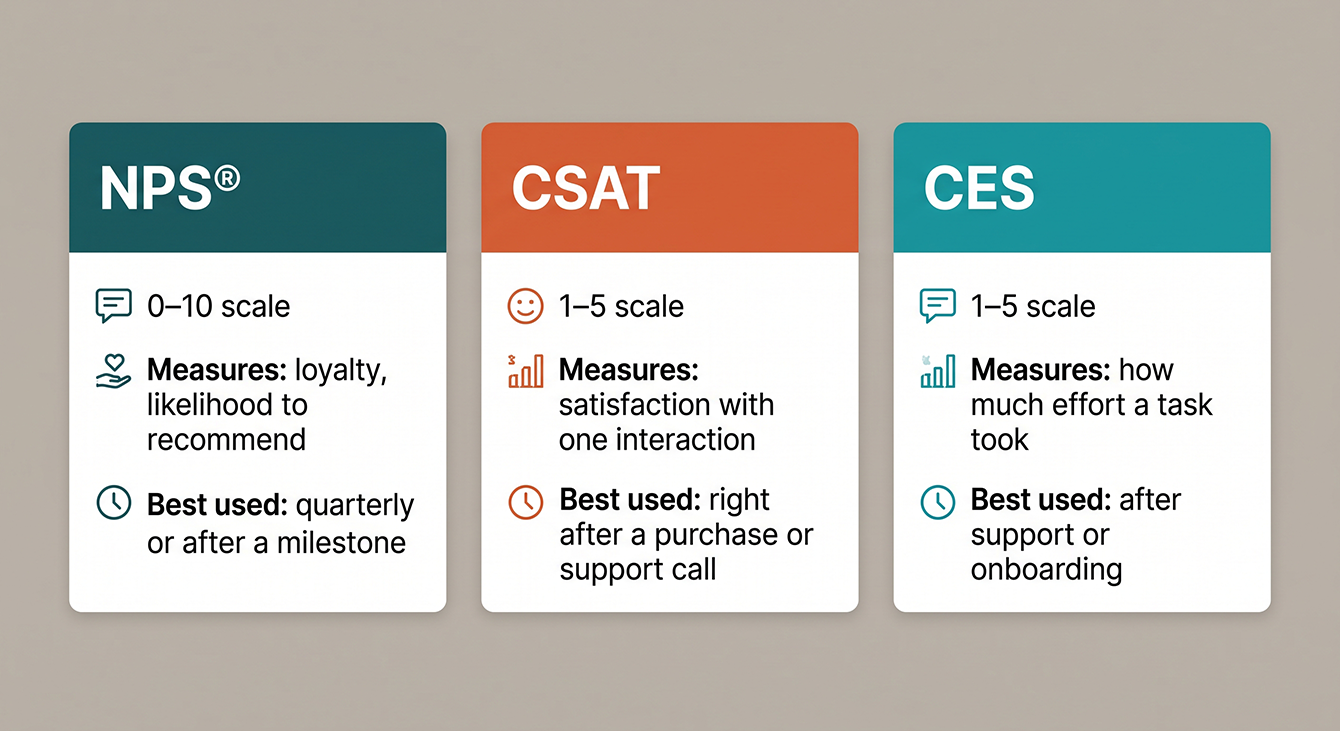
- The right metric depends on the touchpoint. NPS® measures relationship health over time, CSAT measures satisfaction with a specific interaction, and CES measures how easy a process was.
- Free plans from survey tools cap responses and offer no alert routing or closed-loop workflows. They work for occasional pulse checks, not ongoing programs.
- Franchise and multi-location businesses need network-level dashboards with location drill-in. They won't fit a scaled-up version of single-location feedback tools.
Turn Feedback Into Continuous Improvement
Collecting responses is the easy part. Acting on patterns is what keeps customers. This guide covers the strategies that make feedback programs actually stick.
What Customer Feedback Software Actually Does (and Three Metrics You'll See Everywhere)
Customer feedback software is any platform that consistently collects, organizes, and helps you act on what customers think about your business. Early customer feedback tools were mostly survey builders. Today, the tools vary but the goal is the same: turn customer feedback into something your team can use.
The core function is straightforward. Collect structured input from customers at defined touchpoints. Organize it so patterns and urgent signals surface. Then route those signals to the people who can make a difference.
The category has grown well beyond basic survey builders. You'll find:
- In-app widgets that capture feedback while someone uses your product
- Review request workflows that turn satisfied customers into public advocates
- Managed programs where the vendor configures, maintains, and runs the entire operation for you
Three metrics show up in nearly every tool you'll evaluate. Net Promoter Score℠ (NPS®) measures how likely a customer is to recommend you on a 0 to 10 scale. It segments respondents into Promoters (9 to 10), Passives (7 to 8), and Detractors (0 to 6). Treat NPS as an ongoing diagnostic to act on, not a score to chase for its own sake.
CSAT (Customer Satisfaction Score) measures satisfaction with a specific interaction. It's typically on a 1 to 5 scale. CES (Customer Effort Score) measures how easy it was for the customer to accomplish what they needed. Most tools support at least one of these. The best let you deploy the right metric at the right touchpoint.
Why This Matters More Than It Used To
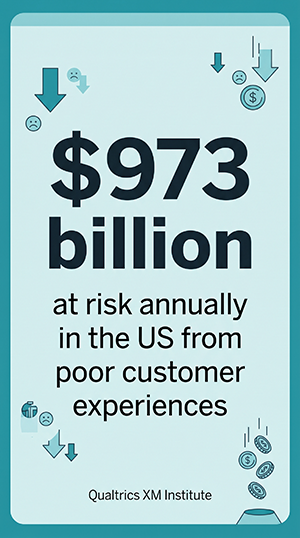
Customer experience (CX) quality in the US has declined for two straight years. According to Forrester's 2025 Global Customer Experience Index, a quarter of US brands saw their CX rankings drop this year, compared to only 7% that improved. That decline has consequences you can measure in dollars. Fewer than one in three consumers give feedback after a poor experience. Another 34% reduce spending and 13% stop entirely. That puts $973 billion at risk in the US alone, as per the Qualtrics XM Institute.
The Best Customer Feedback Tools for 2026, by Use Case
The tools below are organized by use case so you can skip to the segment that matches your business. Each one starts with a quick "Best for" so you can see if it belongs on your shortlist. Then we'll break down what it does and what you can expect to pay.
Best for SMBs and Service Businesses
This bucket covers tools suited to small teams that need feedback collection, review generation, and basic reporting without enterprise complexity. A quick note on free tiers: free plans from tools like SurveyMonkey or Google Forms cap responses. They offer no closed-loop workflows, no managed setup, and no alert routing. They're fine for occasional pulse checks. They won't run a feedback program.
Best for simple one-off surveys on a budget: SurveyMonkey
SurveyMonkey is the most recognized name in survey software. Templates and logic branching get a basic survey live in minutes. It works when you need a quick pulse check and know how to build surveys correctly to capture the data you seek. However, it can't function as an ongoing program. Expect features like:
- Drag-and-drop survey builder with 500+ templates
- Basic analytics and filtering (AI-assisted analysis available on paid plans)
- Integrations with Slack, Salesforce, HubSpot
Pricing: Free plan (limited responses/survey); paid plans from $30/user/month.
Best for branded, conversational survey experiences: Typeform
Typeform turns surveys into interactive, one-question-at-a-time experiences. They feel more like a conversation than a form. Response rates tend to run higher when the experience feels less like homework. It offers businesses:
- Conversational user interface (UI) with conditional logic
- Strong design customization
- Integrations with Zapier, HubSpot, Google Sheets
Pricing: Free plan (10 responses/month); paid plans from ~$28/month (when billed annually).
Best for transactional CSAT after support interactions: Nicereply
Nicereply embeds one-click CSAT, NPS®, and CES surveys directly into email signatures and helpdesk tickets. It captures feedback at the moment the interaction ends and leverages:
- In-signature and post-resolution survey triggers
- Helpdesk integrations (Zendesk, Freshdesk, Front)
- Per-agent and per-team reporting
Pricing: Plans from ~$59/month (when billed annually).
One migration note for this bucket: Delighted sunset on June 30, 2026 and its historical data is no longer accessible. If you were on Delighted, you need a replacement feedback platform now. That makes this a good moment to reconsider whether self-serve is the right model for your next tool.
Best for Product and UX Teams
Product teams need in-app feedback that comes with context. They need to know what the user was doing when they shared it. The right integrations can then bring that feedback into the tools they use to plan the roadmap.
Best for website and UX feedback with behavioral context: Hotjar
Hotjar combines heatmaps, session recordings, and on-page surveys. You can see what users do and ask them why in the same workflow through features like:
- Heatmaps, scroll maps, and session recordings
- On-page feedback widgets and surveys
- Integrations with Slack, Jira, HubSpot
Pricing: Free plan (limited sessions); paid plans from ~$39/month (when billed annually).
Best for in-app experience feedback and user onboarding: Userpilot
Userpilot lets product teams trigger contextual surveys inside the app based on user behavior. Feedback ties to specific features and flows. Teams can boost feedback programs with:
- In-app NPS®, CSAT, and custom surveys
- Behavior-triggered survey targeting
- Product analytics and feature adoption tracking
Pricing: Plans from ~$249/month.
Best for feature request tracking and prioritization: Canny
Canny collects feature requests and lets users vote on them. It connects the backlog to your roadmap so customers see their input reflected in what you build. Expect features such as:
- Public and private feature request boards
- Voting and prioritization workflows
- Integrations with Jira, Asana, Intercom
Pricing: Free plan (limited features); paid plans from ~$79/month (when billed annually).
Best for Enterprise Voice of the Customer (VoC)
Enterprise Voice of the Customer programs pull feedback from many channels. Teams need advanced analytics to make sense of that data. They also need role-based access and connections to customer relationship management (CRM), support, and business intelligence (BI) tools.
Best for enterprise-scale VoC with advanced analytics: Qualtrics
Qualtrics is the enterprise standard for experience management. It offers advanced survey logic, text analytics, and predictive modeling across customer, employee, product, and brand programs. Popular features include:
- Multi-channel survey distribution (email, SMS, web, in-app)
- AI-powered text and sentiment analytics
- Role-based dashboards with CRM and BI integrations
Pricing: Custom enterprise pricing; Qualtrics publishes no public rates, and CX contracts typically run in the tens of thousands per year, reaching six figures for full programs.
Best for: omnichannel experience management at scale: Medallia
Medallia captures signals from surveys, social media, contact centers, IoT devices, and more. AI surfaces patterns across millions of data points. It offers businesses:
- Omnichannel signal capture (digital, voice, video, IoT)
- AI-driven theme detection and action planning
- Enterprise-grade security and role-based access
Pricing: Custom enterprise pricing (often at the higher end).
Best for Managed Feedback Programs
Not every business has someone who can run a feedback program day to day. Managed programs fill that gap for small teams, operations leaders, and marketing managers that need the work handled for them.
Best for businesses that need a feedback program without the internal bandwidth to run one: LoyaltyLoop
LoyaltyLoop is the program behind this guide, so we know it best. Here's what it does: it runs a customer feedback program for you. Setup, survey design, business rules, ongoing management, and review generation all happen in a single managed workflow. You get NPS, alerts, and reporting without configuring or maintaining anything. It's no wonder we have hundreds of five-star Google reviews from our own customers. Anticipate features like:
- Fully managed setup and ongoing operations
- NPS®/CSAT measurement with Poor Feedback Alerts
- ReviewMatch℠ (matches customer records to actual Google reviews)
- Automated review requests and cross-sell question capability
Pricing: No long-term contract required; plans start at $99/month per location plus a one-time setup fee.
Best for Multi-Location and Franchise Networks
Franchise and multi-location businesses need network-level dashboards and location-level drill-in. They also need centralized configuration that doesn't burden individual operators. Franchise and multi-location businesses can see significant value from specialized solutions.
Best for franchise networks needing managed, location-level feedback with centralized oversight: LoyaltyLoop Enterprise
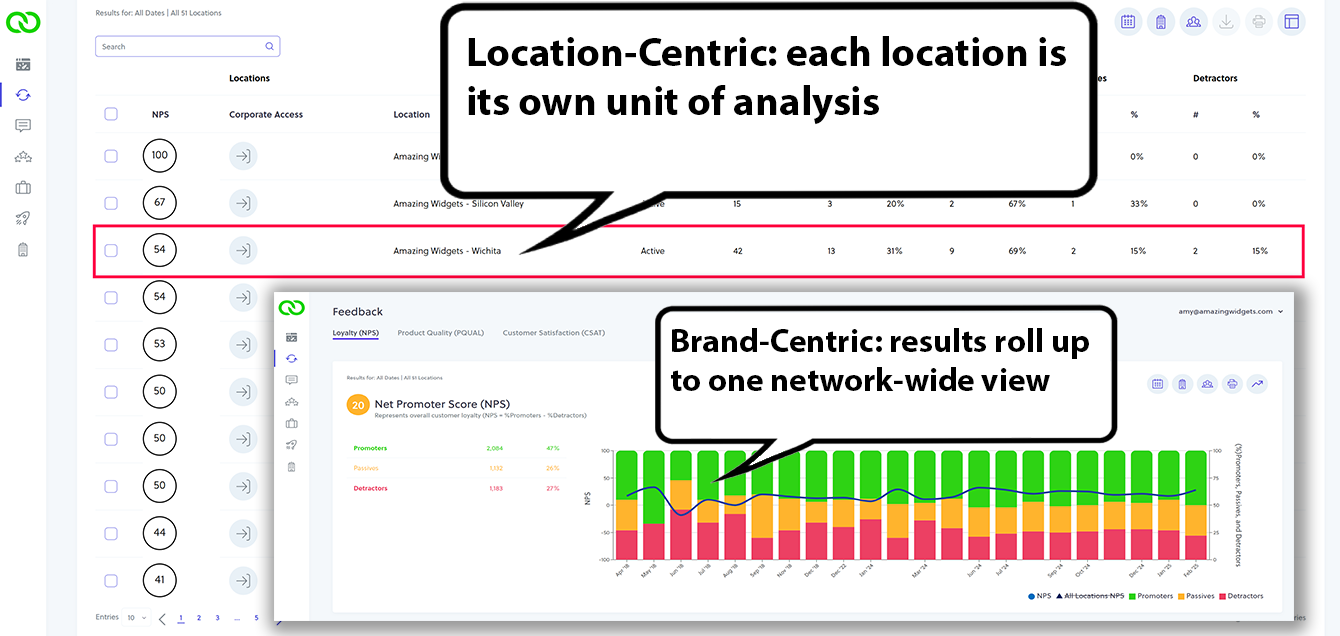
LoyaltyLoop Enterprise gives franchise leadership a network-wide view. Base plans already include location-level dashboards; Enterprise adds the network-wide rollup across all locations at once. Two configuration models, Location-Centric and Brand-Centric, match how the network is actually structured. Glean more from your feedback with:
- Enterprise Dashboard with network-wide rollup across all locations
- Centralized or distributed configuration models
- Managed operations at every location
Pricing: Pricing: Custom price per requirements; pricing varies by network size. Read more on LoyaltyLoop Enterprise.
Best for multi-location review management (self-serve): Birdeye
Birdeye centralizes review monitoring, request workflows, and local SEO management across dozens or hundreds of locations from a single dashboard. Round out your feedback program with:
- Multi-location review monitoring and response
- Automated review request campaigns
- Local SEO and listing management
Pricing: Custom pricing; typically starts around $299/month/location.
Feature Comparison Table: Top Customer Feedback Tools at a Glance
This table maps the top tools across the dimensions that matter most for your buying decision. One column most buyers skip: whether the vendor runs the program or you do. Use it to narrow your shortlist before committing. LoyaltyLoop's row is bolded below since it's the program we run ourselves; every other row reflects public vendor information as of publication.
| Tool Name | Best For | Managed vs. Self-Serve | Metrics (NPS®/CSAT/CES) | Pricing Tier |
|---|---|---|---|---|
| SurveyMonkey | Simple one-off surveys on a budget | Self-Serve | NPS, CSAT, CES | Free–$30+/mo |
| Typeform | Branded, conversational survey experiences | Self-Serve | NPS, CSAT | Free–$28+/mo |
| Nicereply | Transactional CSAT after support interactions | Self-Serve | NPS, CSAT, CES | ~$59+/mo |
| Hotjar | Website and UX feedback with behavioral context | Self-Serve | NPS, custom | Free–$39+/mo |
| Userpilot | In-app experience feedback and onboarding | Self-Serve | NPS, CSAT, custom | ~$299+/mo |
| Canny | Feature request tracking and prioritization | Self-Serve | Custom | Free–$79+/mo |
| Qualtrics | Enterprise-scale VoC with advanced analytics | Self-Serve (with services) | NPS, CSAT, CES | Custom (five figures+/yr) |
| Medallia | Omnichannel experience management at scale | Self-Serve (with services) | NPS, CSAT, CES | Custom enterprise |
| LoyaltyLoop | Managed feedback programs / franchise networks | Fully Managed | NPS, CSAT, CES | $99+/mo plus a one-time setup fee |
| Birdeye | Multi-location review management (self-serve) | Self-Serve | NPS, CSAT, CES | Custom (~$299+/mo) |
Six Features to Evaluate Before You Buy
The features that separate a tool you'll actually use from one you'll abandon aren't on the vendor's homepage. They're the ones that determine whether your program is still running six months from now.
- Survey delivery channels. The tool should offer email, SMS, in-app, and web form options so you can match delivery to how your customers actually respond. Negative feedback skews toward email and website forms, according to a 2025 Qualtrics XM Institute report. Among US consumers who give feedback after very poor experiences, 49% use email and 40% use a company website form. Surveys are 14 points more likely after good experiences than bad ones. A survey-only program paints too rosy a picture.
- Metric support (NPS®/CSAT/CES). The tool should let you deploy the right metric at the right touchpoint. NPS after a relationship milestone. CSAT after a support interaction. CES after a complex process.
- Alert and notification systems. Real-time alerts for negative scores are non-negotiable. Without them, you're reading dashboards instead of saving customers. Look for configurable thresholds and routing to named owners.
- Integration capabilities. CRM, helpdesk, point-of-sale (POS), and industry-specific systems (print MIS platforms, PSA tools) all matter. If the tool doesn't connect to where your customer data lives, you'll be exporting CSVs forever.
- Reporting and dashboard depth. Location-level drill-in, trend tracking over time, and exportable data are baseline requirements. If you can't filter by rep, region, or transaction type, you can't act on what you find.
- Day-to-day overhead. This is the most overlooked, but crucial, feature. How much internal time does the tool require to configure, maintain, and act on? Self-serve tools assume you have that bandwidth. Managed programs assume you don't. Treat this as an evaluation criterion, not an afterthought.
Run any tool you're evaluating, including LoyaltyLoop, against this list before you commit. The tools worth shortlisting hold up against all six.
See How a Managed Feedback Program Works
If you're weighing self-serve tools against a program someone runs for you, this page shows exactly what the managed model covers and what you'd be evaluating.
Managed vs. Self-Serve: The Buying Decision Most Guides Skip
The most important question in choosing the best customer feedback software has nothing to do with features. It's who will actually run the program once you buy it.
Self-serve tools require real day-to-day load and the expertise to use them well. You have to:
- Configure surveys
- Set business rules
- Build alert routing
- Maintain integrations
- Train your team to act on results
Tool abandonment isn't a made-up failure mode. Businesses buy a self-serve tool, never fully configure it, and stop logging in within months. The software keeps charging. Customers keep leaving.
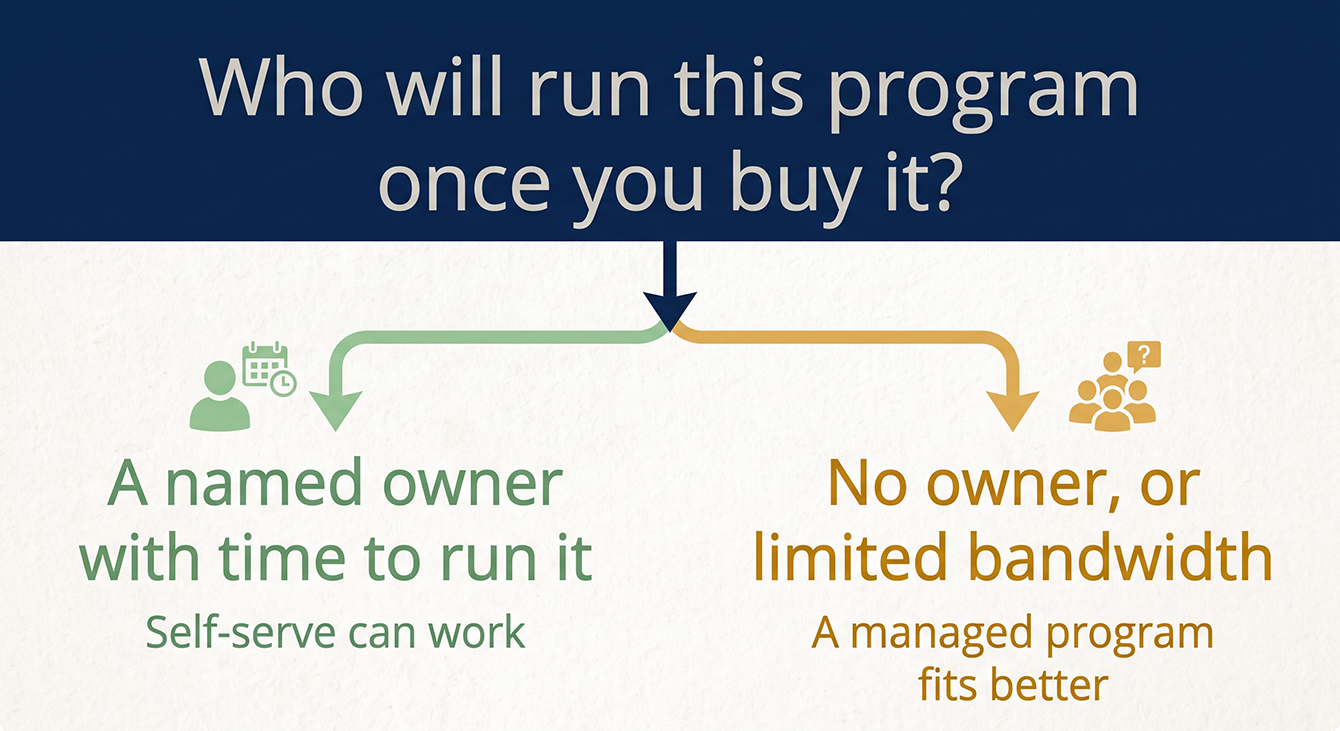
A managed feedback program works differently. A vendor handles setup, survey design, business rules, alert configuration, and ongoing management on your behalf. You get results without owning the operations. The framing here is neutral: if you have internal bandwidth and a designated owner, self-serve works. If you don't, a managed program is the honest answer. Many businesses learn this the hard way.
The Feedback Program Readiness Check
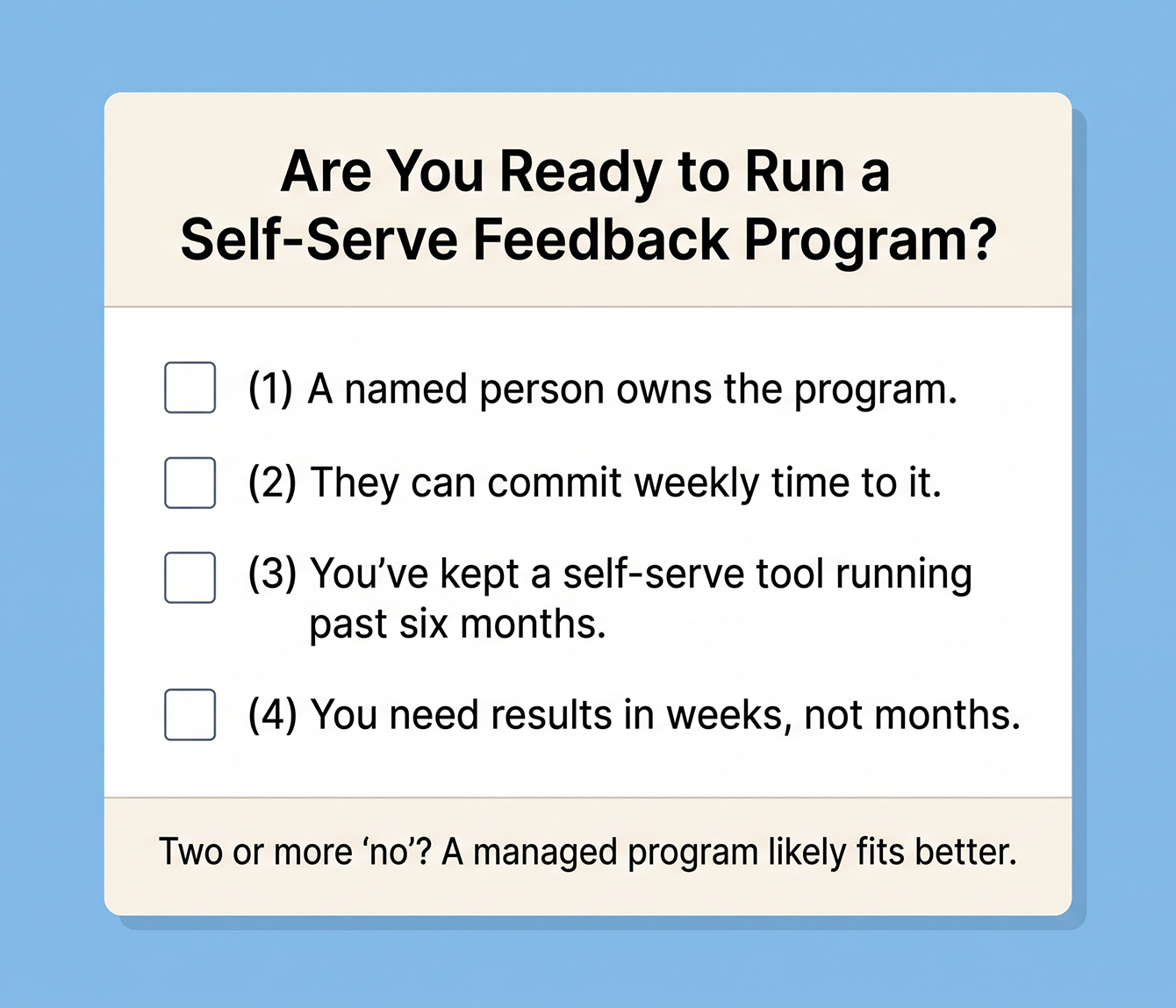
Before you commit to any tool, run through these four questions:
- Do you have a named person who will own this program?
- Can that person commit recurring weekly time to reviewing results and acting on alerts?
- Have you tried a self-serve tool before and kept it running for more than six months?
- Do you need the program producing results within weeks, not months?
If you answered "no" to two or more, a managed program fits your situation better than a self-serve tool. That's true regardless of which features the self-serve tool advertises. Even AI-assisted tools require someone to own the program. As per a Gainsight report, 52% of CS teams already use AI, saving more than 10 hours per week. But the time savings only matter if someone is there to use them.
Not to mention, forced migrations create a natural re-decision point. Delighted's June 30, 2026 sunset already forced this decision for a lot of teams. If yours defaulted into self-serve last time, this is the moment to ask "who will run this?" before you buy again.
Closing the Feedback Loop: What Happens After You Collect Responses
Collecting feedback is the easy part. The program earns its keep in what happens next: who gets alerted, how to close the loop, how fast they respond, and whether patterns turn into changes. Here's how to close the loop.
Alert Workflows and Detractor Response Timing
Start by defining what score triggers an alert. An NPS® Detractor score of 0 to 6 or a CSAT below 3 are common thresholds. Route that alert to a named owner, not a shared inbox, and set a response SLA. Closing the loop within a day or two is consistently linked to stronger retention and higher NPS® over time.
Here's what a concrete workflow looks like. A customer submits a Detractor score. The system fires a Poor Feedback Alert to the account owner within minutes. The owner calls within 24 hours. The issue gets logged and resolved. The customer gets an update. That sequence turns a negative experience into evidence that you listen.
Individual detractor follow-up is urgent, but pattern recognition is strategic. If three customers in one month mention the same billing issue, that's one process problem. Reacting to individuals saves one customer at a time. Recognizing patterns fixes the root cause for every customer who follows.
How to Know If Your Feedback Program Is Actually Working
Four measurable indicators tell you whether your feedback program is producing usable results or just collecting data.
- Response rate: A healthy email-delivered B2B survey response rate is often 20 to 30%. Below 10% means your list quality, survey timing, or sender reputation needs work.
- Speed from feedback to action: Track time from alert to first contact. Target detractor follow-up within 24 to 48 hours.
- Team visibility and usage: Are the people who receive alerts actually logging in and acting? If your dashboard has three active users and you have 12 customer-facing staff, the program isn't reaching the people who need it.
- Impact on customer outcomes: Track whether customers who received follow-up after negative feedback improves retention at higher rates.
Don't forget to track review volume growth as a secondary indicator. A 2025 BrightLocal report found that 80% of consumers are more likely to use a business that replies to every review. Review engagement is both a reputation signal and a retention lever.
Franchise and Multi-Location Feedback Management
Managing customer feedback across multiple locations is a fundamentally different problem than single-location feedback, with its own visibility and ownership requirements. You need network-level visibility and location-level ownership in the same system. The challenges are specific. Some locations generate dozens of reviews per month. Others have had the same 12 reviews for two years. Without visibility into that gap, the network can't fix it.
Franchise leadership can't see patterns across locations: which ones have rising detractor rates, which have gone quiet, which are generating review growth. Individual operators need to see their own results and act on their own alerts, because a centralized-only view doesn't create local ownership.
The stakes are real. A 2024 BrightLocal report revealed that 91% of consumers say local branch reviews affect how they view the overall brand. One underperforming location's review profile drags down the network. The right customer feedback management system for this use case needs three things:
- Network-level dashboards with location drill-in
- Centralized configuration so franchise leadership sets program standards
- Local operator access so each location sees its own results and alerts
Two configuration models matter: Location-Centric, where each location is the unit of analysis, and Brand-Centric, where the brand is the unit and locations roll up. The right model depends on how the franchise network is structured. LoyaltyLoop's Enterprise Dashboard supports both.
The platform's franchise track record backs it up: LoyaltyLoop customers stay an average of 8 to 10 years, well above typical vendor retention in this category. Google's own guidance confirms that review volume and quality influence local ranking, making review generation at the location level a visibility lever as much as a reputation exercise.
Put Your Customer Feedback Strategy into Action with LoyaltyLoop
You now know how to match a feedback tool to your use case, your metric needs, and your day-to-day reality. More importantly, you know the first question to answer is who will actually run the program. And you know that collecting feedback without acting on it is an expense, while routing alerts to owners and tracking outcomes is revenue protection.
We built LoyaltyLoop to run the entire program for you, from setup and business rules to surveys, alerts, review generation, and ongoing management. Every location executes the same feedback program on time. You prove retention impact with real data. No more paying for software you stopped using months ago.
Discover how we approach fully managed customer feedback programs built for your business type.
See Whether LoyaltyLoop Fits Your Use Case
The tools in this guide all solve part of the problem. See how a managed program handles the whole thing, from setup through follow-up, in a live walkthrough with your team's actual use case.
Schedule a DemoFAQs about the Best Customer Feedback Software
Q: What's the best customer feedback software for small businesses?
A: It depends on whether you have internal bandwidth and expertise to configure and maintain the tool yourself. If you do, SurveyMonkey or Typeform handle simple survey collection. If you don't, a managed program like LoyaltyLoop runs the entire feedback workflow for you. Free tools cap responses and offer no alert routing or closed-loop workflows. Self-serve tools require recurring time to maintain.
Q: What's the difference between customer feedback software and review management software?
A: Customer feedback software collects structured survey responses (NPS®, CSAT, CES) to measure satisfaction and surface improvement signals. Review management software focuses on requesting, monitoring, and responding to public reviews on Google, Yelp, and similar platforms. Feedback software is a customer experience tool; review software is a reputation tool. Tools that combine both, like LoyaltyLoop, eliminate the need to run two separate programs.
Q: How quickly should I follow up with a customer who submits a detractor score?
A: Follow up within 24 to 48 hours. Closing the loop within that window is associated with 12% higher retention and a six-point NPS increase, according to CustomerGauge. Assign detractor alerts to a named owner, not a shared inbox. The follow-up should acknowledge the issue, explain what happens next, and loop back once it's resolved.
Q: Do I need different feedback tools for different locations in a multi-location B2B business?
A: No. The right tool gives you one centralized program with location-level drill-in. Each location sees its own results and alerts while leadership sees network-wide patterns. Tools that require separate instances per location create data silos. They make network-level reporting impossible. Look for centralized configuration with local operator access built into the same system.
Q: What response rate should I expect from a customer feedback survey?
A: A healthy email-delivered B2B survey response rate is 20 to 30%. Below 10% means your list quality, survey timing, or sender reputation needs work. Response rate alone doesn't measure program success. Track speed from alert to first contact, how many customer-facing staff actively use the dashboard, and whether follow-up after negative feedback improves retention at higher rates. Survey timing and business rules protect response rates from fatigue over time.