SurveyMonkey Alternatives for 2026, Ranked by Use Case
Maybe SurveyMonkey worked when you first signed up. Now the cost feels harder to justify, the surveys take more time than expected, or the platform doesn't fit how your team works. Whatever brought you here, you're ready to see what else is out there.
Here's what most lists of SurveyMonkey alternatives won't tell you: the problem isn't always price. Every self-serve alternative still needs someone on your team to build, send, and analyze surveys. That work doesn't disappear. It just moves to a cheaper tool. The one alternative that removes the work is a fully managed customer experience (CX) program, and that's where this guide starts.
Choosing the right replacement means matching the tool category to how your business runs. A business where no one has time to log in each week needs a very different fit than a team with dedicated bandwidth. This guide helps you figure out which one you are.
Main Takeaways
- If no one on your team had time to run SurveyMonkey, a cheaper self-serve tool won't fix that. A fully managed CX program like LoyaltyLoop® is the only alternative that takes the work off your team.
- SurveyMonkey alternatives fall into five categories. The right one depends on whether your real problem is bandwidth or price.
- Price tiers can mislead you. Google Forms, Tally, and Microsoft Forms stay free at any response volume. Typeform costs more than SurveyMonkey by 500 responses a month, and Jotform passes it by 5,000.
- HIPAA support usually sits on a higher tier. Most tools only support Health Insurance Portability and Accountability Act (HIPAA) requirements with a signed agreement on enterprise or higher plans.
- Export before you cancel or downgrade. SurveyMonkey locks responses above your plan's limit, and it can delete them after 30 days.
See How Survey Response Rates Actually Move
Most survey programs stall at delivery, long before design matters. These seven strategies show you what moves response volume at the operational level.
Why People Switch Away from SurveyMonkey
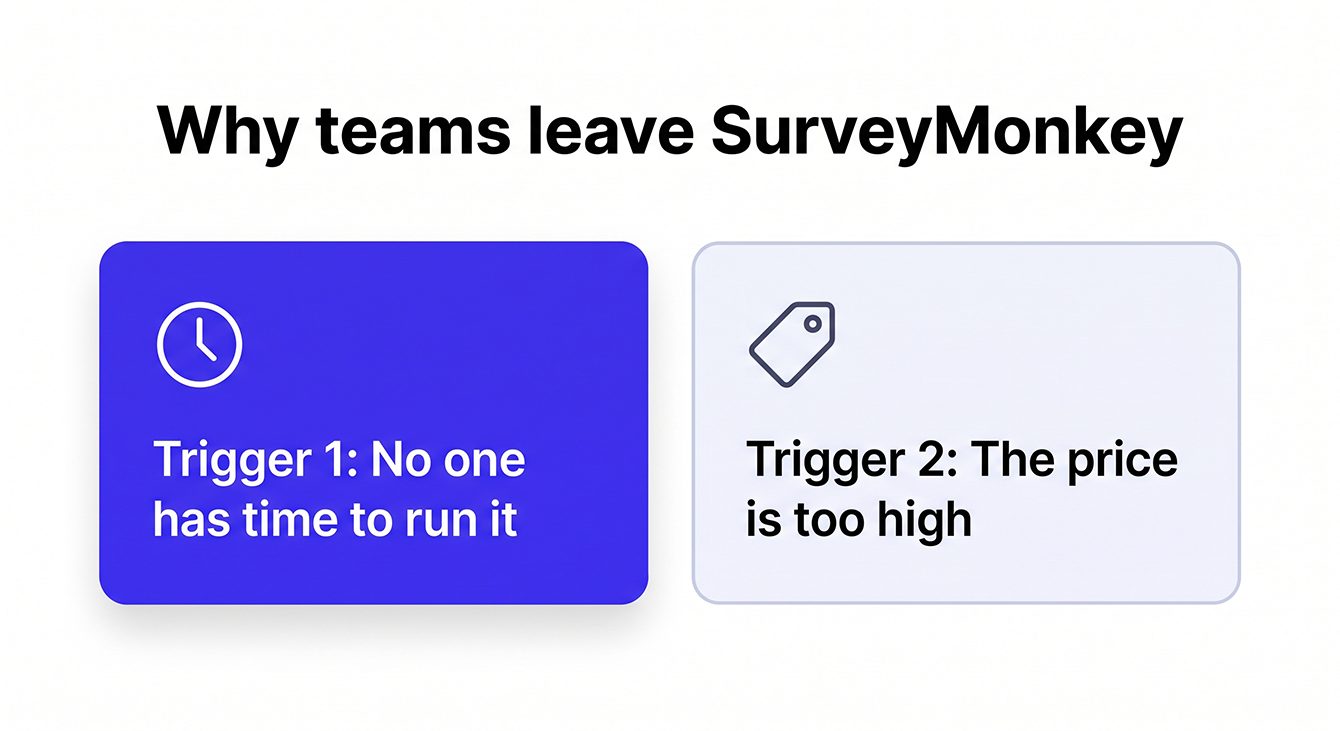
People leave SurveyMonkey for one of two reasons:
- The tool sits idle because no one has time to run it.
- The price is too high for what you get.
The first trigger is quieter, and it's the one most lists miss. If your real problem is that no one has time to build, send, and analyze surveys, a cheaper self-serve tool won't fix anything. The workload is the same. In a 2024 survey from Constant Contact, small businesses named lack of time and resources as leading obstacles to effective marketing. You sign up, build a survey, send it once, and nobody touches it again. The tool works fine. You just don't have someone to own it. That's the problem a managed CX program exists to solve.
The price trigger hits fast. SurveyMonkey's free plan caps you at 10 questions per survey and lets you view only 25 responses per survey. It's built for individual users, and companies outgrow it within weeks. Paid plans raise those limits, but the cost adds up quickly. The individual Advantage Annual plan costs $39/month (billed as $468 annually) and includes up to 15,000 responses per year. The Team Advantage plan costs $30/user/month with a 3-user minimum, also billed annually, and raises the limit to 50,000 responses per year.
For teams already watching their budgets, those costs are hard to justify. That frustration makes sense in context: marketing budgets held flat at 7.8% of company revenue in 2026, according to Gartner. When the budget isn't growing, every recurring subscription gets a second look.
This guide covers both triggers because the right replacement depends on which problem you're solving.
Five Categories of SurveyMonkey Alternatives: Which One Applies to You?
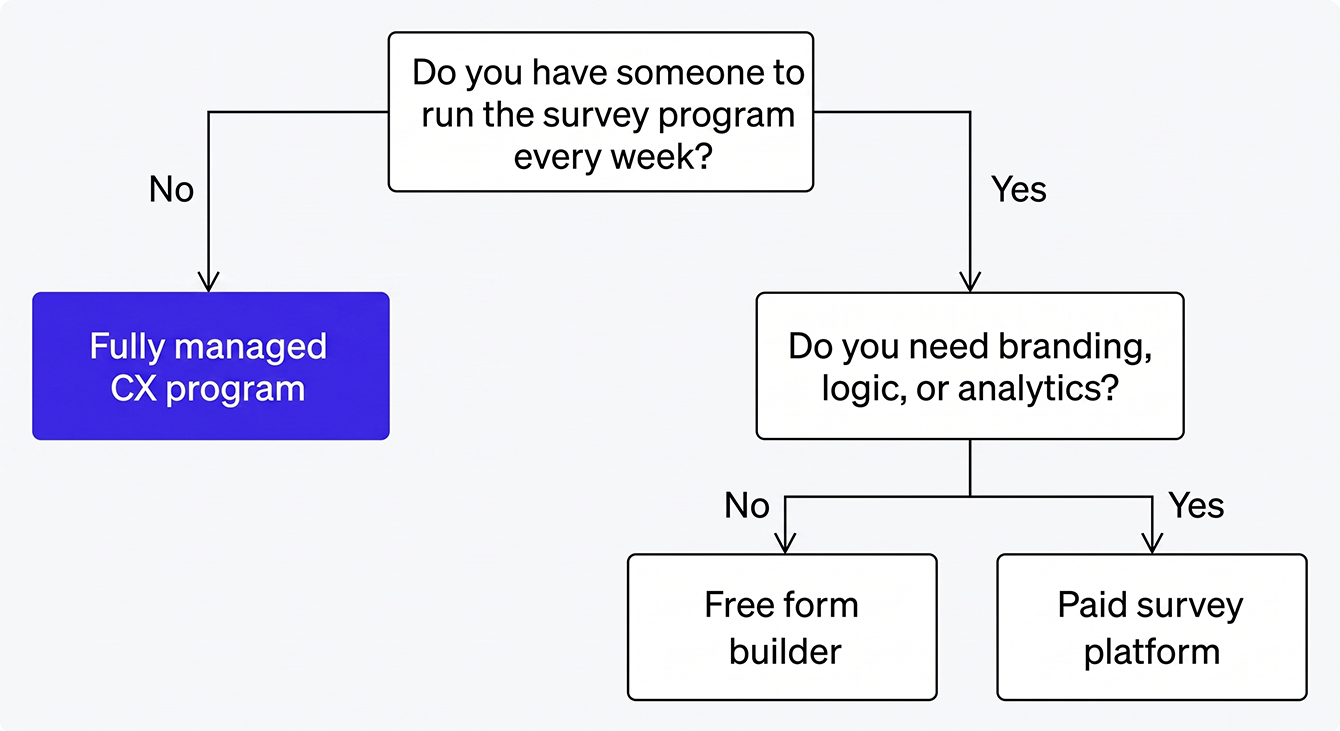
SurveyMonkey alternatives fall into five distinct categories. The right one depends on whether you have someone in-house to run the program, your use case, and your budget at real volume.
- Fully managed CX programs. Best for businesses without internal bandwidth to run a survey program. Start with the fully managed section below.
- Free form builders. Best for simple data collection with no budget. See the free alternatives section.
- Paid survey platforms. Best for branded surveys with logic and analytics. See the paid alternatives section.
- Enterprise research tools. Best for complex research at scale. See Qualtrics in the paid section.
- Open-source survey tools. Best for teams that need self-hosting or full data control. See Formbricks in the free section.
One distinction matters before you pick a category. Post-transaction customer feedback is its own use case. It involves automated surveys sent after a sale or service interaction to measure satisfaction and generate reviews. General-purpose survey builders handle forms, questionnaires, and one-off data collection. They don't handle post-transaction feedback natively, and none of them run the program for you. That's why fully managed CX programs belong in their own category, and why they come first in this guide.
How we picked and rated these tools
We didn't try to list every survey tool on the market. We picked the 10 that come up most often when small and mid-sized businesses (SMBs) leave SurveyMonkey, then judged each one on four things:
- Who does the work. We noted whether someone runs the program for you or you operate the tool yourself.
- The first wall you hit. Every self-serve tool has a limit that forces an upgrade. We looked for it: response caps, branding, logic, exports, or seats.
- What you pay at real volume. We priced each tool at 500, 1,000, and 5,000 responses a month, using annual billing so the numbers are comparable.
- Compliance. We checked whether HIPAA with a Business Associate Agreement (BAA) is available, and on which plan.
Pricing and limits come from each vendor's published pricing page as of September 2026, and we cross-checked recurring complaints in user reviews on G2 and Capterra. Vendors change pricing without notice, so confirm the current plan before you buy.
A side-by-side comparison of SurveyMonkey alternatives
| Tool | Best For | Free Plan Cap | Starting Paid Price | Self-Serve or Managed | HIPAA/BAA Available |
|---|---|---|---|---|---|
| LoyaltyLoop | Businesses without internal bandwidth to run a program | None | $99/month per location, plus a one-time setup fee | Fully managed | Yes (Contact us for details) |
| Google Forms | Simple, free data collection | Unlimited responses | Free (no paid tier needed) | Self-serve | Only on a paid Workspace plan with a signed BAA |
| Tally | Unlimited free forms, modern interface | Unlimited forms and submissions | $29/month (Pro) | Self-serve | No |
| Microsoft Forms | Free surveys inside Microsoft 365 | Unlimited with a Microsoft account | Free (included in Microsoft 365) | Self-serve | Only under a Microsoft 365 enterprise agreement with a signed BAA |
| Jotform | Free form building with templates and logic | 5 forms, 100 submissions/month | $39/month (Bronze; $34 billed annually) | Self-serve | Yes (Gold/Enterprise) |
| Formbricks | Open-source, self-hosted survey control | Unlimited (self-hosted) | Free (self-hosted); cloud plans from $49/month | Self-serve | Depends on deployment |
| Typeform | Branded, conversational surveys | 10 responses/month, with Typeform branding | $39/month (Basic; $28 billed annually) | Self-serve | Yes (Enterprise) |
| Qualtrics | Enterprise research and complex logic | None | Custom pricing | Self-serve | Yes (Enterprise) |
| SurveySparrow | Recurring surveys with automation | 3 surveys, 75 responses per quarter | $19/month (Basic; billed yearly or quarterly, no monthly option) | Self-serve | Yes (Professional/Enterprise) |
| Alchemer | Mid-market workflow integration | None | $55/user/month (Collaborator) | Self-serve | Yes (Business Platform) |
Most readers will land in one or two categories. The table gives you the snapshot. The sections below give you the detail to decide.
Fully Managed CX Programs: The SurveyMonkey Alternative Most Lists Skip
A fully managed CX program is the one category of SurveyMonkey alternatives that removes the work instead of moving it. Someone else handles setup, configuration, survey delivery, and ongoing operation, so your team doesn't have to run anything. This category exists because most alternatives assume you want another tool to operate yourself. For many businesses, that assumption is the reason the last program failed in the first place.
What "managed" means in practice
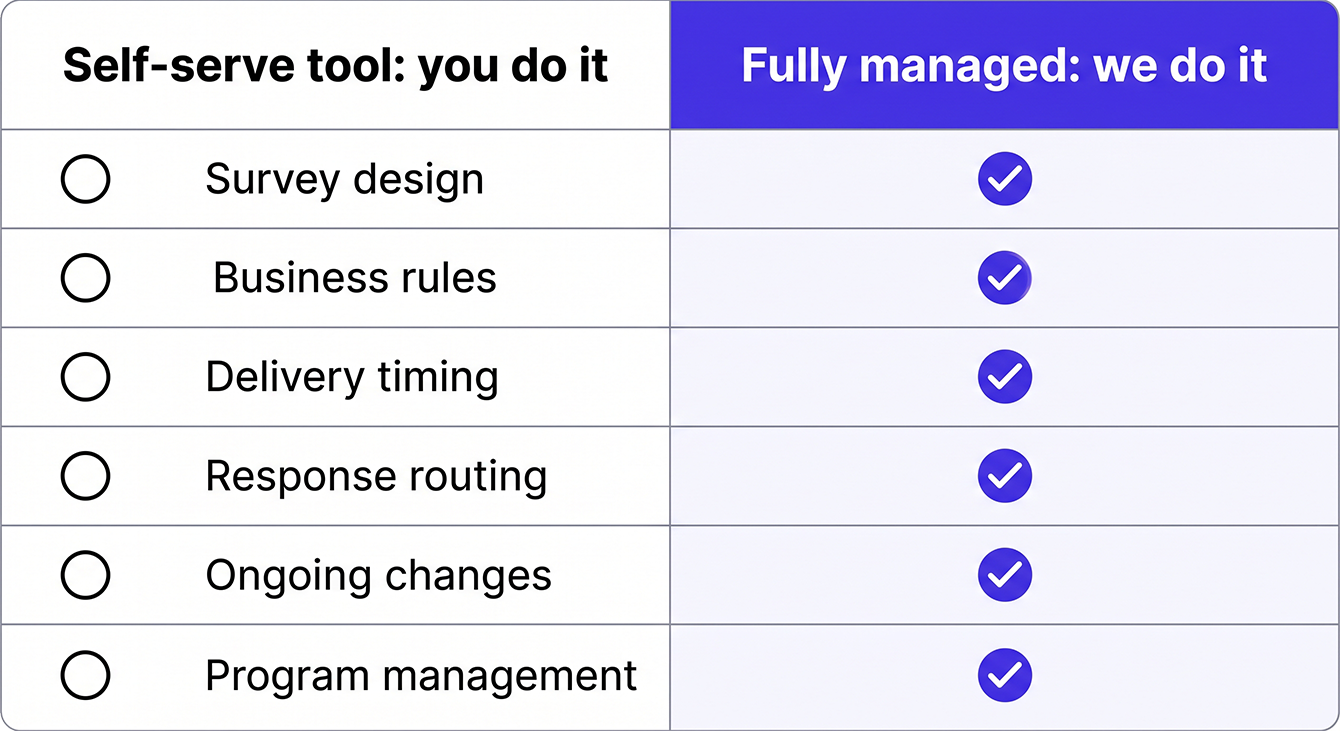
Every self-serve tool in this guide gives you the software. You build the surveys, configure the logic, manage distribution, and analyze results. A managed CX program does all of that for you. This category exists because of the bandwidth trigger: businesses that tried a self-serve tool, found it too time-consuming to maintain, and abandoned it. The operating model caused the failure, and a new tool with the same operating model won't fix it.
This category fits business owners and operations leaders who need a customer feedback program running but don't have a team member to own it. It also fits teams leaving a retired tool like Delighted who want a program running again without rebuilding from scratch.
LoyaltyLoop: best for businesses without internal bandwidth
We built LoyaltyLoop as a fully managed CX program for post-transaction customer feedback. Automated Net Promoter Score℠ (NPS®) and satisfaction surveys go out after transactions, with review generation built into the same workflow. Setup is typically a single 45-minute onboarding call, and most customers are live in under a week. Larger organizations may take a few weeks.
We handle what self-serve tools don't: survey design, business rule configuration, delivery timing, response routing, and ongoing program management. You don't log in unless you want to. That's why our customers stay with us for 8 to 10 years on average, and why our own customer base backs the platform with hundreds of five-star Google reviews.
Watch out for: LoyaltyLoop is built for post-transaction or post-experience feedback and review generation by ongoing engagement of customers, employees, partners, or other business stakeholders. If you need one-off forms, quizzes, or academic research surveys, a self-serve builder below is the better fit.
Evaluate What a Managed CX Program Covers
If your last survey tool sat idle, the operating model was the problem. See how a fully managed program handles setup, delivery, and ongoing adjustments for you.
Free SurveyMonkey Alternatives
If you have someone to run the tool and your needs are simple, five tools cost nothing to start. Each one caps you differently, though. "Free" means something different depending on your volume. Here's how each one compares.
Google Forms: best for simple, free data collection with no response limits
Google Forms gives you unlimited responses on a free plan, with no caps at any volume. You get no branding restrictions and native integration with Google Sheets for analysis. The tradeoff is depth. There's no survey logic branching, no NPS® scoring, and no branded design. You get a data collection tool. A full survey program needs more than that.
Google Forms fits teams that need simple data collection at no cost. If you need advanced logic, branded surveys, or analytics, you'll need a paid tool.
Watch out for: No way to schedule sends or trigger a survey from a transaction. Every survey is a manual send.
Tally: best for unlimited free forms with a modern interface
Tally offers unlimited forms and submissions for free, with no response caps. It has the most generous free tier of any tool on this list, and it stays free as long as you stay within the platform's fair usage guidelines. The interface feels modern and clean, closer to Typeform's experience than Google Forms' plain layout.
The limits show up elsewhere. The free tier has fewer integration options than Typeform or Jotform. Advanced features like custom domains and team collaboration require Pro at $29/month.
Watch out for: Tally is a young company built for forms. It has no compliance program for regulated data.
Microsoft Forms: best for teams already on Microsoft 365
Microsoft Forms is free with any Microsoft account and included in every Microsoft 365 subscription, with no response caps. Results flow straight into Excel, forms embedded in SharePoint and Teams, and Power Automate can move responses into other Microsoft tools. If your business already runs on Microsoft 365, it's the fastest zero-cost option on this list.
The tradeoff is design and depth. Forms look corporate, customization is minimal, and there's no branded survey experience. Logic is basic branching only.
Watch out for: HIPAA coverage depends on your organization's Microsoft 365 agreement, not on Forms itself. If you're on a personal or small-business plan, assume you don't have it.
Jotform: best for free form building with templates and conditional logic
Jotform's free plan includes conditional logic and 10,000+ templates, features most competitors lock behind paid tiers. The free Starter plan allows 5 forms and 100 monthly submissions. That 100-submission cap is tight for any recurring feedback program. Once you outgrow it, paid plans start at Bronze: $39/month ($34 billed annually) for 25 forms and 1,000 submissions.
Watch out for: The free plan also has a lifetime cap of 500 stored submissions. You can hit it without ever passing 100 in a single month.
Formbricks: best for open-source, self-hosted survey control
Formbricks is an open-source SurveyMonkey alternative you can self-host for full data ownership. You own the code, the data, and the infrastructure. The free Community plan gives you unlimited surveys and responses on self-hosted instances. The cloud version is free up to 1,000 responses a month, and the Startup plan is $49/month for 5,000.
The catch is technical overhead. You need developer resources to deploy and maintain it. Formbricks fits teams that care about data residency and have the technical resources to support a self-hosted deployment.
Watch out for: "Free" self-hosting still costs server time and a developer's attention. Budget for both before you commit.
Paid SurveyMonkey Alternatives
Paid self-serve alternatives give you what free tools don't: branded design, advanced logic, analytics, and scale. Pricing varies a lot depending on how many responses you collect.
Typeform: best for branded, conversational surveys
Typeform's conversational format often beats traditional grid-style surveys on completion rates. The one-question-at-a-time design works especially well for customer-facing surveys where you need people to finish. The free plan allows only 10 responses a month and keeps Typeform branding on your forms, so treat it as a test tier. Basic is $28/month billed annually ($39 monthly) for 100 responses. Plus is $56/month billed annually ($79 monthly) for 1,000 responses and is the first plan that removes Typeform branding. Business is $91/month billed annually ($129 monthly) for 10,000. Typeform also sells a Growth Flow plan at $266/month billed annually with 10,000 responses and a 14-day free trial, but it requires a credit card and is built for marketing automation, so it's overkill for a feedback program. HIPAA with a BAA is available only on Enterprise plans.
Watch out for: When you hit your plan's monthly response cap, the form stops collecting. Late respondents are turned away until the month resets or you upgrade.
Qualtrics: best for enterprise research and complex survey logic
Qualtrics is the industry standard for enterprise survey research, but its pricing and complexity are overkill for most SMBs. The platform handles advanced branching, panel management, and statistical analysis at a scale no other tool on this list matches.
One migration note worth flagging: Qualtrics retired Delighted on June 30, 2026. Teams that ran on Delighted now need a new home for their feedback program and their historical data.
Watch out for: Most Qualtrics suites are quote-only, and the self-serve research plan starts at $420/month. Plan for a sales cycle, not a checkout page.
SurveySparrow: best for recurring surveys with automation
SurveySparrow's recurring survey scheduler is built for ongoing feedback programs rather than one-off data collection. You can schedule NPS®, Customer Satisfaction (CSAT), or employee engagement surveys on a cadence without manual sends. That makes it a strong fit for teams that want to automate a feedback loop and have someone to manage it. The free plan is limited to 3 surveys with 75 responses per quarter. Basic is $19/month for one user and 2,500 responses a year, and Starter is $39/month for 15,000 responses a year. SurveySparrow bills yearly or quarterly with no monthly option, and pricing for Business and higher tiers requires a sales call.
Watch out for: Response limits are yearly, not monthly. Basic's 2,500 responses works out to about 200 a month, which a steady feedback program can burn through fast.
Alchemer: best for mid-market teams that need workflow integration
Alchemer fills the gap between basic form builders and enterprise research platforms. Its pricing reflects that middle ground. The tool is strong on workflow integrations with Salesforce, HubSpot, and Slack. Survey logic rivals Qualtrics without the enterprise-tier complexity. There's no free plan, and the starting price runs higher than Typeform for similar features.
Watch out for: Pricing is per user, and the Professional and Full Access plans cap at three users. Teams larger than that land on the quote-only Business Platform.
Paid tools solve the feature problem. They don't solve the bandwidth problem. Every one of these still needs someone on your team to build, send, and analyze surveys. If that's the part that failed last time, go back to the fully managed section above.
What "Free" Actually Costs at Scale
Most "free" survey tools stop being free somewhere between 100 and 1,000 monthly responses. At scale, several cost more than SurveyMonkey's paid plan. That's because most free tiers are designed for trial use rather than ongoing programs. The moment you run a recurring feedback loop, you hit caps that force an upgrade.
SurveyMonkey's Advantage Annual plan is $39/month, billed annually. Here's what the "free" alternatives cost at the same volume. All prices below are billed annually so the comparison is fair. Monthly billing runs about 30% to 40% higher.
| Tool | 500 Responses/Month | 1,000 Responses/Month | 5,000 Responses/Month |
|---|---|---|---|
| Google Forms | Free | Free | Free |
| Tally | Free | Free | Free |
| Microsoft Forms | Free | Free | Free |
| Jotform | $34/month (Bronze) | $34/month (Bronze) | $99/month (Gold) |
| Typeform | $56/month (Plus) | $56/month (Plus) | $91/month (Business) |
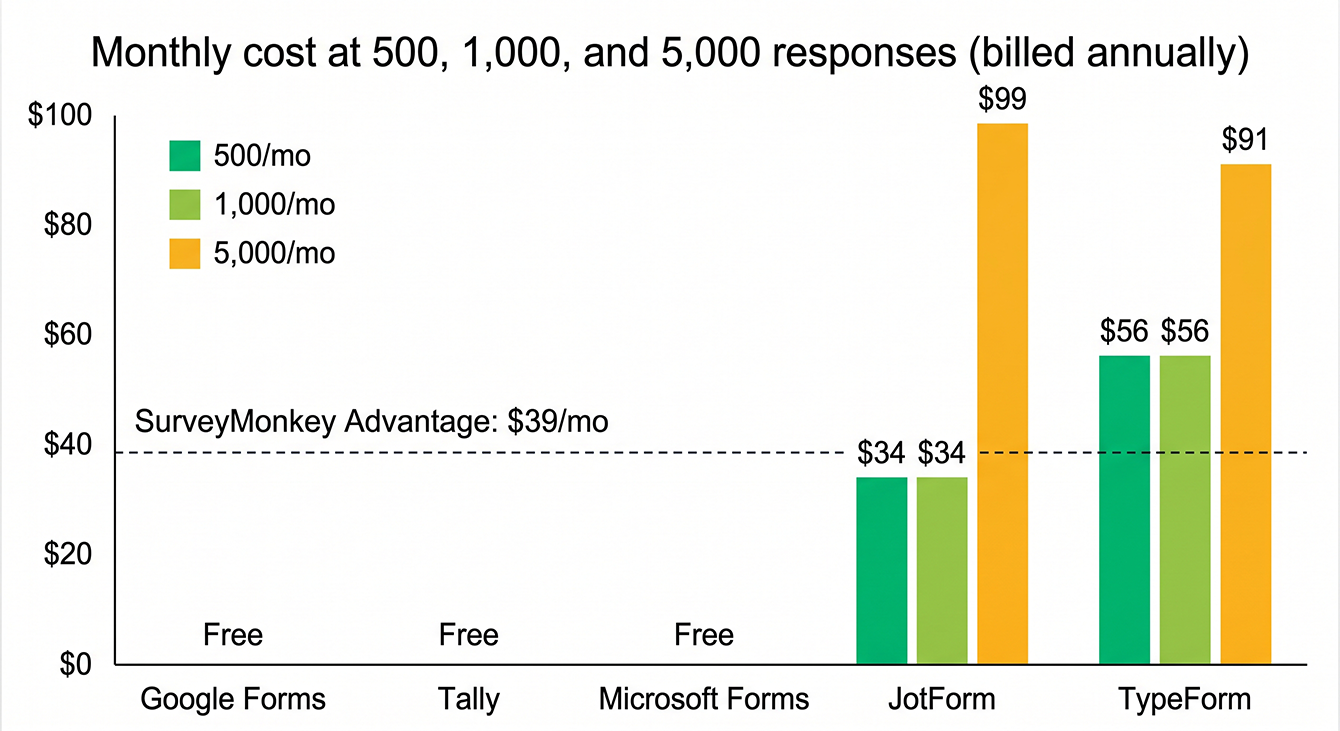
Jotform's free plan caps out at 100 submissions per month. At 500 responses, you're already on Bronze at $34/month, within $5 of SurveyMonkey. Typeform's free plan stops at 10 responses a month and Basic stops at 100. At 500 responses you need Plus at $56/month, which is $17 more than SurveyMonkey. At 5,000 responses a month, Typeform's Business plan is $91 and Jotform's Gold plan is $99, more than double SurveyMonkey's price. (SurveyMonkey's Advantage Annual plan covers 15,000 responses a year, so you'd outgrow it at that volume, too.) The "cheaper alternative" math flips faster than most comparison lists admit.
Even tools that stay free at volume cost something: your time. Building surveys, managing distribution, analyzing results, and following up on feedback is operational work someone has to do. If no one had time to run SurveyMonkey, a cheaper tool that needs the same effort doesn't change anything. A managed program starts at $99 per location per month and includes the people doing that work.
How to Switch from SurveyMonkey Without Losing Your Data
Switching from SurveyMonkey takes less than a week. Handle the data export before you cancel, and confirm your replacement can do what you need before you commit. From there, follow these steps:
- Export all survey results from SurveyMonkey as CSV or XLS before you cancel or downgrade. You lose access to raw data after your plan ends, and if you downgrade, responses above your new plan's limit become unviewable and may be deleted after 30 days.
- Download any custom survey designs or question banks you want to copy.
- Confirm your replacement can handle your survey logic: branching, skip logic, and piping. With a managed program, this is a conversation on the onboarding call, not a feature checklist.
- Verify your new tool meets your compliance requirements (HIPAA/BAA, if applicable).
- Test survey delivery in your new tool with a small batch before going live.
- Update any integrations, such as your customer relationship management (CRM) system or email platform, that currently connect to SurveyMonkey.
- Set a realistic onboarding timeline. Managed programs can be live in under a week. Most self-serve tools take one to two weeks to configure.
If your survey program relies on email invitations, check that your new tool's sending domain is authenticated with Sender Policy Framework (SPF), DomainKeys Identified Mail (DKIM), and Domain-based Message Authentication, Reporting, and Conformance (DMARC). Since 2024, Gmail and Yahoo require bulk senders to authenticate and keep spam complaints under 0.3%, according to Google. Otherwise, invites get blocked.
How to Choose the Right SurveyMonkey Alternative
The right alternative depends on three factors:
- Whether you have someone to run the tool
- What you'll pay at your real response volume
- What compliance requirements apply to your data
Internal bandwidth to operate the program
Every self-serve tool needs someone to own it. If your last survey program stalled because no one had time, the next self-serve tool will stall for the same reason. Ask yourself: do you have a person who will log in weekly, review responses, and follow up on what they find? If the answer is no, a managed program is a better fit than a cheaper tool. Start there, and only move to the self-serve options if you have a clear owner.
Budget for your real volume
Don't judge a tool on whether it has a free plan. Judge it on what you'll pay at 1,000 or more responses per month. The pricing-at-scale section above maps the exact crossover points where "free" tools become more expensive than SurveyMonkey. Factor in hidden costs, too. Time spent building surveys, managing distribution, and analyzing results is a real cost, even when the tool is free.
Compliance requirements
Most businesses on this list are based in the US and survey US customers, so two frameworks matter most.
First, **HIPAA**. If you collect health data, you need HIPAA with a signed BAA. Most tools only offer that on higher-priced tiers. SurveyMonkey requires Enterprise. Typeform signs BAAs on Enterprise. Jotform starts HIPAA at its Gold plan.
Second, **US state privacy laws**. Several new ones took effect on January 1, 2026, so the rules you're judging against are broader than they were a year ago. Ask your vendor for its Data Processing Agreement (DPA), and confirm how it stores and deletes response data.
One more, only if it applies to you. If you also collect data from customers in the EU or UK, the **General Data Protection Regulation (GDPR)** comes into play. In that case, confirm the tool offers a DPA and check whether it can store data on EU servers. If all your customers are in the US, this one likely doesn't affect you.
Go beyond "claims compliance." Ask for the DPA, confirm BAA availability at your plan level, and verify where your data lives before you commit.
Take the Work Out of Running a CX Program with LoyaltyLoop
The best SurveyMonkey alternative depends on more than features or price. You also need to consider who will keep it running and what it will cost at scale. If your team has the bandwidth for a self-serve platform, plenty of options on this list can work. If it doesn't, switching to another self-serve tool leaves you with the same problem.
Most alternatives on this list give you software to run yourself. We built LoyaltyLoop for businesses that need the program running without adding to their team's workload. Every location gets a feedback program that runs on time. You can prove what's working with real data. And you never have to log in unless you want to.
Choose the Alternative That Comes with a Team
If another self-serve platform won't solve the real problem, try a different approach. See how LoyaltyLoop keeps customer feedback moving for you.
FAQs about SurveyMonkey Alternatives
Q: Can I run a customer feedback program without anyone on my team managing it day-to-day?
A: Yes. With a fully managed CX program like LoyaltyLoop, we handle survey design, delivery timing, response routing, and ongoing program management. Your team doesn't log in unless they want to. Every self-serve tool on this list needs someone to own setup, maintenance, and analysis. A managed program stays running whether or not anyone checks in.
Q: Is there still a free version of SurveyMonkey?
A: Yes, SurveyMonkey still offers a free plan. It caps you at 10 questions per survey, and you can view only the first 25 responses per survey. Most teams hit that wall within weeks. Response exports, survey logic, and team features are all locked behind paid plans starting at $39/month. That makes the free tier unusable for any recurring feedback program.
Q: Is Google Forms or SurveyMonkey better?
A: Google Forms is better for simple, free data collection with no response limits. SurveyMonkey is better when you need advanced logic, branded surveys, or analytics. But its paid plans start at $39/month billed annually, where Google Forms stays free at any volume. Most SMBs don't need the features SurveyMonkey charges for. That's why Google Forms is the default pick when budget is the main constraint and someone on your team can run it.
Q: What happens to my SurveyMonkey data if I cancel or downgrade before exporting it?
A: You lose access to all raw survey data the moment your paid plan ends or your free trial expires. If you downgrade instead of canceling, responses above your new plan's limit become unviewable and may be deleted after 30 days. SurveyMonkey doesn't provide a grace period for data export after cancellation. Export all responses as CSV or XLS before you make any plan change, and download any custom survey designs or question banks you want to copy. Those are locked too once your plan lapses.
Q: Which SurveyMonkey alternative works best for a business that collects fewer than 100 responses per month?
A: It depends on who's running it. If you have someone to own the tool, Google Forms, Tally, or Microsoft Forms all offer unlimited responses on free plans, and setup takes under an hour. If you don't, a managed program is the better fit even at low volume, because the volume was never the reason the last tool sat idle.