10 Best Voice of the Customer Tools for 2026
You bought a feedback tool, but nobody had time to run it. The login still sits unused. Customers keep having good and bad experiences that never reach you. It's a frustrating problem, especially when the whole point of the tool was to help you understand what customers think.
Voice of the customer tools, also known as VoC platforms, help you collect that feedback and turn it into real improvements. The catch? They only deliver value when someone has time to manage them. So when you choose a tool, weigh how much work your team can realistically take on right alongside the features.
Tools also differ in how much they ask of you. A fully managed VoC program sits in its own category, with a vendor team that runs the program for you. Below, we'll compare the best voice of the customer tools for 2026 by feedback type, setup demands, and pricing structure, so you can find one your team will keep running.
Main Takeaways
- VoC tools fall into four categories: managed programs, survey platforms, digital and product feedback tools, and enterprise customer experience (CX) platforms.
- Your structure and spare time should pick the category. A tool that needs weekly attention goes dormant when nobody owns it.
- Self-serve software looks cheaper on the subscription line, but your team's hours and the risk of dormancy are part of the cost.
- The right tool should fit your needs and bandwidth. Compare integrations, survey channels, reporting depth, support models, and pricing plans before choosing.
- A VoC program earns its return by responding to detractors, requesting reviews and referrals, surfacing cross-sell leads, and winning back dormant customers.
What Does a Voice of the Customer Tool Do?
A voice of the customer tool gathers customer feedback from surveys, online reviews, and support tickets. It can also pull in call transcripts and in-app prompts. It scores that feedback for sentiment and spots patterns over time. Then it sends what it finds to the people who can fix small problems before they grow.
Most tools work in three stages. First, they collect structured scores and open-ended comments. Next, they analyze those responses for trends, using metrics like Net Promoter Score℠ (NPS®), customer satisfaction (CSAT), and customer effort score (CES). Finally, they route each insight to whoever can fix a problem or build on a win.
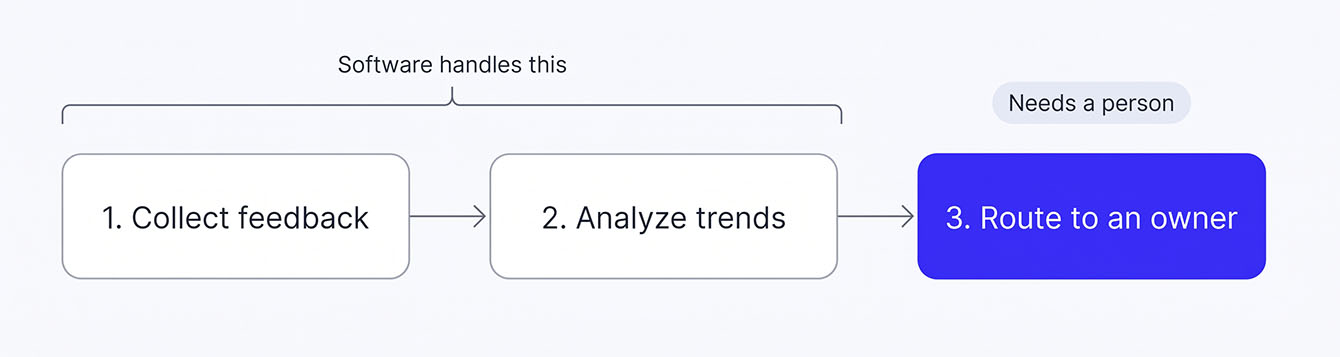
Software handles the first two stages well. The third needs a person who owns the workflow. That's where most VoC programs stall.
Why Feedback Needs an Owner
Tracking customer sentiment is an important starting point. Customer satisfaction metrics like NPS, CSAT, and CES show you how customers feel about their experiences. What a score can't do is make sure someone follows up. A dashboard can flag a problem, but a person still needs to reach out and make things right.
That follow-through pays off. After years of decline, CX quality is starting to recover. In Forrester's 2026 CX Index, 26% of North American brands made significant gains, while just 7% declined. If your VoC tool produces reports nobody reads, fix the operating model first. New software won't change who does the follow-up.
Pick the Right Metric for Every Customer Touchpoint
NPS, CSAT, and CES each answer a different question. See how they work together so you measure what actually matters at each stage.
Types of VoC Tools by Business Type
Voice of the customer tools fall into four main categories: managed VoC programs, survey and feedback platforms, digital and product feedback tools, and enterprise CX platforms. Each collects and uses customer feedback differently, and each asks for a different level of involvement from your team.
The best fit depends on how your business operates. A small business gathering post-sale feedback has different needs than a SaaS team tracking in-app behavior or an enterprise analyzing thousands of customer interactions. And if you don't have dedicated CX staff, the time it takes to run a program matters as much as its features.
Which Type of VoC Tool Is Right for Your Business?
Before comparing individual tools, find your business in the table below and treat the examples as your starting shortlist. Each row matches a business type to a tool category, the criteria that matter most, and tools worth considering.
| Business Type | Tool Category | Key Selection Criteria | Example Tools |
|---|---|---|---|
| Multi-location / franchise | Managed VoC program | Location-level reporting, no setup work for each franchisee, review requests for every location, network-wide Net Promoter Score℠ (NPS®) tracking | LoyaltyLoop |
| SMB / single-location | Survey & feedback platforms | Low cost, email + SMS channels, simple setup, Google review integration | SurveyMonkey, Typeform, Birdeye |
| SaaS product team | Digital & product feedback | In-app widgets, session replay, feature-request boards, product analytics integration | Usersnap, Hotjar, Pendo |
| Enterprise CX | Enterprise CX platforms | Omnichannel intake (calls, chat, social, tickets), AI-powered sentiment analysis, predictive analytics, CRM integration | Qualtrics, Medallia, InMoment |
Your row narrows the field before you compare a single feature. Franchise networks and businesses without CX staff fit a managed VoC program, the done-for-you option. Single-location businesses that want to run things themselves usually start with DIY surveys. SaaS product teams lean on digital feedback tools, while enterprise CX platforms handle huge volumes of feedback with sentiment scoring.
The Best Voice of the Customer Tools in 2026
We picked these tools based on feedback channels, setup effort, who runs the program, and pricing structure. Start with the quick comparison below, then find your category and compare within it.
| Tool | Category | Best For | Pricing | Who Runs It |
|---|---|---|---|---|
| LoyaltyLoop® | Managed VoC program | SMBs, franchise networks, and service businesses without CX staff | From $99/mo for the first location, plus setup | The vendor's team |
| SurveyMonkey | Survey & feedback | Fast survey creation | Free Basic plan; team plans from $30/user/mo, billed annually | Your team |
| Typeform | Survey & feedback | Higher completion rates | Free plan; paid plans from $28/mo billed annually or $39/mo billed monthly | Your team |
| Birdeye | Survey & feedback | Review-focused local businesses | Custom quote based on number of locations | Your team |
| Usersnap | Digital & product | Visual bug reports | Free trial; paid plans from €49/mo | Your team |
| Hotjar (now part of Contentsquare) | Digital & product | On-site behavior insights | Free plan; paid plans from $39/mo | Your team |
| Pendo | Digital & product | In-app feature adoption | Free up to 500 monthly active users; paid plans by quote | Your team |
| Qualtrics XM | Enterprise CX | Enterprise research programs | Custom quote | Your team, often with dedicated admins |
| Medallia | Enterprise CX | Complex, multi-channel journeys | Custom quote | Your team, plus vendor services |
| InMoment | Enterprise CX | Making sense of raw feedback | No public pricing; demo required | Your team, plus vendor services |
Managed VoC Programs (Best for Businesses Without Dedicated CX Staff)
Managed VoC programs form their own category with a different operating model. The vendor owns setup, survey deployment, and ongoing program management. In plain terms, it's done-for-you VoC. You get the program's results while someone else runs the machinery.
LoyaltyLoop® is a fully managed VoC program that runs your surveys, review requests, and reporting so your team doesn't have to. Best for SMBs, franchise networks, and service businesses that need a program that keeps running without extra work. We're a Net Promoter System licensee, and we run the program on your behalf. Depending on your plan, that covers survey timing, business rules, cross-sell prompts, and dormant customer win-back. Surveys and review requests go out by email or SMS, with SMS available as an add-on. The program keeps going even when your team gets busy.
Do-It-Yourself (DIY) Survey Platforms (Best for SMBs)
SurveyMonkey is a survey builder for creating and sending customer satisfaction surveys fast. Best for SMBs that need quick survey creation. Its edge is a deep template library and an interface most people already know, plus a limited free tier.
Typeform is a form and survey tool built around a conversational style. Best for SMBs and creators who want more people to finish. It shows one question at a time, which cuts down on abandonment.
Birdeye pairs customer feedback surveys with review management. Best for local businesses and multi-location operators focused on reviews. It puts survey collection, reviews, and listings in a single dashboard.
Digital and Product Feedback Tools (Best for SaaS Teams)
Usersnap collects visual feedback and bug reports inside your app. Best for SaaS product teams. Users can attach screenshots and notes tied to specific parts of the interface.
Hotjar shows how visitors actually behave on your site. Best for product and UX teams. It pairs heatmaps and session recordings with on-site surveys. Hotjar is now part of Contentsquare, which offers a free plan.
Pendo is a product analytics and in-app guidance platform. Best for product-led growth teams. It combines in-app guides, usage analytics, and Net Promoter Score℠ (NPS®) surveys to track feature adoption.
Enterprise CX Platforms
Qualtrics XM is an experience management platform that pulls feedback from every channel into one system. Best for enterprise CX and research teams. It stands out for predictive analytics and dashboards tailored to each role. Side note: Qualtrics shut down its Delighted product on June 30, 2026. That's a reminder that platform stability matters when you choose a tool.
Medallia is an experience platform for large enterprises with complex customer journeys. Best for enterprise CX operations teams. Its AI text analytics read calls, chat, social posts, and surveys together.
InMoment is a CX platform built to make sense of raw feedback. Best for enterprise brands sitting on piles of reviews, social posts, and call transcripts. Its natural language processing (NLP) finds recurring themes across all three.
Free and Low-Cost VoC Options
Not ready to invest in a dedicated VoC tool? You can start even simpler with Google Forms. It's free and lets you collect unlimited responses, but it has no analytics, no NPS calculation, and no review requests. Some dedicated tools also offer free plans with limits. SurveyMonkey's free Basic plan limits how many responses you can view per survey, which makes it better for testing the idea than running a full program. Contentsquare, which now includes Hotjar, offers a free plan with basic behavior analytics and a monthly session cap.
These options can help you collect feedback, but turning it into an ongoing VoC program takes more effort. They won't track trends over time or route feedback to the right person. They won't trigger review requests or resurvey customers on a schedule. That work lands on you: exporting data, building reports, and following up on every response by hand.
With that legwork in mind, you'll know you've outgrown free tools once you hit one of three marks:
- You track several locations.
- You have repeat customers to keep.
- You have nobody to run things week after week.
Most self-serve tools charge a monthly fee past the free tier. For those businesses, a managed program like LoyaltyLoop starts at $99 a month for the first location and takes the work off your plate.
Managed vs. Self-Serve: Which Model Fits Your Business?
Self-serve VoC software and fully managed VoC programs solve the same problem with two different operating models. With self-serve, your team configures, runs, and maintains the tool. With a managed program, the vendor's team does most of that work for you. Your internal bandwidth should drive the choice more than your budget.
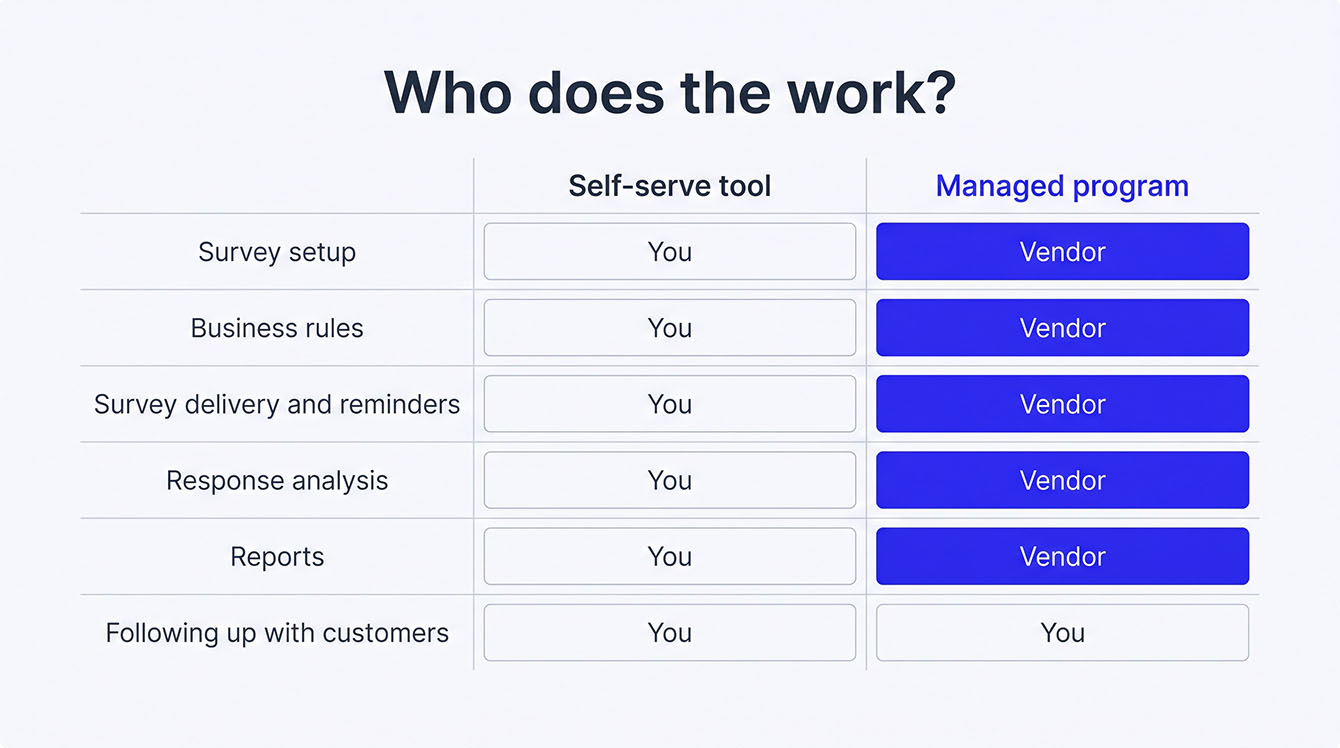
Setup is the first place the two models split. A self-serve tool asks you to build surveys, set business rules, connect integrations, and design reports. A managed program handles that setup with you before your first survey goes out.
The gap widens after launch. Self-serve needs someone to watch responses and spot trends every single week. It also needs upkeep, like changing survey logic and cleaning contact lists. A managed program hands most of that work to the vendor's team. You'll still keep your integrations connected and your email sending records in place, and the vendor helps you set those up.
Cost is another factor. Self-serve usually looks cheaper on the subscription line. The true cost includes the hours your team spends running it, plus the lost value if it goes dormant.
If you're stuck between the two, use this test to decide:
- Choose self-serve if you have a dedicated CX or marketing person who'll own the program week after week, your team knows how to configure survey tools, and you want full control over every setting.
- Choose managed if nobody on your team has time to run a VoC program often enough, a past self-serve tool went dormant, or you run multiple locations and can't add to each one's workload.
Many VoC programs fail because nobody had time to run them. Picking the right model up front helps you avoid the same problem.
How to Choose the Right VoC Tool
Once you've built a shortlist, judge each VoC tool on 6 points: integrations, survey channels, reporting depth, support model, pricing plan, and bandwidth match. These predict fit far better than a long feature list.
- Links to current systems. Check whether it connects to your customer relationship management (CRM), point of sale (POS), or ticketing system. If it can't, you'll lose hours to manual entry and CSV exports. Franchise and multi-location businesses should value location-level data routing over a long list of integrations. Mapping your customer journey first shows which systems matter most.
- Survey channel options. Email-only tools can miss customers who ignore their inbox, while SMS surveys often pull higher response rates. Look for both, along with control over which channel each customer gets.
- Reporting depth. Some tools show raw responses. Others track Net Promoter Score℠ (NPS®), CSAT, and CES trends and filter by location, period, or segment. An owner scanning a dashboard needs less than an ops leader briefing a board.
- Support model. Find out whether you'll get an account manager, a help center, or a chatbot. If you have no CX staff, support becomes the backbone of the program, so look for hands-on program support.
- Pricing plan. Per-response pricing punishes growth. Per-seat pricing punishes small teams. Flat-rate or per-location pricing is often easiest to plan for SMBs and franchise networks.
- Bandwidth match. Go back to the business-type table above. If your row points to a managed program, a self-serve tool with great features still won't run itself.
Beyond features and fit, check how a tool handles review compliance. The FTC's final 2024 rule, 16 CFR Part 465, prohibits fake reviews and certain practices that suppress negative reviews. It also bans passing off company-controlled review sites as independent. Look for a tool that automates review requests, tracks all review activity, and operates in compliance with Google and other review platform rules.
How to Build a VoC Program That Stays Running
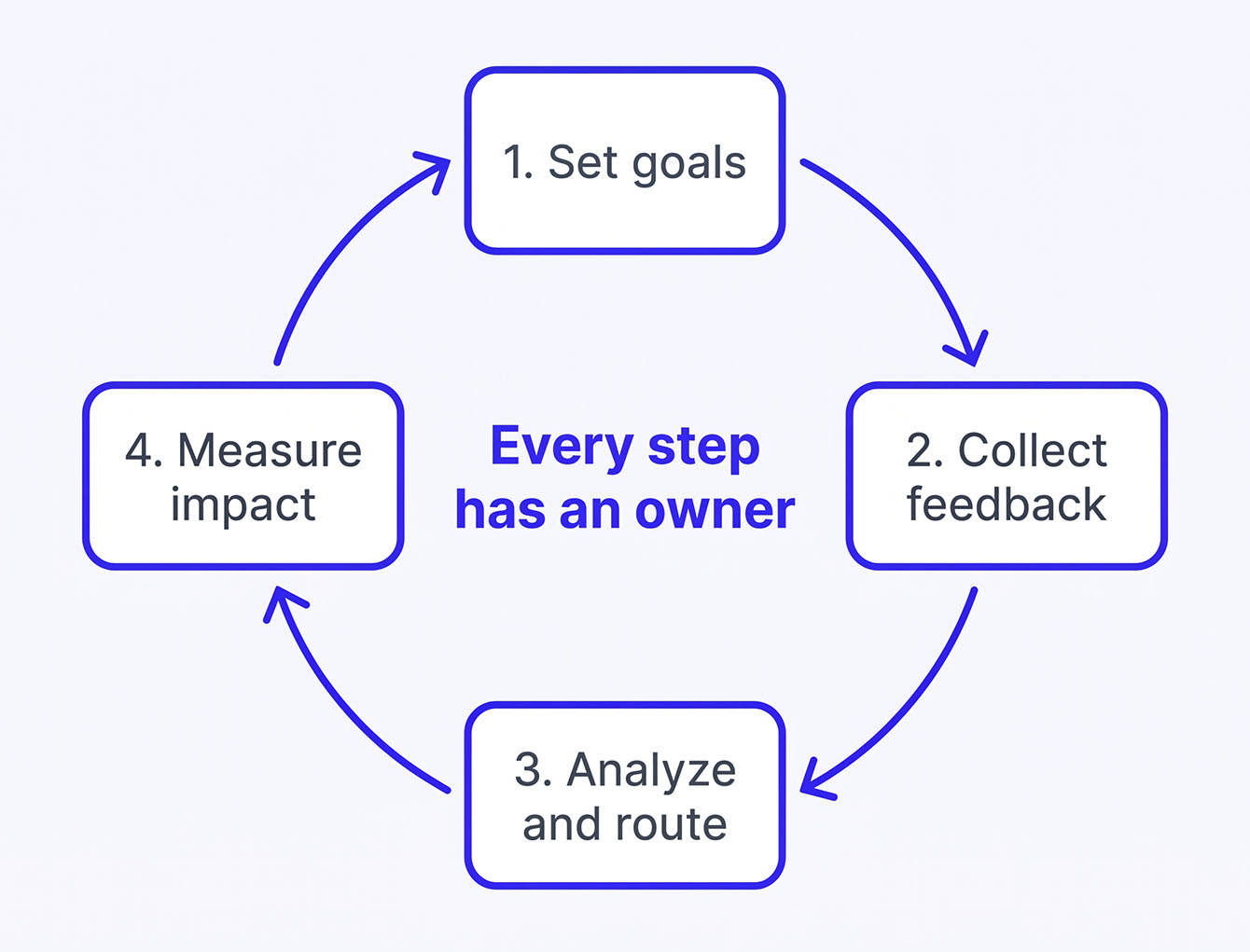
A successful VoC program needs clear goals, consistent feedback collection, and a process for turning insights into action. The key is making sure each part of that process has an owner, whether that's someone on your team or a managed provider. Here's what that looks like in practice.
Set Goals and Define What You're Measuring
Start by deciding what you want the program to tell you. Net Promoter Score℠ (NPS®) shows how likely customers are to recommend you. CSAT shows how satisfied they are with an interaction, and CES shows how much effort you ask of them. Tie each one to an outcome. NPS trends track with retention, CSAT flags service issues, and CES exposes friction. A managed program sets these goals with you during onboarding and builds the survey to match.
Collect Feedback at the Right Time
Timing shapes the quality of what you hear. Send surveys while the experience is still fresh, and let business rules decide who gets one and when. A blanket trigger that fires after every visit wears customers out. Choose email, SMS, or both based on where your customers actually reply. Follow up once with customers who haven't responded to lift your response rate. A managed program sets these rules for you and sends the reminder automatically.
Analyze Results and Route Issues to an Owner
Analysis goes past single comments to NPS, CSAT, and CES trends, filtered by location, segment, or period. When several detractors name the same issue, send it to the person who can fix it. That might be a service manager, a location owner, or a frontline team lead. Speed matters, because poor customer service is the second most common reason customers stop buying, according to Salesforce. A managed program handles the analysis for you. With LoyaltyLoop, a Poor Feedback Alert notifies the person you choose in near real time whenever a detractor responds.
Measure Impact and Report Results
The last step checks the program itself. You want NPS trending up, a steady response rate, and detractor issues getting resolved faster. Hold those results up against the goals you set in step one. A managed program gives you a customer experience dashboard, so you see outcomes without building your own reports.
These steps stay the same whether you run the program or someone runs it for you. What changes is who does the work at each one. Either way, the program needs to keep moving from feedback to action, long after launch.
See What a Fully Managed VoC Program Covers
LoyaltyLoop’s team sets up your surveys, sends them on schedule, and delivers the reports. Your team gets alerts when a customer needs a follow-up. See everything the managed service handles, from setup to reporting.
What Happens After You Collect Feedback?
Collecting feedback is only the starting point. The real value of a voice of the customer program comes from what you do with it. That might mean resolving a complaint, earning a public review, or finding new opportunities within existing relationships. Here's how those actions turn feedback into business results.
Respond to Detractors Before They Churn
A low score opens a short window to make things right. Reach out before that customer leaves or posts a negative review. Your aim is to show them someone heard their concerns and is working to fix the problem. That's how you close the loop, and no other move in a VoC program carries as much weight.
Turn Good Experiences into Reviews and Referrals
Many happy customers are willing to share their experience publicly. They just haven't been asked yet. A workflow that sends every customer an easy Google review request turns private satisfaction into public proof.
Responding to those reviews pays off as well. BrightLocal found 88% of consumers would use a business that replies to all of its reviews, compared with 47% for a business that doesn't respond at all.
A strong score can also open the door to referrals. A happy customer asked at the right moment is often more willing to recommend your business than one asked cold six months later.
Surface Cross-Sell Signals and Win Back Dormant Customers
Feedback can also reveal chances for more business. A survey can ask which other services a customer might need, giving your sales team a warm lead from an existing relationship. You can also use customer data to reconnect with people who haven't purchased in a while.
Identify dormant accounts based on how long it's been since their last purchase, then reach out with a reason to return. An automated workflow takes the remembering off your plate and helps turn your database into a pipeline.
Treat your VoC tool as more than a way to collect feedback. The programs that deliver a return use what they learn to strengthen relationships and create new business.
VoC Best Practices: Survey Timing, Frequency, and Response Rates
Three things decide whether customers answer your surveys: when you send them, how often you send them, and how long they take. For one-time jobs, send the survey soon after the work wraps up, while the details are fresh. For recurring service, a set schedule usually works better than a survey after every visit. Surveys tied to real events also beat generic "how are we doing?" blasts.
Preventing Survey Fatigue with Touch Frequency Limits
Survey fatigue hits when repeat customers stop answering because you've asked too often. A common guideline for relationship surveys is a 90-day window, meaning one relational survey per customer per quarter, at most. You can still learn from the sales in between. Your business rules filter who gets a survey and when, so your best customers never feel hounded.
SMS vs. Email Response Rates
SMS surveys often pull higher open and response rates than email. They cost more per send, though, and work best with one to three questions. Email handles longer surveys and richer formatting, but it competes with a crowded inbox.
A healthy response rate depends on your channel and industry. If yours lags, check timing, sender name, and survey length before you decide customers don't care. Keep surveys short, because each added question lowers completion. For most SMBs and service businesses, the Net Promoter Score℠ (NPS®) question plus one open-ended follow-up gives you plenty to work with.
Get timing, frequency, and channel wrong, and you'll collect silence instead of signal.
How to Measure Whether Your VoC Program Is Working
Four metrics show whether your VoC program works:
- Net Promoter Score℠ (NPS®) trend. One score is a snapshot. The quarter-over-quarter trend shows whether your customer experience is getting better. Watch the direction more than any single number.
- Response rate. A falling rate means your survey setup needs work. Treat it as an early warning that the program is losing pull.
- Detractor churn. Compare your detractor list against customers who stopped buying. Detractors tend to churn faster than promoters, so fewer lost detractors is proof that following up protects revenue.
- Review growth. If your program sends review requests, track monthly review volume. More reviews with written comments can lift your local search reach and sales.
Report VoC results on a simple quarterly page. Include NPS trend, response rate, and detractor fix rate. Add review volume and the revenue won back through win-back or cross-sell. Frame it two ways. First, show revenue protected by saving detractors. Second, show revenue earned through reviews, referrals, and cross-sell leads. That setup lets an ops leader back the program's cost without building a special dashboard.
Put Your Voice of the Customer Tools Shortlist to Work with LoyaltyLoop®
You can now match a voice of the customer tool to how your business runs and to the time your team really has. That lets you pick one your people will keep running long after launch day. If nobody on your team can own a VoC program, we'll run it for you.
With LoyaltyLoop, every location surveys customers on schedule, and you get reports you can share with leadership. You get an alert when a customer is unhappy, so you can reach out before they walk away. Every customer also gets an easy path to leave a Google review.
See how our fully managed service handles setup, surveys, and reporting without adding work to your team's plate.
Turn Detractor Alerts into Saved Customers
Franchise networks and service businesses use our fully managed service to spot unhappy customers fast and keep the program running without adding work to any location.
Schedule a LoyaltyLoop DemoFAQs About Voice of the Customer Tools
Q: What's a voice of the customer tool?
A: A voice of the customer (VoC) tool collects customer feedback from surveys, reviews, support tickets, and call transcripts. It analyzes that feedback for sentiment and trends, then routes insights to the people who can improve the experience. It produces scores like Net Promoter Score℠ (NPS®), CSAT, and CES.
Q: What's the difference between a VoC tool and a survey tool?
A: A survey tool helps you build a questionnaire, send it, and see the answers. A VoC tool goes further. It tracks trends over time, combines feedback from several sources, and sends issues to the person who can fix them. A survey tool can be one part of a VoC program, but it won't run the program on its own.
Q: What are examples of voice of the customer?
A: Voice of the customer shows up in several forms:
Q: Can I run a voice of the customer program on free tools?
A: Yes, for a short test. Free tools collect responses, but they don't track trends, route feedback, trigger review requests, or resurvey on a schedule. Someone has to export data and follow up by hand. Free tools work for a pilot. You've outgrown them once you have repeat customers, multiple locations, or nobody to run the program weekly.
Q: How do I know if my team has the bandwidth to run a self-serve tool?
A: Check whether one named person will own the program every week. That person reviews responses, follows up with detractors, and adjusts survey settings without being asked. Ask how many hours a week that takes and who covers when they're out. If a past feedback tool sat unused, you already have your answer.
Q: What should I do if my survey response rate is low?
A: Check the likely causes in order: timing, channel, length, then sender name. Start with timing and channel. Then trim the survey to the Net Promoter Score℠ (NPS®) question plus one open-ended follow-up. Change one variable at a time and watch results over a full survey cycle. Compare against your own past cycles before you decide customers don't care.