Did you know you can set your FROM email to have a "friendly name"?
When someone receives email, their email client software determines what they see. Most email clients support what is called an email "from name" or "friendly name". The "friendly name" is how you wish to be identified in email, and is what is displayed to the recipient when viewing your emails. The 'friendly name' is typically the sender's first and last name. When a 'friendly name' is not provided, the recipient will only see the sender's email address, which is not always obvious or friendly looking.
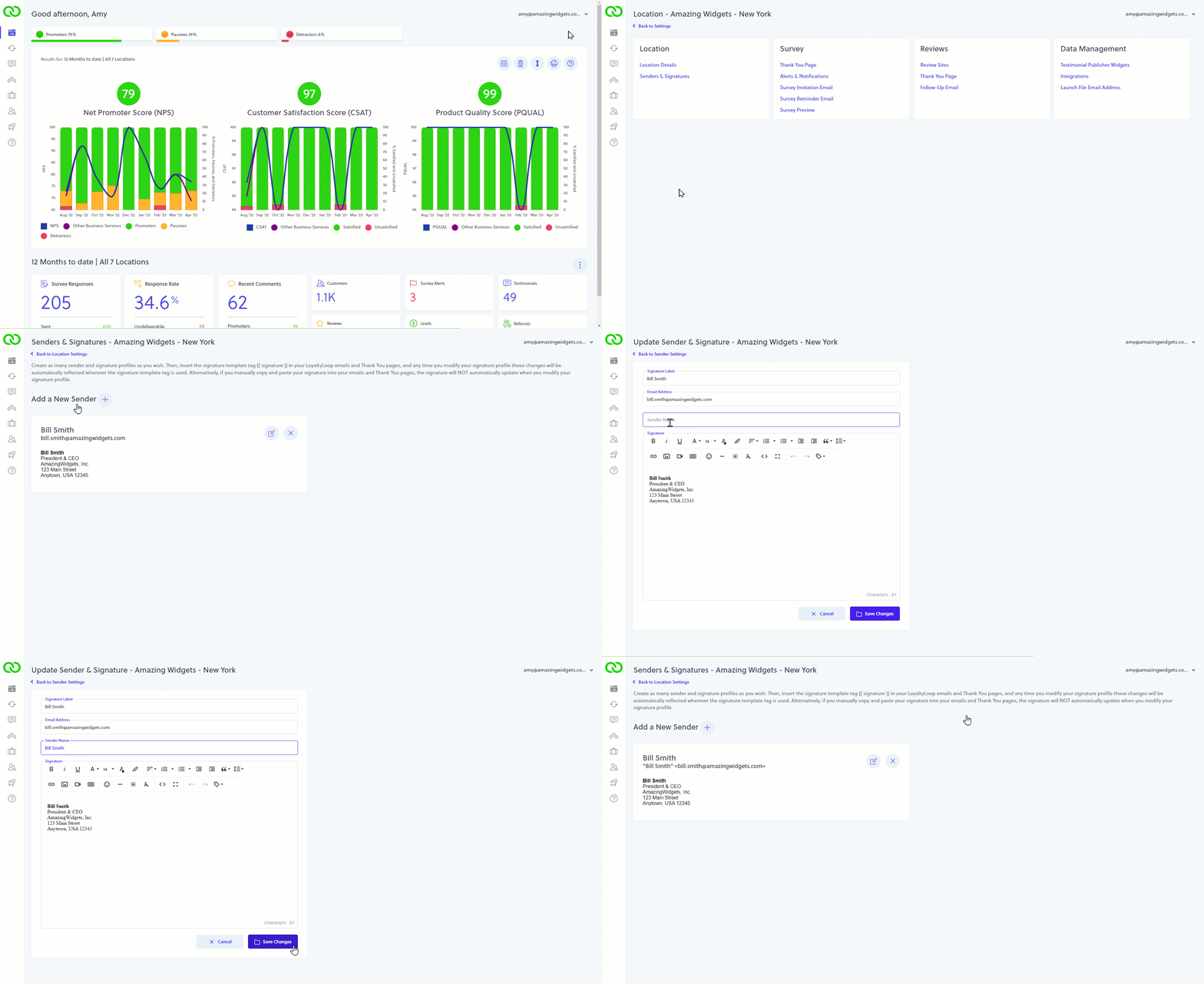
To ensure the best experience for your customers, make sure your friendly name is set. Go to your Settings, then Sender & Signatures. Click the edit icon next to the signature you want to check, and view the value in the "Sender Name" section. If the Sender Name is blank, make sure to add your friendly name, and then click Save Changes. That's it. Now, when customers get your LoyaltyLoop emails, they'll see your friendly name in their email client and will be more likely to read it.