
Unlocking Better B2B Insights: Reorganize Accounts by Launch Data
Are You Seeing the Full Picture? How to Group Feedback by Account
In the world of B2B, a single "customer" is rarely just one person. It’s a collection of stakeholders, often using a mix of corporate and personal email addresses. If your feedback platform only groups data by email domain (like @company.com), your view of a client’s health can become fragmented and misleading.
For our LoyaltyLoop Premier users, there is a better way to gain clarity.
The Power of Launch Data Tags
By default, LoyaltyLoop organizes Accounts by email domain. While effective for many, it doesn’t account for the complexity of modern B2B relationships.
Did you know you can reorganize your Feedback by Account view using any attribute from your launch data? Whether you want to roll up feedback by Company Name, Parent Account, or Industry, you have the power to define what an "Account" looks like in your dashboard.
3 Steps to Reorganize Your View
Ready to clean up your reporting? Follow these steps to switch from domain-based grouping to attribute-based grouping:
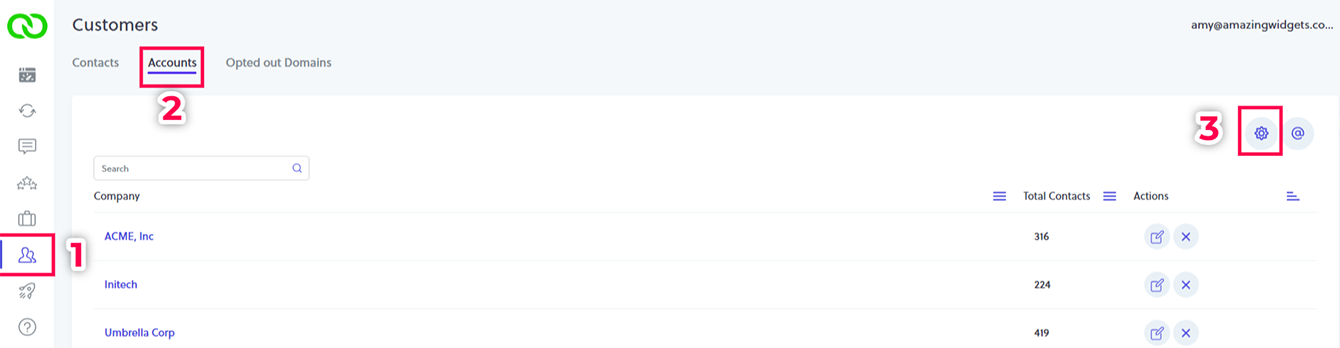
- Navigate: Go to the Customers menu and select Accounts, then click the Gear Icon in the upper right corner.
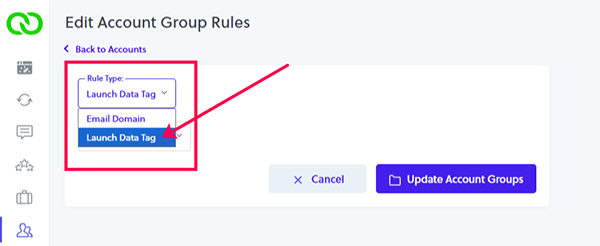
- Configure: Change the Rule Type from "Email Domain" to "Launch Data Tag."
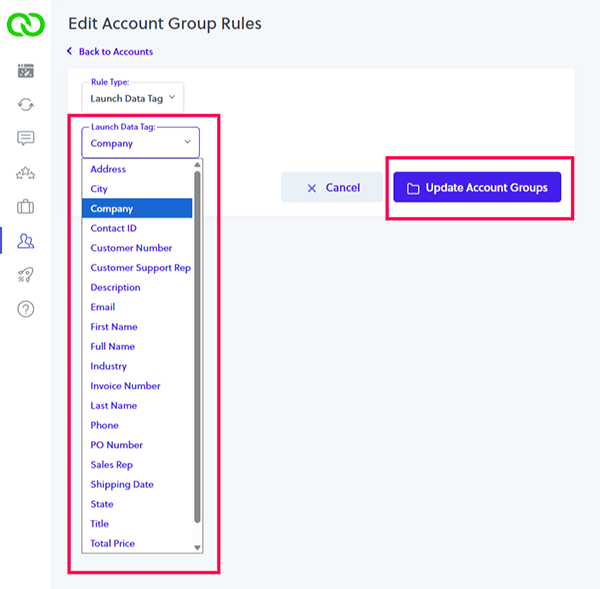
- Update: Select the specific tag you wish to use (e.g., Company Name) and click Update Account Groups
Note: the data tags shown in the image below are examples. The tags you will see are the specific fields you include with your launch data.
Note: This kicks off a rebuilding process for your groupings, which typically takes a few minutes to complete.
Why This Matters for Your CX Strategy
Once the process is complete, your "Feedback by Account" view will display your chosen attribute as the primary column. When you click into an account, you’ll see every contact associated with that specific Company Name, regardless of the email address they used to respond.
This unified view allows you to calculate a more accurate Net Promoter Score (NPS) and track customer experience metrics across your entire book of business with surgical precision.
Stop guessing and start growing. If you’re ready to see how LoyaltyLoop’s advanced reporting can transform your B2B relationships, schedule a personal demo and see our Premier features in action.
Schedule a DemoFrequently Asked Questions (FAQs)
Q: Will changing this setting delete my old feedback?
A: A: Not at all. It simply changes how your existing and future feedback is grouped and displayed in the Account view.
Q: Can I change the attribute more than once?
A: A: Yes. You can update your Account Groups whenever your reporting needs evolve, though the rebuilding process takes a few minutes each time.