
Did you know Admin Users Can Generate API Keys?
From time to time you may wish to connect your LoyaltyLoop to another cloud service. You may choose to do this natively using our API, or using our Zap on Zapier. Either way, when you connect LoyaltyLoop to another service, your Admin User will need to create a new API key that will be used with the other service.
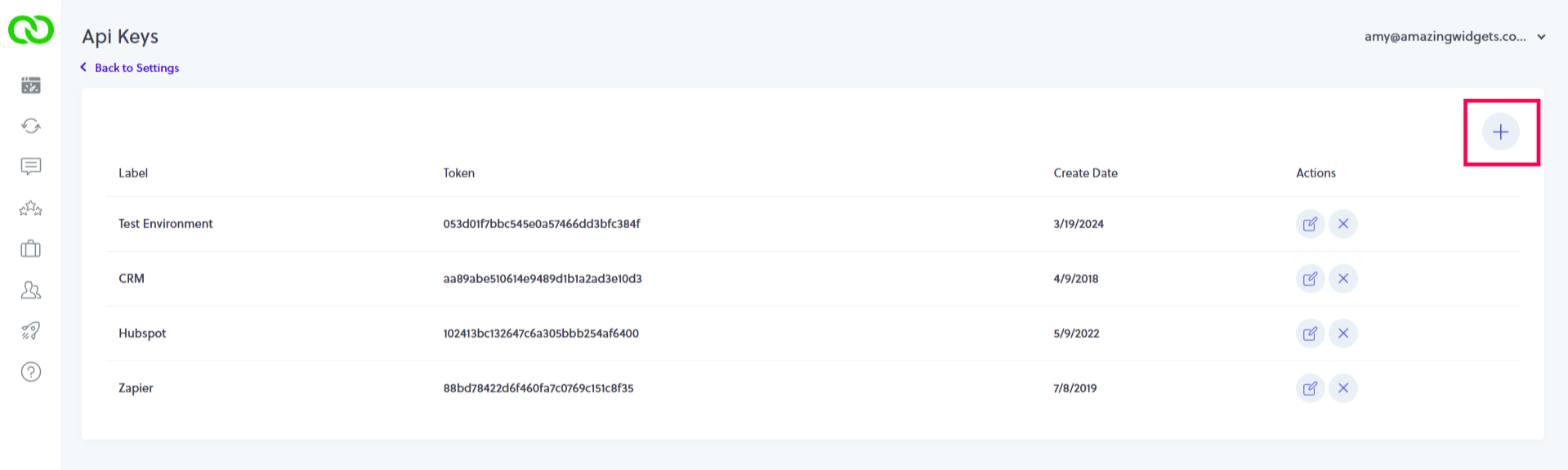
To create an API key, Admin Users would click their username, then Settings. In the Admin section click API Keys. Then, simply click the plus (+) button to create a new key. Give your key a name, and save it. Use that key in the other service to connect to your LoyaltyLoop. For security reasons, remember to only give API keys to trusted sources.
Why would you need a LoyaltyLoop API key?
- Setting up or modifying integrations with back office software that flows contacts to your LoyaltyLoop.
- Setting up or modifying integrations with Zapier, and other cloud-2-cloud connector services, to drive automations.
Things to keep in mind
- Can generate as many as needed
- Name the key specific to the use-case (e.g. "Zapier integration key")
- Keep your API keys secure and private (this is why only Admin Users have access).
- Give your API key to only trusted sources, as it provides programmatic access to your LoyaltyLoop data and results.
Photo by Nerene Grobler on Unsplash