Nobody's Perfect: Handling Negative, Fake, and Accidental Google Reviews

Google Reviews are the gold standard of online reviews and everyone wants as many 5-star reviews as possible. But sometimes you find yourself having to manage a bad one that's come your way due to a poor experience or worse: a fake review or one left by mistake.
Handling Negative Reviews
Sometimes mistakes happen or expectations aren't or can't be met which results in a poor review. The best perspective to have is to put yourself in the shoes of the potential customer who is reading your reviews. What sort of response would you want to see from a company that received a bad review? What resolution would you like to see that wouldn't affect your willingness to do business with you? This can help guide how you manage reviews in a public space.
Do not ignore negative reviews. Review sites like Google are public and leaving negative reviews unanswered can send the wrong message about your business to prospects. Our advice is to first research your customer's experience with your business before responding, so you know what may have gone wrong. Then proactively address the negative review by replying with a short non-argumentative reply and offer to take the discussion offline where it can be resolved in private. Acknowledge the customer's concern in your reply, express your understanding, and let the customer know you will be contacting them directly via phone or email to personally address their issue. Always be positive, constructive, understanding, and professional. Do not get caught in the trap of engaging in a battle between you and your customer in a public place.
How you respond will help shape your perception by customers, and potentially solve the issue at hand. What if you don't have your customer's contact information or they won't take it offline, where it can be solved in private? Here are some additional tips Google suggests for How to Respond to Negative Reviews.
- Respond in a timely manner. Customers will appreciate a prompt response.
- Stay professional and courteous. Never lash out - avoid taking the review personally.
- Be honest about mistakes made, and steps you've taken (or will take) to remedy the situation.
- Apologize when appropriate, but don't take responsibility for things that were not your fault. Show compassion and empathy for the customer.
- Show that you're authentic and genuine. Sign off with your name or initials to show you're taking the matter seriously and that a real person is listening.
The Case of the Angry Hotelier
Recently, the owner of Hotel Widgets USA (name obfuscated for reasons that will become obvious) had a great policy of making sure their customer's stay was satisfactory during the check-out process. They performed this task with a customer during checkout in case they needed to address any issues they didn't know about. Once the customer left, they discovered a bad review on Google from another customer. This customer had not gone through a face-to-face checkout process, and had left their room keys at a seemingly abandoned service desk.
Confusing the second customer for the first, who said everything was fine, the owner reached out via text and threatened to keep the room deposit unless the review was taken down. The second customer, as you would expect, left a new, poor review based on this experience. Once the owner had been corrected that the second customer wasn't the first one, he/she dug in and resorted to name-calling. The second customer then shared the text conversation on social media, resulting in the owner demanding the social media post be removed or they would go to the police.
We can count on one finger the number of things he/she did right. The owner correctly tried to resolve the issue in private but then what followed was a chain of poor decisions. He/she then offered an unreasonable solution, by threatening to keep a deposit, and continued to make matters worse by taking the situation personally and resorting to additional threats.
Consider the alternative, if the owner had been polite, and genuinely sought a resolution to everyone's satisfaction, the conversation never would have been posted on social media, and contacting the second customer is the kind of mistake they might be laughing about today.
Handling Fake Reviews
But what about poor reviews left by people who have never been a customer? It's possible a review was left for you by accident or maliciously. Maybe a customer of another business mistook your Google review link for the other business, or worse, someone is intentionally trying to sink your 5-star ratings.
Remember the owner of Hotel Widgets USA in the first section? There's more. When the conversation was posted on social media, Hotel Widgets USA got a swarm of fake reviews from people who sympathized with the customer's experience. The name of the business was shared, and people took it as an opportunity to review bomb the hotel. This may have allowed a certain set of people to feel an online version of justice, as people take sides against the owner. But, at the end of the day, the reviews are not legitimate, and should be taken down. Given enough time, Google will eventually detect the reviews are false and remove them, but that doesn't do the owner or potential future customers any good. The owner should have real feedback on which to act (hopefully), and future customers of the hotel should have real reviews to inform their decision on where to stay.
If you receive accidental, fake, or malicious reviews, contact Google to begin the process to have them removed. Once you've done your part, the issue you then face is waiting for Google to get around to removing those very public reviews. We have some suggestions that may expedite the process.
Visit the Google support page explaining How to remove reviews from your Business Profile on Google. And visit the support page that outlines Google content policies.
Here's what we suggest:
- Visit the above pages and review them completely before taking stated action
- Take note which reviews violate which policies.
- When making the request to Google to remove any fake reviews, cite the Google policy violations of each fake review
- Lastly, be patient. It could take a while (weeks to months) for Google to remove it. In the meantime, keep doing a great job creating happy customers who'll post great reviews to minimize that one fake review.
Remember, there's a person on the other end of your request, and if you pinpoint the exact violation for them and they agree, you will have done their research for them. Hopefully the review is removed quickly.
Correcting a Google Review Mistake
Maybe you received a bad review and you followed up with your customer only to discover they're beside themselves because they didn't mean to leave a poor review at all. They thought they clicked 5-stars.
As with all online third-party reviews, they are posted under your customer's credentials on services outside of your control. Unfortunately, this means only your customer can correct the error. We have a couple of methods to help your customer fix their review.
The first is to provide your review link found in LoyaltyLoop which takes them to Google's review edit window so they can rewrite and re-star their review. Here's how to find this. Go to the Settings area in LoyaltyLoop, select a location (if necessary) and then click on Review Sites in the Reviews area. Click on the edit button of your Google settings where you'll find the link to send to your customer in the area labeled Your Review Page.
When they click on that, they'll be presented with their previous star rating and comments so they can update what they wrote.
1. Go to your Review Sites
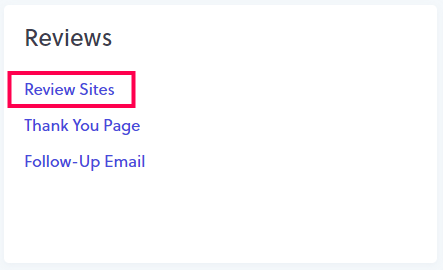
2. Click Edit next to Google review setting
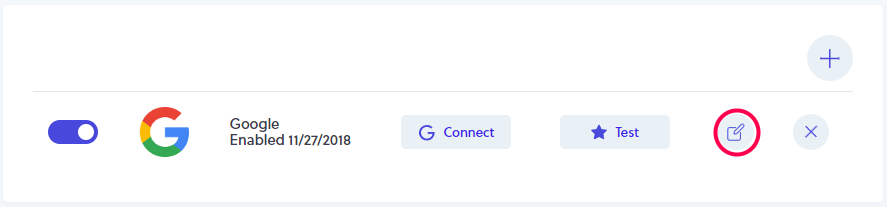
3. Copy entire URL

4. Provide URL to customer to edit their review
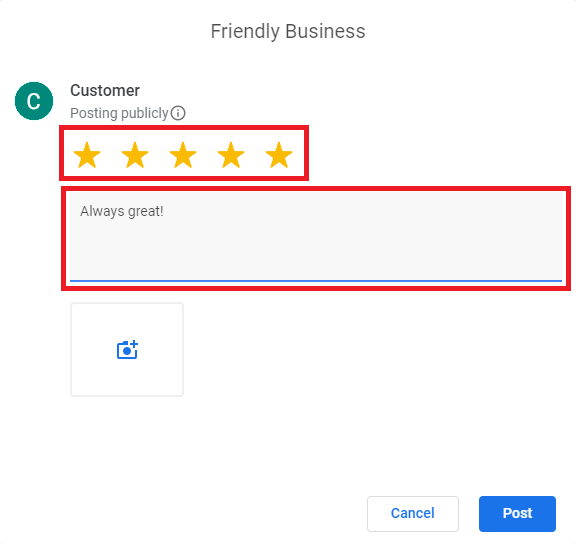
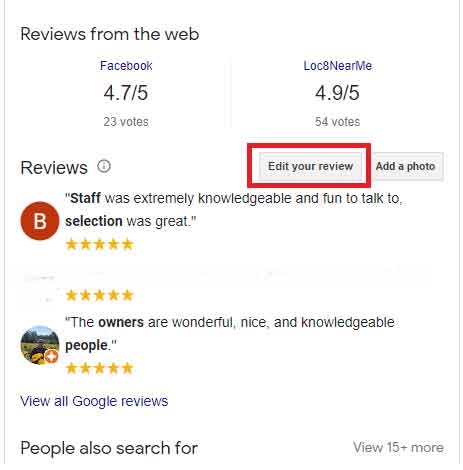
Alternatively, they can re-do their review by finding your Google Business Profile information via a Google search. Ask your customer to do a Google search for your company, and on the sidebar where they would normally leave a review, they will find a button that reads, "Edit your review". They can then change their review and star rating by clicking there.