
Did you know you can share testimonials on social channels?

Photo by Piotr Cichosz on Unsplash
When customers give you glowing testimonials, LoyaltyLoop gives you a simple way to publish them on your website, and share them on your social channels. There's no better way to promote your business than in the words of your own happy customers, and LoyaltyLoop makes that easy to do.
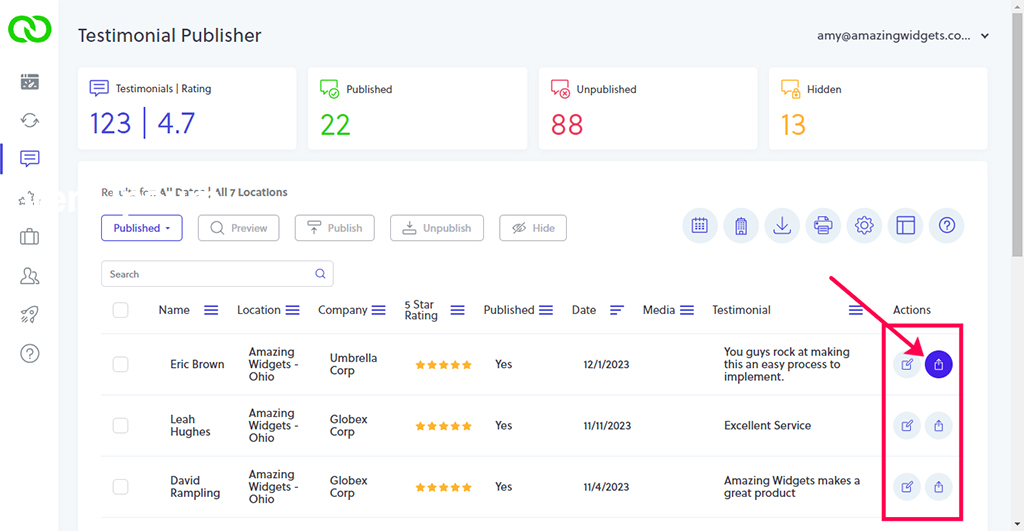
You can share any published testimonial on your social channels in seconds. Navigate to your Testimonial section. First, set the filter to view only published testimonials. Next, set the date picker to view all dates, or the date range that contains the testimonials you'd like to share.
Now, notice the Share icon on the row of each published testimonial. Simply click the icon, and then select the social channel on which you'd like to share it, then hit the Share button. If this is your very first time sharing from within LoyaltyLoop, you will be challenged to sign in to that social site.
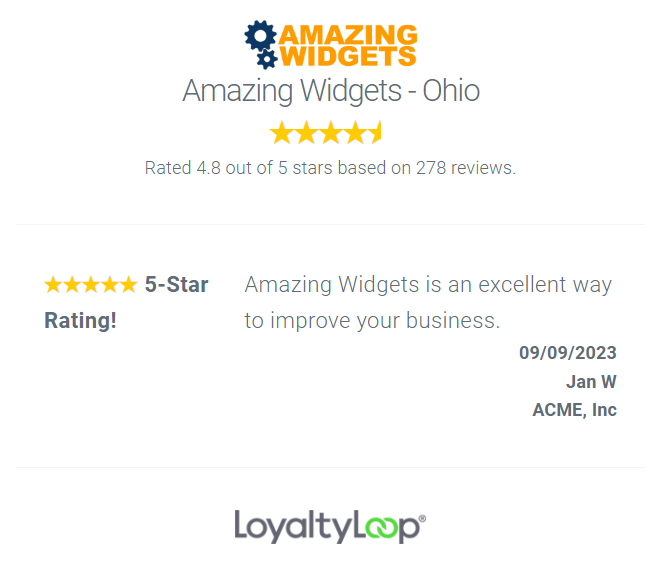
Every published testimonial has its very own page and dedicated URL, that renders it in the same style as your testimonial publisher settings. Copy the URL and share it in emails, newsletters or any other place.
You don't need to share every day, but perhaps you get in the habit of doing Testimonial Tuesday, where each week you share a great testimonial with your followers to amplify why customers love working with your business.