
The Power of Personalization: Why Unique Survey Links Matter
When you send out a request for feedback, every touchpoint matters. In a standard LoyaltyLoop setup, each customer receives a uniquely encoded survey link tied directly to their profile for that specific invitation.
Unlike generic "catch-all" links, these unique survey links allow you to track exactly who has responded and who hasn't. By focusing on survey non-respondents, you can tailor your outreach to ensure no customer voice goes unheard. This level of personalized survey invitations shows your customers that their specific opinion is valued, which is the first step in building long-term loyalty.
Strategies to Increase Survey Response Rates Beyond Email
Most feedback loops rely on the standard automated flow: an initial request followed by a reminder seven days later if no feedback is received. However, sometimes a standard email isn't enough to cut through the noise.
To increase survey response rates, you may want to get creative with your direct survey links. Consider these high-impact methods:
- One-on-One Follow-ups: Send a personal note via your own email or a chat app to a specific high-value client.
- SMS & Social Messaging: Drop the unique link into a text message for a faster response.
- Print Media & QR Codes: If you are sending a physical thank-you note or a bulk mailer, you can use these unique links to generate QR codes for customer surveys. This bridges the gap between the physical and digital worlds seamlessly.
Step-by-Step: How to Retrieve Your Links in LoyaltyLoop
Accessing these links is a quick and easy process within your dashboard. Follow these steps to start your customer feedback follow-up:
Sign into LoyaltyLoop, then:
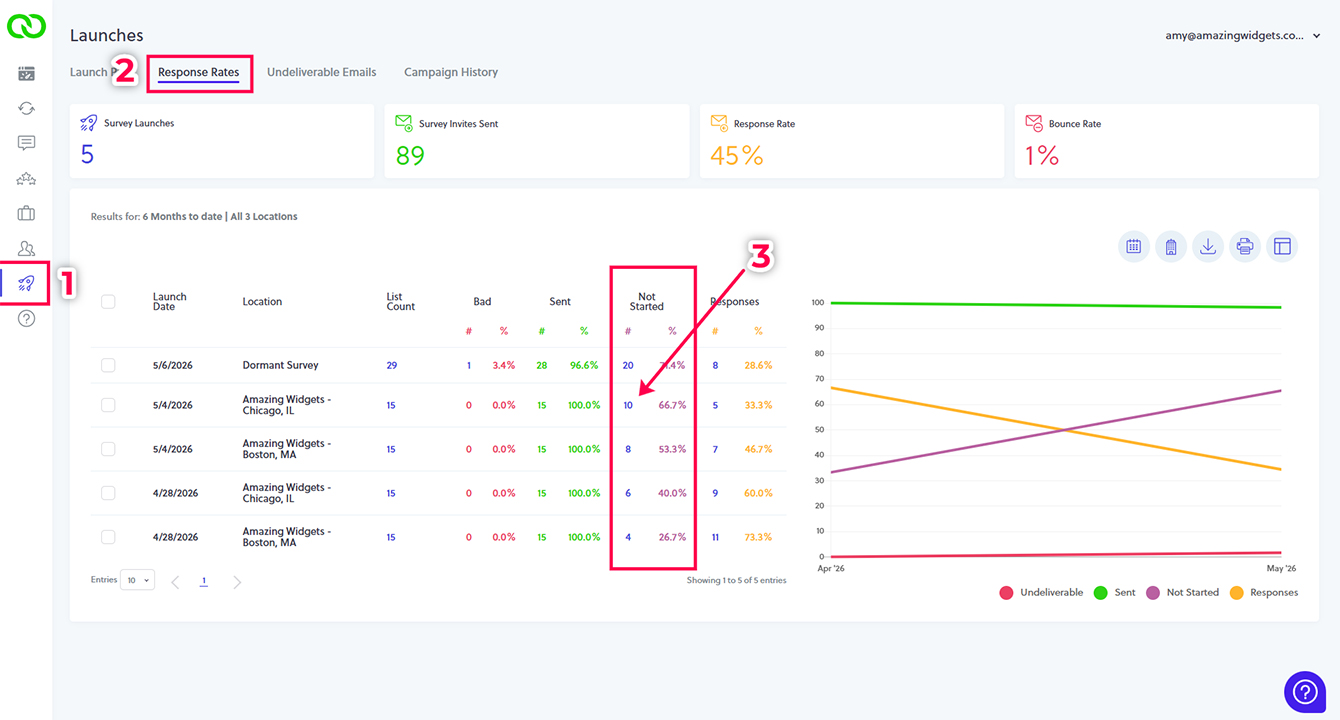
- Navigate to Launches: Click "Launches" from the left-hand main menu.
- View Response Rates: Select "Response Rates" from the top navigation menu.
- Identify Non-Respondents: Find the specific launch date and survey you are interested in and click the number listed under the “Not Started” column.
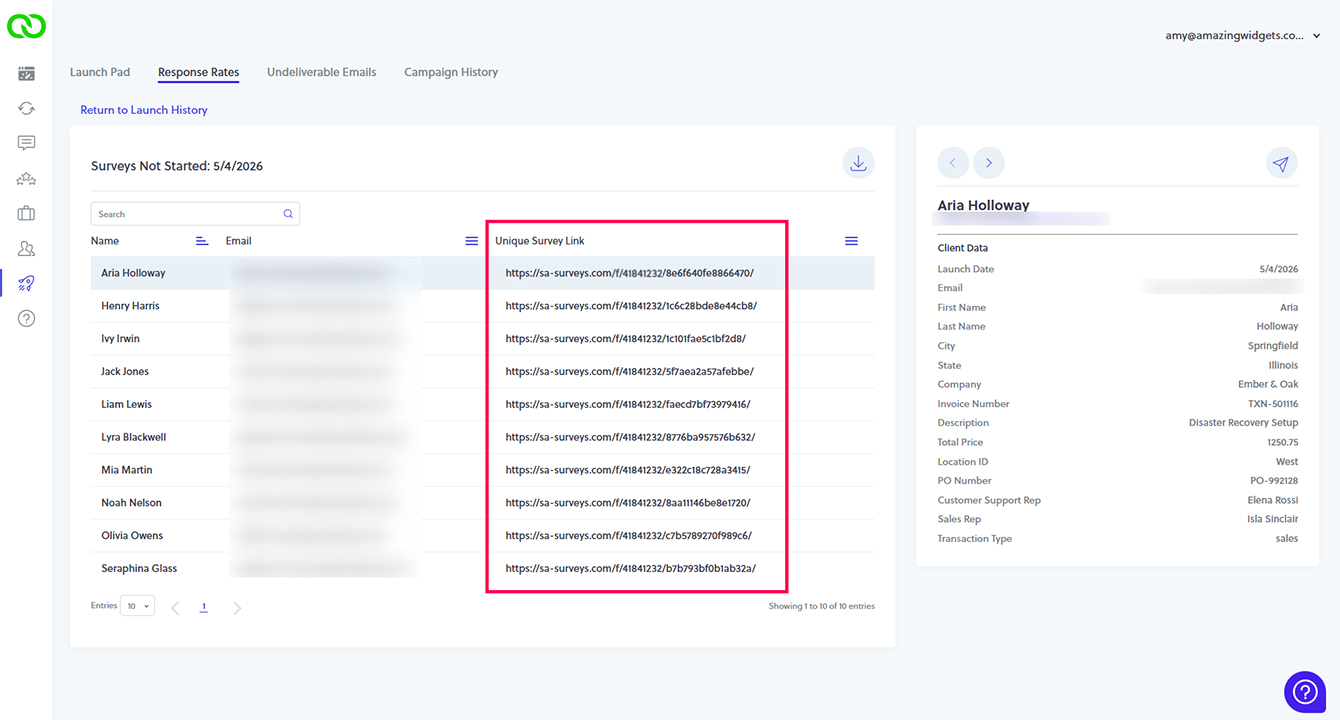
- Copy or Download: You will now see a view of all unique links. You can search for a specific contact to copy an individual link or download the entire table to use for a bulk mailing or external campaign.
Closing the Loop: Turning Non-Respondents into Brand Advocates
The goal of any feedback program is to understand the customer's journey. By taking the extra step to reach out to those who haven't responded yet, you demonstrate a proactive commitment to their experience.
LoyaltyLoop makes this technical process simple, allowing you to focus on the human side of your business. Whether it's a quick text or a creative print campaign, using unique survey links ensures that your data is accurate and your customers feel heard.
Ready to see more responses?
If you're looking to take your customer engagement to the next level, our team is here to help you optimize every step of your feedback loop.
Schedule a DemoFrequently Asked Questions
Q: Can I use the same unique link for multiple customers?
A: No. Each link is uniquely encoded and tied to one specific customer and one specific survey invitation to ensure data integrity.
Q: What happens if a customer clicks the link after already responding?
A: LoyaltyLoop tracks the status of the invitation. If the survey is completed, the link land the customer on a greeting page and allow them to modify and resubmit their survey. This allows customers to fix a mistake on that unique response. You can also resend a customer their unique survey link to their completed survey, allowing them to correct a mistake.
Q: Can I download all links at once for a marketing campaign?
A: Yes! You can download the entire table of non-respondent links, which is perfect for creating bulk mailers or personalized SMS campaigns.