
Did you know the sender of your LoyaltyLoop emails can be set dynamically?
Depending on the nature of your specific business, you may wish to have your requests for feedback or reviews be penned and sent from specific staff associated with that customer. Since feedback typically rises to the level of the person asking, we always recommend someone senior in your company be the person penning and requesting feedback. That being said, it is completely up to you, and if you have a need to vary the requester, here is how to do it.
As a LoyaltyLoop user, you're probably already familiar with Signature
Templates. This feature allows you to create various signatures for various "senders", and by adding the {{signature}}
template tag to your emails, those can be used as the senders of your emails and their signatures are displayed to your survey recipients.
But this feature creates static signatures. You can also create dynamic signatures that vary based on details associated with your survey
launch data.
Let's look at an email of dynamic senders & signatures. The table below represents an example of "launch data" that you might upload, email or automatically flow into your LoyaltyLoop account via one of our integrations. In this example, you see 4 columns titled "gm_email", "gm_name", "gm_title" and "gm_phone", representing the contact details of the General Manager who is associated with that particular customer. We will configure LoyaltyLoop to dynamically send the survey and review requests from the specific GM associated with each customer on each row.
Keep in mind that you can include any details in your launch data that is relevant to your business. Perhaps your business wants the requests to come from the sale representative, the product manager, or the branch manager. All of those options and more, can be accommodated in the same way.
| customer_email | first_name | last_name | company | gm_email | gm_name | gm_title | gm_phone |
| jane@anycompany.com | Jane | Doe | Any Company | bwilson@xyzcorp.com | Bill Wilson | GM, New York | 888-555-1212 |
| ann@bigcompany.com | Ann | Smith | Big Company | jscott@xyzcorp.com | Janet Scott | GM, Hartford | 800-555-1212 |
| kent@thecompany.com | Kent | Jones | The Company | tgrant@xyzcorp.com | Trent Grant | GM, Newark | 888-555-1111 |
Just like creating static signatures, you will create a new signature but will replace specific values with tags that represent the values found in your launch data. When the emails are generated by LoyaltyLoop, or Thank You pages are rendered, the tags get replaced with the values in your launch data.
From within the signature editor, notice the drop-down menu under the tag icon  containing all
your unique Launch Data Tags that come from your actual launch data. Using the above table for this example, you would see Launch Data
Tags for GM Email, GM Name, GM Title, and GM Phone.
containing all
your unique Launch Data Tags that come from your actual launch data. Using the above table for this example, you would see Launch Data
Tags for GM Email, GM Name, GM Title, and GM Phone.
Simply place your cursor in the spot in the signature where you want to insert the Launch Data Tag, and click that tag from the drop-down
menu. The tag will look something like this, {{gm_email}}, {{gm_name}}, {{gm_title}}, {{gm_phone}}.
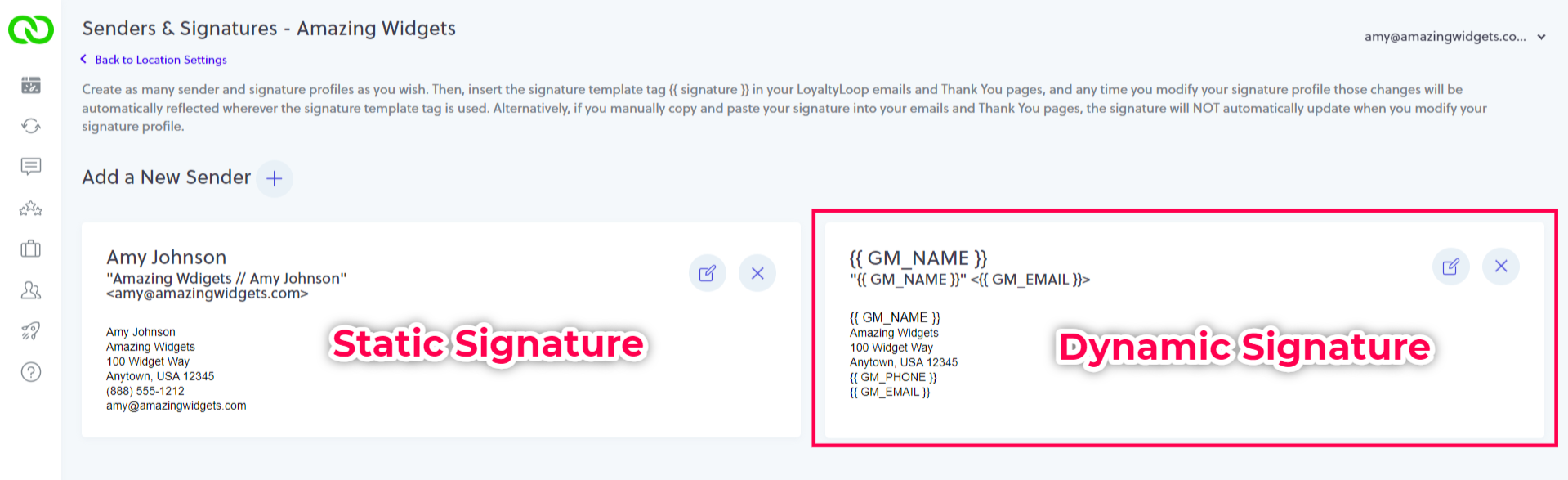
You can copy and paste the tags anywhere in the email or Thank You page. You can even insert a tag in place of the Sender's Name and Email
Address, and in the Subject line. An example of what a dynamic signature would look like is below on the right.
Once you've saved your new dynamic signature, go to the emails and pages where you want to use it. Make certain the signature tag, {{signature}}
is inserted into your emails, and you've selected the correct signature that you just created. Where tags are used, they'll be inserted
into the email or page settings. Lastly, remember to save your changes. Update each email and Thank You page where you wish to use the
dynamic signature.
That's it. Now when your survey launches, that actual values associated with that customer in your launch data (i.e. the columns containing the GM's name, email, etc.) will be inserted where you placed the tags. This advanced functionality gives you new ways to personalize, and tailor, your surveys and review requests to fit your exacting business needs.
Need Help? Are you interested in this feature, but not sure if you can set it up on your own? Don't worry. Just give our support team a call or drop us an email. Reach us at support@loyaltyloop.com or (888) 552-5667 option 3.