The Importance of Ensuring Email Deliverabilty
The Internet is 100% safe, right? Wrong.
We all know there are a myriad of things that make surfing the Internet and communicating via email, less than safe. When using a trusted service like LoyaltyLoop that sends emails on your behalf, or any other trusted email service like MailChimp, HubSpot and the countless other services out there, it is important to understand what you can do to ensure your selected service is successful in delivering your emails.
Fortunately, there are specific techniques available to all of us to ensure trusted emails get delivered. The good news is services like LoyaltyLoop and other email-based systems will work well without implementing these techniques. However, if you do implement them, not only will you get better results, but you'll be better positioned for the future should companies deploy stricter Internet security policies within their email systems.
Can LoyaltyLoop help?
Yes. Usually, all you need to do is arrange a call between our Support Team and the folks in your company who manage the domain name used in your email address - specifically the email address domain used in your survey invitation and related emails. We'll walk them through everything they need to do in about 5 minutes. During your onboarding process, we provide these details to you to pass on to your team. We'll help them implement (1) Sender Policy Framework (SPF), discussed in an earlier post, and (2) DomainKeys Identified Mail (DKIM)
Photo by Yogas Design on Unsplash
Why is this important?
With any email system, personal, marketing, or transaction-based feedback like LoyaltyLoop, you want to maximize the number of people who actually receive the emails. In the case of LoyaltyLoop, the more emails delivered, the more feedback and reviews you receive. When LoyaltyLoop sends email requests to your customers, these emails are sent FROM your email address. This helps customers feel connected with you, and makes their overall survey experience more personal. Some email servers detect that our domain (e.g. loyaltyloop.com) is sending email on behalf of another domain (e.g. yourcompany.com). Unfortunately, bad actors use this approach to pretend to be you. As a result, some email servers may consider the LoyaltyLoop email as a threat, and prevent the email from being delivered. But we're not a bad actor, we're your trusted partner. Employing these simple techniques tells the receiving email services that LoyaltyLoop is a trusted sender of email from your domain, and gives the receiving email service confidence to deliver the email.
How can I check to see if my company is correctly using SPF and DKIM for LoyaltyLoop?
It is very simple to confirm SPF/DKIM. To confirm your DKIM records, we have a record of our customers who have registered DKIM settings with us. Drop us an email at support@loyaltyloop.com (or call 888-552-5667 option 3) and we'll let you know if you're all set. To confirm your SPF record, follow these steps:
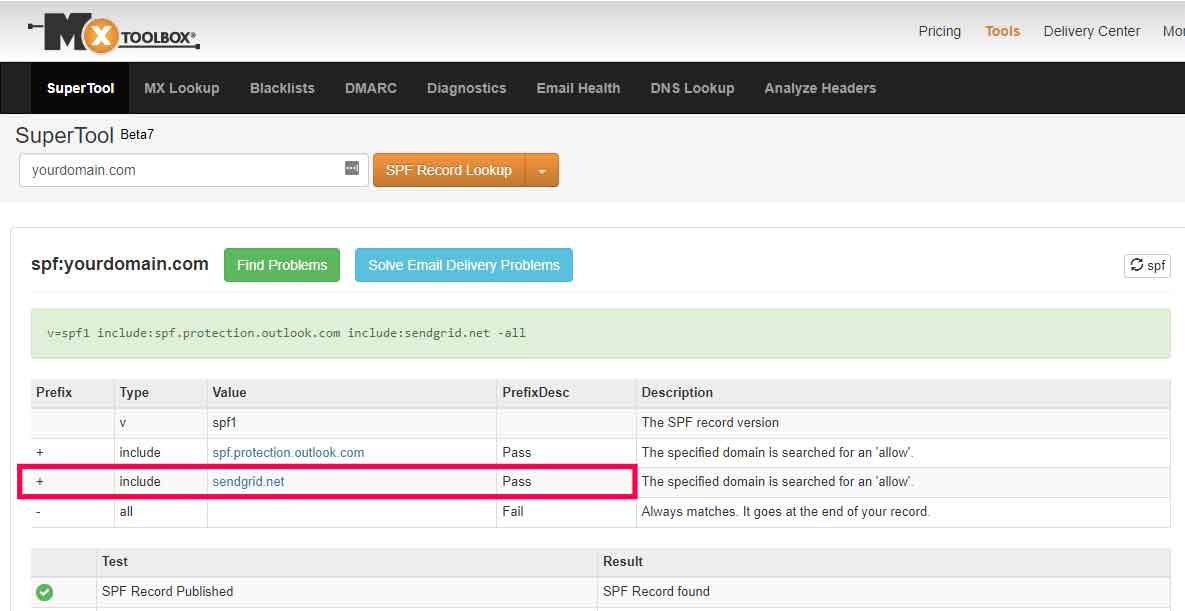
- Go to the free tool MX Toolbox, Super Tool
- Click the orange drop-down button and select SPF Record Lookup
- Enter the domain name of the email address used when sending your survey invites and reminders (i.e., "yourdomain.com"), and click the orange button
- In the results, you should see the following: include:sendgrid.net. You should see a result similar to the image below.