
Star Ratings Get Attention, But Written Google Reviews Win Customers, Here's Why
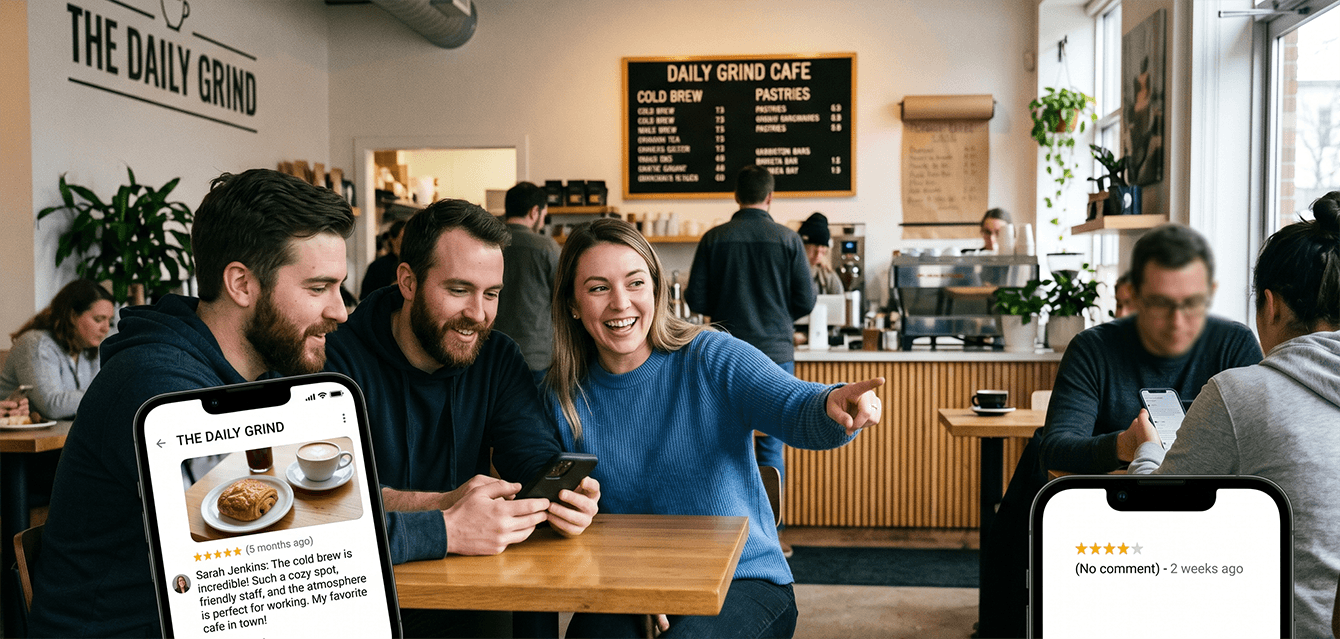
Star ratings get attention, but written Google reviews win customers because they explain the "why" behind the rating.
If you're a busy owner, you already know star ratings matter. They're a quick signal that tells potential customers you're reputable. The challenge is that stars alone don't always help someone decide if you're the right fit for their specific situation.
Written reviews do. They add context, details, and credibility that help a buyer move from "they look good" to "I'm confident this is who I should choose."
This guide covers how to consistently earn written Google reviews using a simple, compliant process, what to do with them once they come in, and how LoyaltyLoop® can run the whole workflow for you so it keeps happening even when you're heads-down running the business.
Table of Contents
- Star Ratings Vs. Written Google Reviews: What Actually Changes A Buyer's Mind
- Why Written Google Reviews Win More Customers
- How Written Google Reviews Support Local Visibility
- How To Ask For A Review Without Sounding Pushy (And Without Breaking Google's Rules)
- When To Ask For Written Google Reviews (Timing, Touchpoints, And Touch Frequency)
- How To Respond To Google Reviews (Including Negative, Fake, And Accidental Ones)
- How LoyaltyLoop Helps You Earn More Written Google Reviews Consistently
- Conclusion: Make It Easy To Leave The Kind Of Review That Sells
- FAQ
Star Ratings Vs. Written Google Reviews: What Actually Changes A Buyer's Mind
Star ratings create instant credibility, but written reviews change a buyer's mind by adding the details that make your business feel like the safest choice.
A strong star rating is a real advantage. It's the fastest way for someone to filter options and decide who's worth clicking. But when the buyer is closer to choosing, they usually want more than a score. They want to understand what you actually did, how you communicated, and what the experience was like.
Written Google reviews add that missing context. They're the "helpful info" that helps a business stand out and helps potential customers make a decision. And when buyers search for a specific service, written detail can be the difference between "they seem fine" and "they sound like exactly what I need."
| Dimension | Star Rating (Good) | Written Google Review (Better) |
|---|---|---|
| What a prospect learns | Quick read on overall satisfaction | What was done, what problem was solved, and what the experience felt like |
| How it builds trust | "They're reputable" | "They're reputable, and I can see why" |
| How it helps a buyer choose | Confirms you're worth considering | Helps a buyer decide if you match their needs and expectations |
| How it can appear in search | Rating can display prominently | Text can surface as "justifications" (snippets) that add service context |
It's also worth being precise about terminology. Google reviews live on Google, a third-party platform you don't directly control, while testimonials are customer comments you collect and publish on your own channels.
Now let's get specific about why written reviews are so persuasive, even when the star rating is already strong.
Why Written Google Reviews Win More Customers
Written Google reviews win more customers because they answer the questions buyers use to reduce risk before they commit.
When someone is choosing a local provider, they're usually trying to avoid regret. They want to know: Will this be easy? Will they communicate clearly? Will they do what they said they'd do? A star rating says "people generally liked them," but it doesn't show what the experience is actually like.
Written reviews fill that gap with the details buyers care about: communication, timeliness, outcome, and how the business handled the process. That's exactly why Google positions reviews as information that helps customers make better decisions (Google Business Profile Help).
You don't need essays to get the benefit. What you're aiming for is a review that's easy to read and includes one or two concrete specifics.
Here's an illustrative example (not a real customer quote):
"They were on time, explained the next steps clearly, and finished the work without leaving a mess. I appreciated the quick follow-up when I had a question afterward."
That level of detail makes a buyer feel like they know what to expect, which is what turns interest into action. The challenge is getting customers to write that detail at the moment they're staring at an empty Google review form, a gap LoyaltyLoop solves by carrying their own survey comment forward into the review for them. More on that workflow below.
How Written Google Reviews Support Local Visibility
Written Google reviews support local visibility by strengthening buyer confidence in search results and by helping you build a steady, credible footprint over time.
There are two practical reasons written reviews matter for local visibility. First, recency and consistency, a steady stream of new reviews keeps your profile feeling current. Most businesses do not have a review problem, they have a consistency problem; when it gets busy, asking gets skipped. Second, written detail can show up in search. Review text can surface as snippets, often called "justifications," which adds context right in the results. When that snippet mentions a service detail that matches what the buyer wants, it can increase click confidence (Search Engine Land).
Authenticity also matters. Google uses AI to detect and remove fake reviews, which means real, customer-written reviews carry more weight, and shortcuts like buying reviews or pressuring customers to leave 5 stars are riskier.
From a systems standpoint, this is where consistent outreach helps. Automated requests can keep things running week to week, and ReviewMatch℠ can identify who has already reviewed versus who hasn't so follow-up stays targeted.
Next, let's turn this into practical language you can use, without sounding pushy and without breaking Google's rules.
How To Ask For A Review Without Sounding Pushy (And Without Breaking Google's Rules)
The best way to ask for a review is to make it easy, keep it short, and guide customers toward one specific detail they can mention.
Most customers are not looking for a reason to say no. They just don't want friction, and they don't want pressure. The structure that works is simple: gratitude, direct link (or QR code), and one short prompt.
Start by making the path effortless. Google explains how to create and share a review link or QR code, and suggests using it in places like receipts, thank-you emails, at the end of a chat interaction, or on an in-store display.
Next, keep it compliant. Don't ask for "5 stars," and don't offer incentives. Google prohibits offering incentives in exchange for reviews. The safest phrasing is simply asking the customer to share their experience. The post on bad temptations with Google reviews walks through the shortcuts that look harmless but can put your profile at risk.
Finally, invite written detail with a single prompt. You're not scripting anything, you're helping them get started. One line like "What did we help you with?" is often enough to turn a star rating into a written review. One of the biggest reasons customers leave star-only reviews is that, in the moment they're staring at the empty Google review box, writing something feels like work. LoyaltyLoop closes that gap: when a customer who left a written comment in your survey is handed off to Google, their own comment is pre-copied to their clipboard so they can paste it straight in. The result is more written reviews, not just more star ratings, which Google's algorithm favors in local search.
Here are three short asks you can use:
Subject: Thank you
Hi [Name], thanks again for choosing us. If you have a minute, could you leave a Google review here: [Link]
If you can, add a sentence about what we helped you with.
SMS
Thanks again, [Name]. Could you leave a Google review? [Link]
A quick note about what we helped with is perfect.
In person
"Thanks again for your business. If you don't mind, could you leave a Google review? This QR code takes you right there. A sentence about what we helped you with is plenty."
If you want this running consistently without manually sending messages, LoyaltyLoop can deliver these asks through email and SMS using customizable, on-brand templates, and because LoyaltyLoop is software plus a fully managed service, the team handles configuration, branding, and ongoing tuning, so you don't have to learn a tool to get this running.
Timing matters too, so here are the touchpoints that tend to feel the most natural.
When To Ask For Written Google Reviews (Timing, Touchpoints, And Touch Frequency)
The easiest time for customers to write a review is soon after transactions or experiences, when the specifics are fresh.
If you ask days or weeks later, customers may still leave a star rating, but they're more likely to skip the written part because they have to think harder. Asking at the end of the journey reduces that effort. Google's own suggested touchpoints reinforce this: receipts, thank-you emails, end of chat interactions, and in-store displays are all natural places to share your link or QR code (Google Business Profile Help). These work because they match the moment when the customer is already "closing out" the experience.
You can map that idea to common events in almost any business:
Service completed or order delivered: send the link immediately with one short prompt.
Pickup or checkout: put a QR code where customers naturally pause.
Issue resolved: include the link at the end of the conversation.
Touch frequency: don't over-ask the same person. A common worry, especially for businesses with repeat customers, is that consistent review outreach will feel like spam. It won't if you put a sensible cap on how often any one customer is asked. Inside LoyaltyLoop, the Touch Frequency Filter defaults to no more than once every 90 days per customer, so requests reach the right customer at the right time, instead of repeating on every interaction.
Keep follow-ups gentle and limited. The goal is consistency, not chasing. Once reviews start coming in, how you respond becomes part of the trust story too.
How To Respond To Google Reviews (Including Negative, Fake, And Accidental Ones)
Responding to Google reviews reinforces trust by showing customers, and future customers, that you pay attention and take feedback seriously.
Most people reading your reviews are also reading your replies. A short, professional response sets expectations for how you communicate, and it signals that customers won't be ignored after the sale. Google's guidance is clear: stay professional and polite, keep replies short and simple, and be conversational rather than promotional (Google Business Profile Help). That applies to good reviews and bad ones.
Here are two templates you can adapt quickly:
Positive review reply
"Thanks for the review, [Name]. We really appreciate it, and we're glad you had a great experience."
Negative review reply (take it offline)
"Thanks for sharing this, [Name]. I'm sorry you had this experience. I'll be reaching out directly today to learn more and make this right."
A negative review feels bad in the moment, but it's often more useful than a 5-star one because it tells you exactly what to fix and gives you a chance to recover the relationship in public.
Fake or accidental reviews are a separate situation. Google does provide a path to flag and address them, and the guide on handling negative, fake, and accidental Google reviews walks through what each one looks like and the best move for each.
To make review management easier, you can monitor and reply to Google reviews from your LoyaltyLoop dashboard, and AI Suggested Replies can speed up drafting while keeping you in control of what gets posted.
How LoyaltyLoop Helps You Earn More Written Google Reviews Consistently
LoyaltyLoop helps you earn more written Google reviews by turning your review requests and replies into a consistent, low-friction system. It's software plus a fully managed service, which means the team helps with the heavy lifting, not just the dashboard.
It supports the exact workflow this post recommends:
- Email and SMS outreach to request reviews, using on-brand templates
- Automated triggers and workflows tied to real business events (orders shipped, tickets closed, jobs completed, quotes won)
- Touch Frequency Filter so customers aren't asked too often, defaulting to no more than once every 90 days
- Customizable, on-brand surveys and messaging so requests sound like you
- Feedback First vs. Reviews First workflows to collect private feedback first, or invite reviews directly
- Copied-to-clipboard review comments when a customer is sent to Google, LoyaltyLoop pre-copies the comment they already wrote in your survey to their clipboard, so they can paste it straight into Google with one tap. This is one of the biggest reasons LoyaltyLoop clients see written reviews instead of star-only ratings.
- ReviewMatch℠ to identify who has reviewed and who hasn't for smarter follow-up
- Monitor and reply to Google reviews from a central dashboard, with AI Suggested Replies to speed up drafting
If you want the product details on matching customers to reviews, the post on ReviewMatch explains how it works.
Conclusion: Make It Easy To Leave The Kind Of Review That Sells
Star ratings matter because they get you noticed, but written Google reviews win customers because they help people choose you with confidence.
If you want more written reviews, keep the process simple and repeatable: share a direct link or QR code, ask right after the outcome, use one short prompt to invite specifics, cap how often you ask the same customer, and respond professionally so your reputation looks as strong as your service.
If you'd like help setting up a consistent, compliant review process that keeps running even when you're busy, LoyaltyLoop can manage the outreach and automation that reduces friction for customers and effort for your team.
Schedule a DemoFAQ
Q: Is It Okay To Ask Customers For Google Reviews?
A: Yes, it's okay to ask, as long as you follow Google's rules. Google also allows you to share a direct review link or QR code to make it easy for customers. With LoyaltyLoop, you can send these requests through consistent email or SMS outreach using on-brand templates.
Q: Can I Offer A Discount Or Freebie For Leaving A Google Review?
A: No. Google prohibits offering incentives in exchange for reviews, including asking someone to post, change, or remove a review in return for something of value. LoyaltyLoop helps you earn reviews through consistent timing and low-friction requests, not incentives.
Q: How Do I Get A Google Review Link Or QR Code?
A: Google provides a way to create a review link or QR code you can share with customers, and suggests using it at touchpoints like receipts, thank-you emails, end of chat interactions, or in-store displays. LoyaltyLoop can also send the link automatically through email or SMS, so you don't have to remember to do it.
Q: Won't Asking For Reviews Annoy Customers?
A: It can if you ask too often. The fix is a sensible cap on how frequently any one customer is contacted. LoyaltyLoop's Touch Frequency Filter defaults to no more than once every 90 days per customer, so requests feel timely instead of repetitive — the goal is reaching the right customer at the right time.
Q: Can The Same Customer Leave More Than One Google Review?
A: There's some nuance here. The post on whether a customer can leave more than one Google review explains the scenarios in detail and what each one means for your reputation.
Q: Do Keywords In Google Reviews Help SEO?
A: Detailed, text-heavy reviews can be valuable because snippets (justifications) may show in search results. It's hard to isolate whether review text directly changes rankings versus the impact of review volume and consistency overall, so avoid treating keywords as a guaranteed lever. LoyaltyLoop supports the safer approach: consistent requests and simple prompts that invite specifics, and makes it easy for the customer to leverage their written survey comments as their reviews.
Q: What's The Best Way To Respond To A Negative, Fake, Or Accidental Google Review?
A: Google recommends staying professional and polite, keeping your reply short, and being conversational rather than promotional. For negative reviews, protect the customer's privacy, apologize when appropriate, and take the conversation offline. For fake or accidental reviews, you can flag them through Google: the handling negative, fake, and accidental Google reviews guide walks through next steps for each. LoyaltyLoop can centralize monitoring and speed up drafting with AI Suggested Replies, while you control what gets posted.