
Video Feedback and Testimonials
This month, we are releasing a fantastic new enhancement for LoyaltyLoop Promoter plan subscribers - capturing video feeback and publishing video testimonials to your website .
 Written comments
  Images
  Videos
The optional media upload question on your Promoter plan survey now supports video feedback uploads, in addition to the image uploads as previously released. This means your customers can now provide feedback to you in 3 ways:
We all know that there's no better way to promote your business than in the words of your happy customers. LoyaltyLoop has enabled this for years with our popular Testimonial Publisher, which allows you to curate and display your customer testimonials directly on your website, and share them to your social channels.
Now, in addition to text and images, your customers can upload videos with their survey response, and publishing video testimonials to your website works the same as comments and images.
In your Testimonial section, if the customer included images or videos with their feedback, you'll see either an image or video icon under Media column. Hovering your mouse over the icon will allow you to preview the media. Each browser handles media preview their own way, and video testimonials can be large, so it might take a second for preview to start.
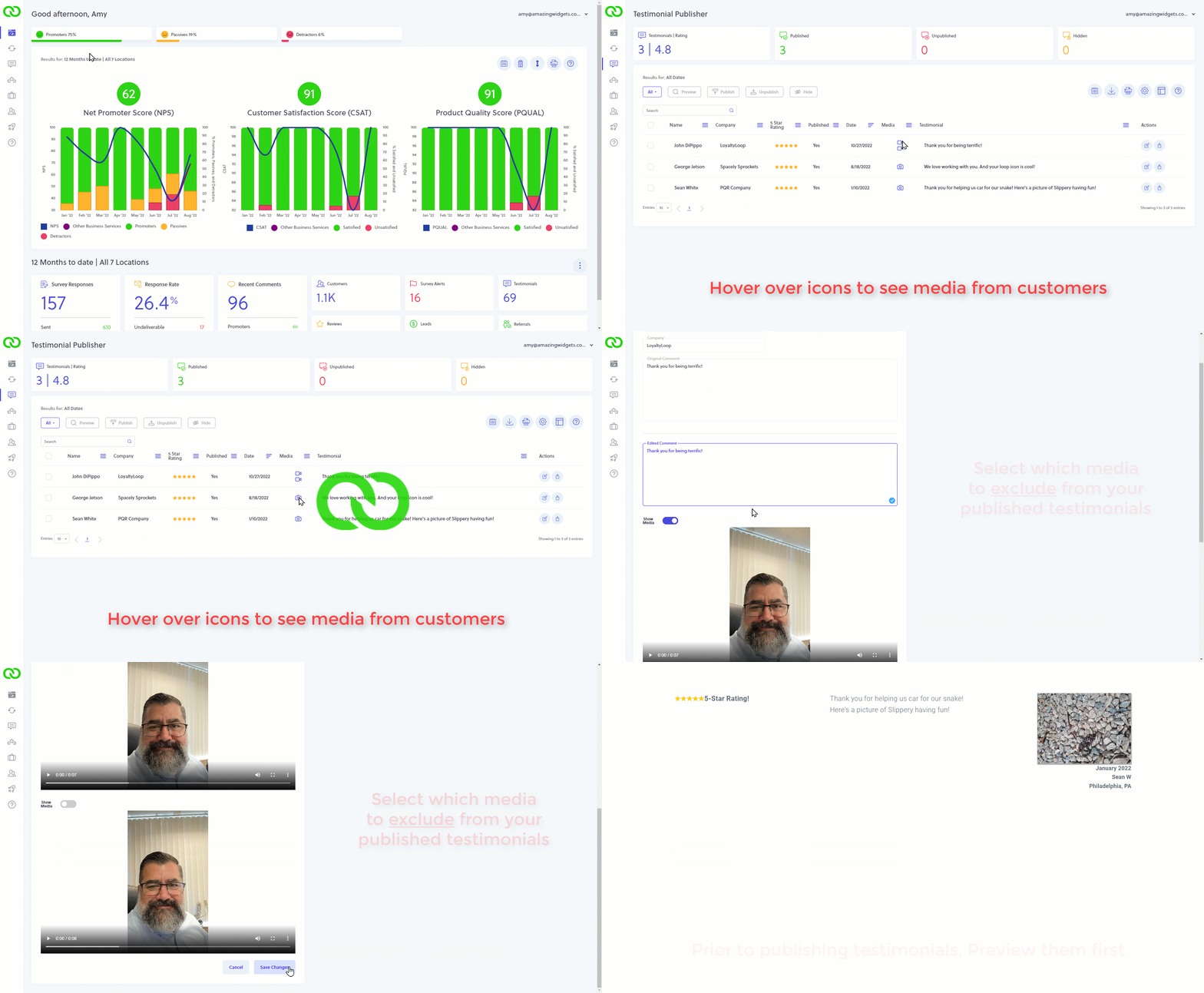
When publishing testimonials to your website, by default, all media will be published along with the customer's comment. To control which media are included in a published testimonial, click the Edit (pencil) icon under the Action column. You'll see the full comment and each media. If you do not want media to show in the published testimonial, simply flip the "Show Media" switch from Yes to No. Back on the main Testimonial page, the icon in the Media column will be grayed-out to indicate it is not attached to your live published testimonial.
You can also preview your testimonials before they are published to your website. Using the preview feature is a great way to ensure you have successfully edited the testimonial to your liking. The Preview feature is available in both the Testimonial page, and in Settings for Testimonial Publisher Widgets.
Whether you already have image uploads or not, adding the video testimonials to your Promoter Plan service has no additional cost. When adding this feature, we will also update your survey to the mobile-optimized theme so that your customers can use their phones to take pictures and/or videos from your survey.
If you use our Testimonial Publisher Widget with your website, multimedia testimonials can be published to your site as soon as your survey has been updated. If you use our API to collect and publish testimonials, please refer to our API documentation, or our support team, for help in updating your testimonial publisher implementation.